• After 15+ years, we've made a big change: Android Forums is now Early Bird Club. Learn more here.

Root ICS with working 4g...who has flashed it?

I have .902 running, all stock and rooted. I was install Eclipse rom. But I formated the /osh by accident when I was supposed to format /system.

But I also formatted /system too.

So I'm in the safe boot menu and not sure what to do here.

Step 22 is what I screwed up on.

Can I continue, should I do a restore?

Thanks


this backup of your unsafe system to your safe system).

21) Now hit "+++Go Back+++", and go to "Safe Boot Menu" and then "Toggle Safe System". Safe system must be enabled before continuing. Don't skip this step.

22) Go to "mounts and storage" menu and format \system. Not as scary as it sounds.

23) Now hit "+++Go Back+++" to leave mounts and storage, and go into "Install zip from sdcard". DON'T GO TO "apply update from sdcard".

24) Go to "choose zip from sdcard" and find the ROM .zip file. DON'T GO TO "apply /sdcard/update.zip".

25) Now hit "+++Go Back+++" and hit "Wipe data/factory reset" and then also "Wipe cache partition".

26) Now go to the "Advanced" menu and "Wipe dalvik cache".

27) Finally, hit "+++Go Back+++" to return to the main recovery menu and select "power off".
 
I'm waiting for the newest ics rom that has the camera working. When i reinstall the new rom will i have to flash the gapps again? Also, after i install the rom should i wipe data/cache again and then install the gapps or does it matter? Because when installed the 2-20 rom i just immediately installed the gapps after i flashed the ics rom and it's been working fine.
 
I'm waiting for the newest ics rom that has the camera working. When i reinstall the new rom will i have to flash the gapps again? Also, after i install the rom should i wipe data/cache again and then install the gapps or does it matter? Because when installed the 2-20 rom i just immediately installed the gapps after i flashed the ics rom and it's been working fine.

Based on dhacker's tweet the gapps were also updated so yes you would need to flash it again. I'm assuming a wipe would be necessary also. I always wipe when flashing beta roms but that's me.
 
Based on dhacker's tweet the gapps were also updated so yes you would need to flash it again. I'm assuming a wipe would be necessary also. I always wipe when flashing beta roms but that's me.


So to be clear, it should be.....

wipe data/cache/dalvik>flash ics rom>wipe data/cache/dalvik>flash gapps>reboot?
 
Since the original 1/29 build I ahve not wiped data at all. I manually wiped /system, /cache, and the dalvik cache, but that's it.

I have over 200 apps installed, and I cannot afford to reinstall all of them every single time. And Titanium doesn't restore all of the games correctly for whatever reason (presumably b/c the implementation of Apps2SD in GB is a bit different than in ICS, not really sure). And if the camera is working now, welp...looks like I know what I'm doing tomorrow night!

I do wish I could get the Moto Blur on this ROM - I've actually gotten accustomed to havign the categories of apps to find stuff (from 200, you can imagine that it takes some time lol). As it is, I'm back to useing LPP, which I haven't used in, oh, 6 months or more....
 
Going to a concert tonight. Decided to stop by the hizzle to change and spruce up a bit. Opened my browser, pointed the links to my phone via Chrome2Phone, and I'll be installing while on the drive up to the concert (Yes, I already did the preliminary work before getting in the truck lol).

This is gonna be fun....pics of the concert from my ICS enabled phone.

BTW, I pointed out in a thread on here that the force enabling of the second core does amazing wonders for killing the FCs in all the games I have tested by far - if you haven't done it yet, then do it. See Activate DualCores - RootzWiki for more info.
 
Bluetooth phone connection still isn't working for me. I don't know where to find the changelog for RC1. No big deal, I use my headphones primarily for music anyway. It's just a problem when I get a phone call b/c I need to disable bluetooth and often I lose the call.
 
Droidth3ory has an ICS rom AOKP_AXI0M_B_AB2_KANG_4.0.3 that includes gapps, no separate flash, working camera and data, 3g,4g and lots of customizations. Installs with safestrap or bootstrap. As a failsafe, if you use bootstrap, it boots to the recovery menu where you can recover if necessary.
 
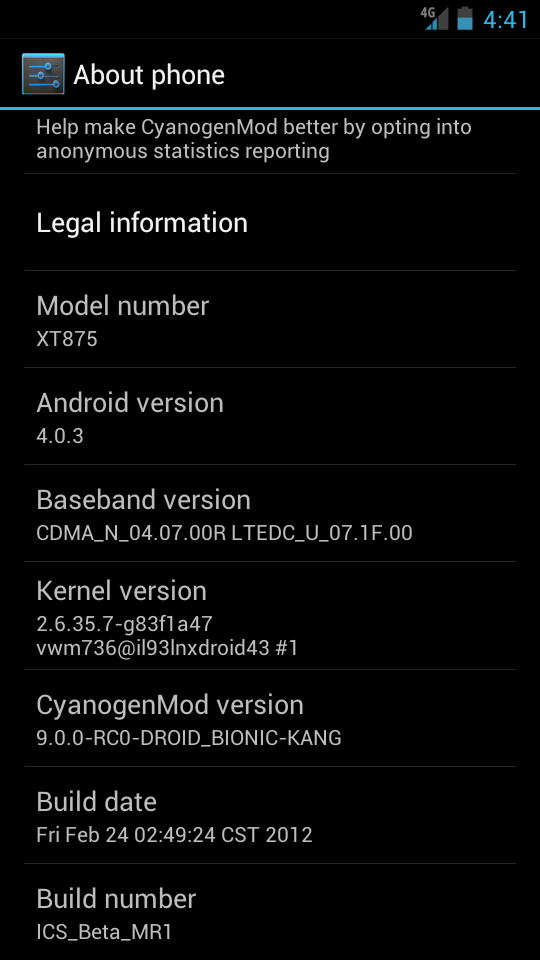
hey guys, im a bit confused. is this the latest release?
Screenshot_2012-03-01-04-41-12.png
 
Flash isn't working for me. I have the latest flash installed from the market.

Anyone know how to fix it?
 
flash worked fine for me, I had some data issues. Had to switch to GSM, wait a few seconds, and switch back to LTE/CDMA a few times. Also, my Tesla LED app didn't work with ICS. And, my Settlers of Catan app froze my phone a lot. Also I think the camcorder didn't work. I went back to .902 gingerbread for now.

I did find out that the Apex launcher is awesome, and will be using that with my Gingerbread. I will miss a few of the ICS bits but I can wait for a more stable ROM.

maybe someday somebody will unlock this bootloader....? I still don't feel comfortable making backups and flashing ROMS on this phone. I've had a few random things go wrong for no apparent reason, things that never happened on my droid incredible. I might have to practice some patience in the future and wait to buy a phone until it's already fully unlocked/rooted. I also miss being able to just select a ROM out of ROM Manager and flash it.


EDIT

dang, just found out Apex launcher is for android 4.0 and up only...shoot.
 
I flashed ICS AXIOM 3/18 nightly build yesterday. It went flawlessly.
This is my first experience with the ICS interface, and I have to say that it's great! Very polished.

Things that didn't work on my Bionic:
Front-facing camera - (and facial login as a result)
Video hardware acceleration - an Axiom ICS Bionic is not a great gaming system atm.
Intermittent data after reboot - Must toggle GSM & LTE to regain mobile data.
Handset audio with BT enabled - I was able to pair & use BT devices, but if you accept a call while out of range of those devices the handset speaker does not work. Disabling BT allows handset audio to work again.

I snapped a pic using the rear camera and the quality was very good. The resulting photo was much sharper than anything I ever took while running gingerbread.
That's it so far. I have my old Eclipse 2.2 backup in (un)Safestrap, but I don't think I'll be returning unless something huge blows up. This is a great ROM!
 
Back
Top Bottom