• After 15+ years, we've made a big change: Android Forums is now Early Bird Club. Learn more here.

iPhone to Galaxy S2 question(s)...

samcraig

Member
Without getting into an iOS/Android debate - I am curious what I might miss and/or significant differences between using an iPhone and the Galaxy. I'm hoping someone who has actually made this transition can assist

A little more info:

  • I have a gmail account and also a work (exchange) account
  • Most of the apps I regularly use are also on Android
  • I typically am able to use my iPhone (light to medium usage) from 7am - 10pm before having to recharge
  • I use my phone mostly for email, a few apps (not really games), pictures, messaging and web browsing

So I guess my questions involve transitioning... I am sure gmail will be "better" on android - but how is mail overall (especially exchange) on Android? Can you have folders, flag messages, etc?

Are there any native iOS functions that I might miss or get frustrated with (aside from maybe keyboard placement)

Any other info would be great.. thanks!
 
Email is better in general, you can pretty much find any flavor of email client you like. The default mail client is pretty good though. It supports folders but not flagging. I personally don't use exchange, so I can't really comment on that. gmail is way better on android, and supports almost all of the web-client's functionality.
 
I think the biggest thing that will overwhelm you MAYBE is choice. On the iPhone you use what your given...ie. safari, music player, keyboard. On android you may think you hate your phone but you can change everything. Don't like the stock browser....use dolphin, don't like the stock email, use any one you decide to download from the market, right on down to music players and GPS. These are the things all my friends that came over from IOS could not understand at first. In a couple of months your phone will be YOURS. It just may take you a couple of attempts of finding what works best for you. IOS solves those problems by taking away the choice....you learn how to use what they assign....Android lets you decide what works for you.

As for battery life.... please let us know what you did, if you actually manage to kill it.
 
I go back and forth between the iPhone 4S and the SG2. I like both but prefer the SG2 just because it is more open. The larger screen gives me a larger keyboard and the SG2 keyboard is WAY smarter than Apples.

For me the SG2 is just a bit more friendly and way more advanced. While they improved the iP4s CPU, it does not do near as well as the SG2
 
I just switched from the iphone 4 to the SG2 yesterday. I've been using the iPhone since the very first one and have switched to the newest every year.

Biggest things I've noticed so far;

The resolution of the screens. iPhone's pixel density is still unmatched by anyone. Not to say this screen isn't real nice. It is. Just not as sharp.

The FB app kinda sucks on android.. Just my opinion though.

Notifications don't slap you in the face like they do on the iPhone. Kinda of an issue for me. I like to be slapped i guess. I want to see all my notifications on the lockscreen in detail.. Haven't found a way to do that on Android, yet.

This thing takes FOREVER to charge. iPhone charged so much faster it's ridiculous.

Speaker is kinda crappy on the SG2. I didn't really expect any different though. Apple's build quality is still king in my experience.


That said there are alot of things I really like about Android on the SG2 so far.

Mainly the ability to customize pretty much everything on it. It's quite refreshing. Some may not like this though. I'm pretty tech savy so I feel comfortable with it. Most wont.
 
I also have the 4 and while the may appear sharper to some it only does it from one angle. I like to watch netflix at lunch on my phone. With the Iphone i have to have it proped up at just the rite angle. With the SGS2 it doesnt matter what angle and with the bigger screen the I is just a joke. Speaker sound better to me too, but i dont hear well so maybe its just louder.
 
Without getting into an iOS/Android debate - I am curious what I might miss and/or significant differences between using an iPhone and the Galaxy. I'm hoping someone who has actually made this transition can assist

A little more info:

  • I have a gmail account and also a work (exchange) account
  • Most of the apps I regularly use are also on Android
  • I typically am able to use my iPhone (light to medium usage) from 7am - 10pm before having to recharge
  • I use my phone mostly for email, a few apps (not really games), pictures, messaging and web browsing
So I guess my questions involve transitioning... I am sure gmail will be "better" on android - but how is mail overall (especially exchange) on Android? Can you have folders, flag messages, etc?

Are there any native iOS functions that I might miss or get frustrated with (aside from maybe keyboard placement)

Any other info would be great.. thanks!

Just transitioned last week from Iphone. Yes, some frustrations but there were many limitations I had with Iphone. A few comments from 50 year old consultant/businessman who doesn't use Gmail and just set up a gmail account this week to handle syncs, etc.

1. It is not as intuitive because you have so many choices. So the out of box experience is still lacking IMO and my wife was lost due to the bloatware until I helped her. They still lack that pure "out of box" set-up for most anyone that Apple has. But then, Apple keeps you grounded while this puppy can fly.

After much research:

a. Sync bookmarks and contacts (think I-tunes replacement but I don't care about media management) I use MyPhoneExplorer on both PC and phone. It works nicely. I then just drag movies and music onto my 32gb sd card (class 10 and cheap online) and they play - perfectly and the movies in most any format.

b. Browser: Dolphin Browser. Nice but still a little more complicated than Safari which I still think is the best browser (simplicity) except for no flash.

c. File Manager on phone (Iphone lacks this completely): Astro Files. Think Windows Explorer.

d. Email managing multiple accounts: K-9. Good but not yet fully dialed in.

e. Make a ringtone: Ringdroid. Idiot proof from any file on your phone.

All work nicely. Not as simple out of the box to set-up due to the large number of (free) choices but quickly great. I hope you see I try to be "fair" to both sides since millions of people can't be wrong. It comes down to whether you like someone else's vision or you have your own vision.

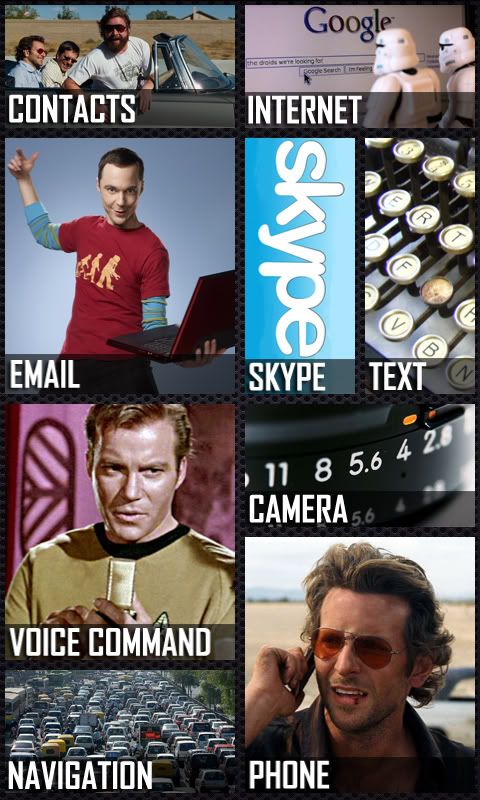
And then the coup-de-grace inspired by the Android Theme 7 Forum by Paul. A total reskin to truly personalize your phone and leave the Iphone in the dust and their users drooling in envy. I never imagined you could do this but it is easy and "personal" to the nth degree. I even killed the dock and notifications to keep it truly minimal but that's personal choice that is undone in seconds. Here's the homescreen I created in 30 minutes on photoshop and a few hours of google images and concept thinking:

BazingaNewHomeScreenForGalaxyS2.jpg


As the song says - "don't look back" and welcome to the future. I can't wait to re-skin a Galaxy 10" tablet!
 
I just came over from the iphone as well. People at the Att store thought I was crazy to change my 4s in. I am having problems like all the iphone guys, this phone takes alot more work to get it right. You guys are right that apple has everything but you have no options, but the stuff they do have work fluidly. My main pet peeve is the dam pandora and the task killer. I kill all my tasks, but they start right back up without me doing anything. Also pandora sucks so bad on this things, maybe its just the update, but it takes forever to start a song, and like 8 secs to switch to a song. I tried spotify and it works perfectly. I do love the web browsing and the screen, I changed mainly because of that. The customization is great as well, I love the stupid live wallpapers, I am a sucker for those. All in all this is a great phone, but I am not gonna say one is better than the other, they both have the flaws and strengths.
 
DO NOT use task killers, they are pointless on Android. There are some good articles floating around android sites. In a nutshell, Android is smart enough to close programs that are using memory and that haven't been used or not being used at all (in most cases). This phone has enough ram to withstand MANY apps running at the same time. They may show up as running, but they are actually not doing much.

Just though I would get that out there for Android newbies, task killers are NOT recommended, especially with the caliber of our phones.
 
DO NOT use task killers, they are pointless on Android. There are some good articles floating around android sites. In a nutshell, Android is smart enough to close programs that are using memory and that haven't been used or not being used at all (in most cases). This phone has enough ram to withstand MANY apps running at the same time. They may show up as running, but they are actually not doing much.

Just though I would get that out there for Android newbies, task killers are NOT recommended, especially with the caliber of our phones.

Thanks alot, I love this phone, just takes some getting use to. I already found a program better than pandora, its called spotify. Spotify is super fast and has great sound quality
 
Np, always willing to help for things that I know (which I myself am still learning lol).

Spotify is great, I use it too after Pandora has been having issues lately, I love how you can save songs on your phone so you don't eat up data since data is now tiered :/. One gripe is the app itself, can't really organize too well, seems a bit restricted, but it should change soon hopefully.
 
I switched from iphone 3gs to sgs2 (AT&T) 2 weeks ago. My main complaint so far is that the iphone email client is so right for me. After trying K-9 mail and the stock email clients, I decided to try the Enhanced Email app. Voila! It comes very close to the iphones email. It costs $9.95 but is available for a 7 day trial. I also rather liked the iphones "slap in the face" notifications. Still trying to duplicate them on Android. Otherwise, very happy with my new Sammy S2.
 
went from iphone 4s to sg2. The biggest 2 things I miss are:
1. I can't voice dial straight from the lock screen. PLEASE someone tell me if there is a way around this. I have to click a button, then swipe, then do my security code, then double tap for voice. This is HORRIBLE. I am considering going back for just this feature.

2. I like getting notifications when my phone is locked. It sits on my desk and tells me when a text comes or fb. Again, let me know if I am missing something.

Also, the speaker sucks...
 
-iPhone has a better stock email client than anything on Android, exchange on Android is pretty much a joke at this point.
-iPhone battery life is better than anything Android can offer without constantly tinkering
-iPhone now has a Gmail app, though unnecessary IMO
-iPhone has higher quality apps
-Android let's you change basically everything, much more customizable
-Android offers a wider selection of devices
-Android offers tight integration with Google services out of the box
-Android offers apps that may never be available on iOS due to their content or nature, and you can side load android apps
 
went from iphone 4s to sg2. The biggest 2 things I miss are:
1. I can't voice dial straight from the lock screen. PLEASE someone tell me if there is a way around this. I have to click a button, then swipe, then do my security code, then double tap for voice. This is HORRIBLE. I am considering going back for just this feature.

2. I like getting notifications when my phone is locked. It sits on my desk and tells me when a text comes or fb. Again, let me know if I am missing something.

Also, the speaker sucks...

1. I use Ripple Lock. Not only is it very customizable, and looks very cool, but it also allows you to add "clickable" widgets right to your lockscreen. If you do try it, don't get frustrated by the original lockscreen showing sometimes, in the options screen there are sevral "fixes" for that, mode 3 worked for me on the GS2.
Although I don't use it, I believe widget locker lockscreen will let you put shortcuts to anything, including voice dial on your lockscreen also.

2.Try Noled. It's awesome. It will show you a small (or large) illuminated icon on your screen to let you know you have something missed.
Also, if you like the nifty popups for sms, you should definitely try Go sms pro. It is a messaging replacement app, and it is wonderful. Conversation lists can have the iphone style bubbles, and also gives the option to have popups of your sms.
The popups are customizeable, and I believe similar to the iphone, but better, because you can reply directly from the popup (by the way, I have never owned an iphone, so I am going by memory of friends' phones).
 
I just switched from iPhone 4 to SGS2. I was worried about the transition. I was a jailbreaker though and I seriously appreciate that I've been able to tweak the mess out of this phone without having to jailbreak/root it.
Truly customizable...took a little digging around on youtube and the market and google...but I got it all personalized now.

As far as VOICE comands from locksreen.

I bought WidgetLocker. You can create customer sliders as well as one click short cuts. One of which I chose to use my voice program of choice and assigned a icon of my choosing.

One click, then talk.


went from iphone 4s to sg2. The biggest 2 things I miss are:
1. I can't voice dial straight from the lock screen. PLEASE someone tell me if there is a way around this. I have to click a button, then swipe, then do my security code, then double tap for voice. This is HORRIBLE. I am considering going back for just this feature.

2. I like getting notifications when my phone is locked. It sits on my desk and tells me when a text comes or fb. Again, let me know if I am missing something.

Also, the speaker sucks...
 
I am a 3gs to GSII user also. How do I set up voice mail? And when I do does it work similar to iphone where it shows a list of all VMs on your phone? Right now I hit the VM icon on the phone screen and it goes to dial VM and asks if i want to leave a VM or if I have a mailbox number. What am I supposed to do?
 
You can actually use Google Voice to manage your voicemail (visual like on the iPhone). You just need to install and set it up to forward all voicemails to gVoice.
 
I too just came from a 3Gs, and I have to admit; I am completely addicted to my galaxy sII. As everyone else above mentioned, the learning curve was a bit steep, but enjoyable...exploring folders and menus that my iphone never allowed me to explore. I have found all the apps I once used on the iPhone, or similar substitutes.

Both the iPhone and the GSII excel in many things, and I can honestly say I'd be happy with either phone.
 
Back
Top Bottom