

• After 15+ years, we've made a big change: Android Forums is now Early Bird Club. Learn more here.

kworker?

ironass

Extreme Android User
Something I have noticed in BetterBatteryStats, under Process, is kworker/u:0/1/2 and 3 popping up.

I've done a Google on it, which frankly didn't yield much info other than that it is related to the kernel.

I suppose the questions that I would like to ask are:-

1. What are the kworker processes (Dummies guide please).

2. Given that they should be there, are they over using battery or CPU?

3. Judging from the screenie, is this an acceptable level for them or do I need to take any actions (if possible)?

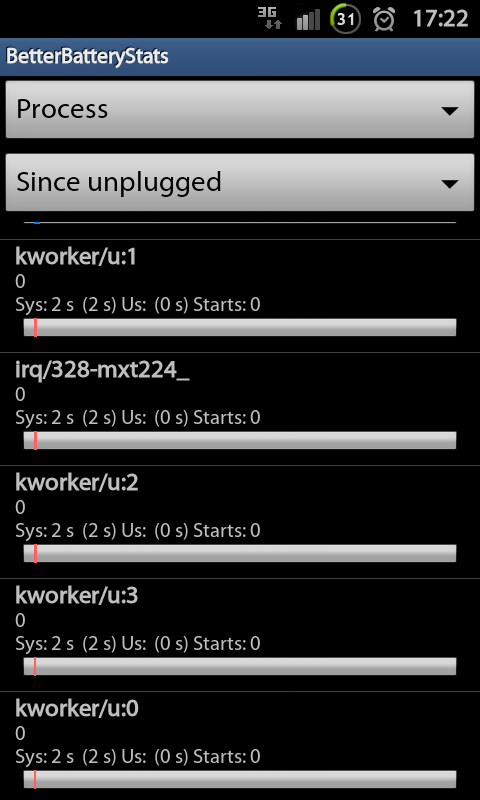
kworker2.png
 
Not really sure what causes them. I had a quick google search myself and from what I could make sense of, it seems its to do with processes which wake your phone up from sleep. Anyway that seems quite high to me. Or maybe mines low.

Kworker.png
 
I think it's the kernel master process in charge of the running order of all the actual working processes... sort of a task scheduler come resource allocator, if you like.

The impact of kworker on resources is probably directly related to the nature and number of scripts, schedules and mods running within the kernel.

kworker = kernel worker?
 
Mine too like shotguns have eaten up a grand total of 8 seconds system cpu time combined. This was over 10 and half hours.
Yours does seem a tad high butty.

I will do some Percy thrower digging 4u my old son and get back to you.
 
Percy Thrower. cheesus, that's going back a few years. always thought with a name like that, he coulda made his name in porn instead of horticulture ;)
 
Mine too like shotguns have eaten up a grand total of 8 seconds system cpu time combined. This was over 10 and half hours.
Yours does seem a tad high butty.

I will do some Percy thrower digging 4u my old son and get back to you.

Cheers hawker! Out of my depth on this one. :(

Percy Thrower! Wasn't he a gardening presenter on TV in the olden, black & white days?

I think my great gran used to watch him. ;)
 
Yes butty. I expect you don't remember watching him when he was on TV as you were probably plotting your escape from the oap complex during those years!
:D
 
Kworker is a Linux process that controls wakeups from the BIOS, iirc.. mines low, some people obviously wake up their phones alot ;-)
 
I'm really no further forth in solving my issue with kworker.

I know that it is kernel related but I'll be blowed if I know what is causing it.

I have noticed that on the latest Siyah kernel, 2.6.2, it is less than it was before.... yet I have changed nothing.

Kworkerud.png


I have scoured the web but there seems to be no definitive explanation or remedy for it. :confused:
 
Has anyone found a remedy for this? It is killing my battery!

In the end, I came to the conclusion that kworker was a representation of the Android OS usage and although it is always present on Siyah, as it should be, it wasn't that detrimental to my battery.

If your kworkers are draining your battery then look at stuff that might be using the Android OS.

Here is a useful thread that should help you:-

http://androidforums.com/galaxy-s2-.../491113-battery-saving-tips-rooted-sgsii.html
 
So, I have to root my phone to stop the drain?

I mean, I can go get a replacement, I just don't wanna get a new phone tbat does the same thing as this one.

And, how can I even really figure out what is really causing this?

Last night, for about six hours of no usage, the phone dropped 14%. Then, I used it a little and it really dropped. Then, I stopped using it for a little while and the battery actually went up...?

And now, this morning, after being on Wi-Fi for 20 minutes, and auto-brightness, the battery life dropped over 10%. How can that be?
 
So, I have to root my phone to stop the drain?

I mean, I can go get a replacement, I just don't wanna get a new phone tbat does the same thing as this one.

And, how can I even really figure out what is really causing this?

Last night, for about six hours of no usage, the phone dropped 14%. Then, I used it a little and it really dropped. Then, I stopped using it for a little while and the battery actually went up...?

And now, this morning, after being on Wi-Fi for 20 minutes, and auto-brightness, the battery life dropped over 10%. How can that be?

I'm sorry, I thought as you were posting in the All Things Root section of the forum, that you were rooted with the Siyah kernel.

You can still use some of the tips shown in the thread I linked to. I'm afraid it's a case of trial and error as there may well be an app that is calling on your Android OS. In my case, I found that Wi-Fi Manager and Wi-Fi share were big users.
 
Thanks. So now, I just don't know what to do. I think I have to get it replaced. Although, this may all happen again.
 
Yeah, so what can I do? I am at such a loss. :-(

Well I guess you are already using BetterBatteryStats from the Play Store.

You could try un-installing your app's, one-by-one, to see if this affects kworker.

Also, make sure you are running the latest firmware for your phone model and carrier.
 
Back
Top Bottom
