
Install the app
How to install the app on iOS
Follow along with the video below to see how to install our site as a web app on your home screen.
Note: This feature may not be available in some browsers.
-
After 15+ years, we've made a big change: Android Forums is now Early Bird Club. Learn more here.
You are using an out of date browser. It may not display this or other websites correctly.
You should upgrade or use an alternative browser.
You should upgrade or use an alternative browser.
Help landscape home screen problems~~
- Thread starter lcfz86
- Start date
BriscoCountyJr
Newbie
That would be because of the xperia play controller. I don't know if other sliders have this issue but slide out the controller and exit the xperia play menu and you will have
landscape.
landscape.
is the auto rotate turned on in your display settings?
yes~~

XperiaTACO4G
Well-Known Member
I believe that's a 2.3.4 feature. I'm running 2.3.3 and landscape is a no go. Believe me, I've looked into it 

fuhrl
Well-Known Member
I believe that's a 2.3.4 feature. I'm running 2.3.3 and landscape is a no go. Believe me, I've looked into it
i've got mine in landscape right now. the dock icons stay where they are but they're just rotated for landscape. unless i'm just misunderstanding what you're talking about you should have the same ability.
i've got mine in landscape right now. the dock icons stay where they are but they're just rotated for landscape. unless i'm just misunderstanding what you're talking about you should have the same ability.
1st i think he said is if we wan the landscape is at version android 2.3.4~ and he also looking for it...
2nd how did u do the landscape... can teach me/us?? my phone android is 2.3.3, the software was said mine is the last update but still dun hv landscape...
fuhrl
Well-Known Member
i'm not sure how to do that exactly. mine just...does it. if your auto-rotate is on is should just be a matter of holding your phone the right way. if that doesn't work, do what the second post suggested. if neither of those things work, it might be an issue with the phone itself. i'm on v2.3.3 myself and have had no problems. i'm pretty sure that a landscape home screen just a basic feature of android. it shouldn't matter what phone or version of software you're running.
this is what you're trying to accomplish right?:
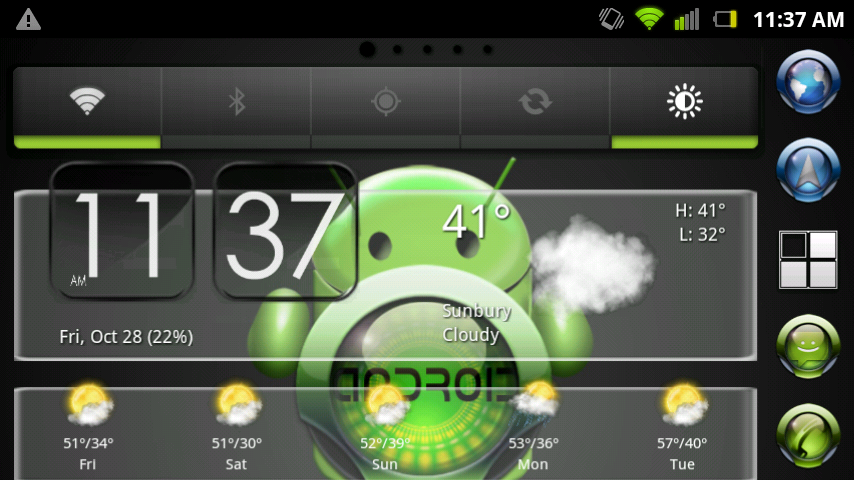
this is what you're trying to accomplish right?:
i'm not sure how to do that exactly. mine just...does it. if your auto-rotate is on is should just be a matter of holding your phone the right way. if that doesn't work, do what the second post suggested. if neither of those things work, it might be an issue with the phone itself. i'm on v2.3.3 myself and have had no problems. i'm pretty sure that a landscape home screen just a basic feature of android. it shouldn't matter what phone or version of software you're running.
this is what you're trying to accomplish right?:
i think ur suggestion was not bad... thx anyway... i will try...
XperiaTACO4G
Well-Known Member
I honestly have no idea why yours works like that. For some reason the At&t version does not do landscape on homescreen. fuhrl, what version do you have? Does it have a custom launcher or is it rooted? Let me know 
fuhrl
Well-Known Member
I honestly have no idea why yours works like that. For some reason the At&t version does not do landscape on homescreen. fuhrl, what version do you have? Does it have a custom launcher or is it rooted? Let me know
I'm on version 2.3.3. and I'm on Verizon. I rooted it using the process in the all things root forum for the Play. It was a major pain in the ass, took me three hours to get it figured out and I thought I messed up my phone at one point. It was the first time I've done a root like that. It was well worth it though. I cleaned up a ton of space by getting rid of a bunch of the pre-installed apps. My battery life is much, much better now too. I'm sure that has to do with the removal of said apps and not just because of the root. I am using a custom launcher as well. ADW or whatever its called. I can't remember if it's free or not.
XperiaTACO4G
Well-Known Member
Ok, that's probably what it was then. I believe 2.3.3 supports landscape, because my phone will sometimes switch to landscape for a split second before going back to portrait. Most likely an override built into the phone... And once I go into settings or some other similar menu, landscape works fine.
yea i have a verizon phone too, and my landscape doesnt work either, only if i open the controler then it does work. you can go to the xperia game launcher and click the settings button, once you are there you can change it so that when you open the slide out controler it doesnt take you to the game launcher automatically.
fuhrl
Well-Known Member
yea i have a verizon phone too, and my landscape doesnt work either, only if i open the controler then it does work. you can go to the xperia game launcher and click the settings button, once you are there you can change it so that when you open the slide out controler it doesnt take you to the game launcher automatically.
i wonder if it's the ADW launcher that's letting me do it. i had it as stock for all of five minutes. i'll check it out.
fuhrl
Well-Known Member
ok. so i switched back to the stock launcher and it doesn't switch to landscape mode unless i have the slider out. i swear that it did but like i said, i barely used it before i re-downloaded ADW after i switched phones. i would recommend the ADW launcher to you guys if you would like to have landscape mode without having the slider out. i think there's a free version and a paid version.the paid version is a couple of bucks i think. i can't remember what the differences between the free and paid are though but there's a ton of customization options to spruce up your phone and it runs quick and smooth on play.
XperiaTACO4G
Well-Known Member
Cool, thanks for checking that out! I guess the At&t version wont work even with the game pad out . Do I need to be rooted to install that launcher?
. Do I need to be rooted to install that launcher?
fuhrl
Well-Known Member
Cool, thanks for checking that out! I guess the At&t version wont work even with the game pad out
no, you don't need root.
here's the link to it:
https://market.android.com/details?id=org.adw.launcher&feature=search_result
this is the free version.
Digital Jester
Member
Landscape mode was introduced in the 2.3.3 update, but it only works on the home screen if you slide out the gamepad. If you're running stock Android on Verizon the update process may have been different though.
XperiaTACO4G
Well-Known Member
Apparently not on the At&t version dj
Thanks for the link fuhrl
Thanks for the link fuhrl
fuhrl
Well-Known Member
Download Launcher Pro from the market. It has landscape and it should work fine. Plus that homescreen launcher is one of the quicker home replacements out their i think. Correct me if im wrong.
i used that one at some point, can't remember anything about it though. i think i got rid of it because it was making my ally chug. that was well before i rooted it and installed the velocity rom though. after that i discovered ADW and stuck with it since it ran pretty nice.
fuhrl
Well-Known Member
oh, by the way, i use an app called 'launcher switcher' to easily switch between launchers. otherwise you have to go through a not so obvious (yet still simple) process to switch between stock and other launchers. it might be good to use if anyone wants to try out a couple of launchers to find out which one works to best for you.
https://market.android.com/details?id=kr.mobilefirst.launcherswitcher&feature=search_result#?t=W251bGwsMSwxLDEsImtyLm1vYmlsZWZpcnN0LmxhdW5jaGVyc3dpdGNoZXIiXQ..
https://market.android.com/details?id=kr.mobilefirst.launcherswitcher&feature=search_result#?t=W251bGwsMSwxLDEsImtyLm1vYmlsZWZpcnN0LmxhdW5jaGVyc3dpdGNoZXIiXQ..
XperiaTACO4G
Well-Known Member
Good info, thanks.
TheGuitarBoss
Well-Known Member
Download Launcher Pro from the market. It has landscape and it should work fine. Plus that homescreen launcher is one of the quicker home replacements out their i think. Correct me if im wrong.
Go launcher is great

Duke 505
Member
Ima check that one outGo launcher is great