
• After 15+ years, we've made a big change: Android Forums is now Early Bird Club. Learn more here.

Accessories Lastest Incredible Creation

Terabethia

Android Expert
So I am completely bored with the 1000 threads about Froyo so I am starting something more entertaining. (To me at least ;))

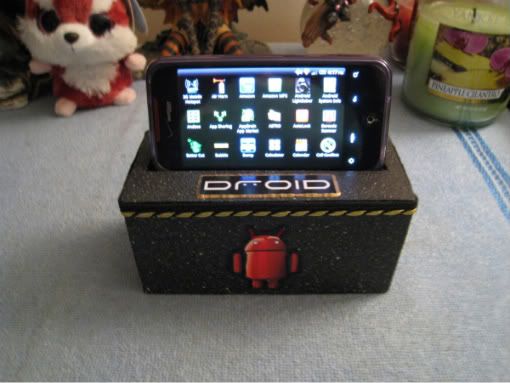
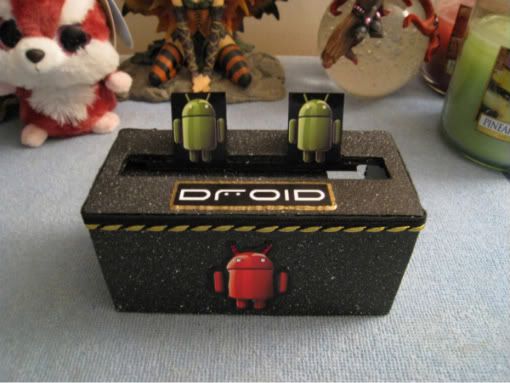
You might remember my last creation, The Incredible Entertainment Center. Well... I have made another, this one a bit more simple but I like it none the less. And it doesn't take up as much room as the last one.
IMG_0233.jpg

IMG_0229.jpg
 
It's my favorite "light" scent. For a heavier one, I love Home Sweet Home. Makes the room smell like you just baked cinnamon cookies :D
 
Nice work on the dock! What all did you make it out of? The yellow stitching kind of reminds me of the stitching on Doc Marten shoes :D
 
Nice.

I like how it serves both as a cinema, or, with the projection screen removed, a stage for live productions.
 
Thanks everyone!! While the entertainment center is cooler, this one is a bit more practical :D

This one was actually super simple, it's made out of foam board. I like the foam board because it's light and easy to work with (and cheap!) but it's sturdy enough to hold up well.

I then spray painted it with spackle paint and pasted on the logo and droid guys that I printed on photo paper. A little fabric paint and some ribbon and I was all set. Oh yea... and to be a little extra girly, I put "diamond" gems on the red android's eyes ;)
 
From the picture I thought you used a block of high density foam. How did you put it together? Did you glue layers together?
 
Excuse my ignorance, how do you activate dock mode on our Inc's? All I can find is that it is not done by magnets. Terabethia, it appears from your first pic that you are in your all apps screen and it's displayed in landscape. I am assuming your are in a dock setting, no?
 
Excuse my ignorance, how do you activate dock mode on our Inc's? All I can find is that it is not done by magnets. Terabethia, it appears from your first pic that you are in your all apps screen and it's displayed in landscape. I am assuming your are in a dock setting, no?

I don't think there is a "dock mode" on the DINC. At least not one that I am aware of.

What you are seeing in my picture is the App Drawer from Launcher Pro Plus. LPP allows you to use landscape mode for home screens and folders and such.
 
Oh I see, didn't realize you had laucher pro. Actually I did find a dock mode, but I am not able to utilize as it senses that it is not in a dock. I read something about a 5pin usb connector for the Evo but I am not certain if it is the same with the DInc.

What I found is that if you long press on a blank screen area so the menu for widgets, folders and shortcuts comes up. Go to shortcuts, settings, you are then given more settings options one of which is Dock settings. When you press it here it will set it as a short cut on your screen.

You can then select it to see the options of dock audio config and dock placement sound. Dock placement sound you check and uncheck, but config wont let you select it as it recognizes that it is not on a dock.

I referenced this in "the little things" thread but no one mentioned anything about my post so I wasn't sure if it was something from 2.1 although I don't believe it was. I figured maybe there is hope for an oem dock.
 
I referenced this in "the little things" thread but no one mentioned anything about my post so I wasn't sure if it was something from 2.1 although I don't believe it was. I figured maybe there is hope for an oem dock.

This isn't in 2.1, I just checked. At least, I think I checked in the right place. (Don't shoot me if I'm wrong. :eek: )
 
Wouldn't think of it. I came accross it and it stood out to me as I didn't recall it from 2.1. Long press on blank screen, shortcuts, settings, Dock settings should be right below Display settings with the same green cog wheel as shown in the 1st settings selection.

In fact there is also a Device administration settings shortcut as well which wasn't there before either. If I set that as a shortcut and try to click it, it tells me there are no administrators available?:confused:
 
Back
Top Bottom