

jaymzway
Android Enthusiast
"When Voting" If you choose the vote option "I find this not to be accurate"
please also come in and explain "why and what part" you feel is "inaccurate" not just hit and leave lol....
Keep in mind I Am just starting this thread so if something doesn't make sense please point it out to me as for I may have overlooked something along the way here.
If you feel that I Am providing inaccurate information
let it be kindly known in a respectful way and I will take it into consideration and change it accordingly if I have been proved to be inaccurate.
I Am never claiming I Am some Big Shot Mr.Know It all, I'm just simply trying to find help for others on here so they can benefit from suggestions and helpful information that will fix their problem and or help them into buying a "Legit Sd Card"
Everything and anything below this line can and will be found on google some way or another so it is best to research before you do anything just to clear things up, any actions you take from this point on is under your own responsibility as for neither Android Forums nor I will accept responsibility over what you choose to do with your phone based off of suggestions that are being made here in this thread, post or any material is for education and are in clear intentions to help recover data and is not the intentions to destroy your lost data, damages!
If anything here has caused data loss and or any damages of any kind will be at your own risks that you choose to take.
I do ask if you could politely make your situation known and I will do my best to address your issues over your device and see where the problem exist and try to further assist you.
---------------------------------------------------------------------------------------------------------------------
["If you are not able to get any of your data back this is only suggested as a last resort."]
Get an actual sd card reader.
plug it in the usb slot and choose with option "FULL FORMAT" Note Full Format will take longer. Choose fat32 with default allocation file size Also note it will erase the card entirely !!!
Then choose scandisk from pc
and put checks in for "automatic fix errors"
then put the card back in phone and choose to "format sd card" so the phone will apply the method that is necessary.
["Again Suggested as a Last Resort"]
I will have further suggestions at a later time
I HAVE NEVER HEARD OF A SD CARD OR ANY CARD OF IT'S SORT
BEING FRIED OR HAVE FRIED WHILE BEING IN A PHONE. LoL.....
LESS YOU HAVE SEEN SMOKE OR HAVE SMELT A BURNT BAND-AID AND OR SULFUR.
KEEP IN MIND NEVER TOUCH THE GOLD LEADS WITH BARE HANDS, SAME RULE APPLIES TO NEVER TOUCH A BLADE OF A SWORD RIGHT?
BECAUSE THE OILS OF YOUR SKIN WILL INDUCE RUST AND CORROSION!
IT WILL ALSO ACT AS A CONDUCTOR BETWEEN THESE GOLD LEADS AND WHEN YOU INSERT THE CARD INTO THE SLOT WILL CAUSE DATA CORRUPTION.
ALWAYS STORE THEM IN A STATIC RESISTANT CARD HOLDER THEY MAKE THEM FOR A REASON.
STATIC CHARGE TO THESE CARDS WILL RENDER THEM USELESS.
HAVE YOU COMPARED A STATIC CHARGE FROM YOUR HAND WHEN YOU TOUCH METAL IN A CLOTHING STORE COMPARED TO A WALL SOCKET?
IT IS VERY CLOSE TO THAT.
NOW of what SD Really means.
I see load's of confusion here about SD cards.
S.D. Is not SANDISK !
"
 " Is a company from many years back, when computers first Started using S.D cards Sandisk WAS LIKE "NIKE" IN THE TRANSFLASH CARD BUSINESS.
KENSINGTON was junk back then.
S.D cards stood for is "SECURED DATA" the intentions of these cards was to move your standard data from camera or mp3 player to and from pc to device OR from pc to pc, under a solid state transferring data, great for a mobile device as for you never have to worry about movable parts inside such as the hard drive or cd rom or dvd. and they put off no heat this is great for laptops as a hard drive.
They became smaller to fit inside cameras and the data capability grew from there over time.
I still have 16mb 32mb 64mb 512mb 1 GB and a 2GB 32GB 64GB and they all still work.. and have been used heaps and loads of amount of time on them as for I use them for putting an OS-> Operating System on them. and running and booting them straight from my phone as a mini hhard drive..
These are all called "TRANSFLASH CARDS"
THIS SIDE IS THE REAL DEAL
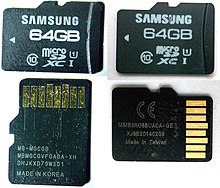 <THIS SIDE IS THE FAKE 1 .
I also have the "SANDISK ADAPTER" that I can slide them into for my card reader.
So yes I do have a rather large amount of knowledge over these what you call SD CARDS.
I'am never a Mr.Know it all. but I do know a great deal of what is behind these cards.. and how to make them run. Even after they have "EXPIRED" As for these cards have an expiration date embedded into the transflash it self why else when you buy a card that is supposed to be a 32gig only registering at 28 gigs and x amount of mb's and kb's when you go to use them? It is because you truly have a 32gig transflash card but some of it is being used for the system to understand what it is that you are running and the fact's that it will expire on you at a certain date, it's in the code.
It is there to help you save your data in time before it becomes corrupted, I feel some companies have found this to be helpful to them to make them expire sooner so you would have to buy more of them.
means now google is now trying to phase them out as you can already see this on the gal s3 slot it there.
but who say's that it has to work when they provide you one that is built in?
With all of that said here is where I will begin to try to help everyone get their data back and also get the card back up and running.
For 1 means there is a big market for these Transcards
There will be fakes as you can see from the picture above. Pay attention case you missed it
the card on the left take notice to how the 64GB is written. Nice BOLD
look on the left at the fake one.. choppy sloppy? RIGHT?
Now look at the one on the left bottom picture see how it is read left to right... with the gold connectors facing upwards!
Now look at the picture on the bottom right sorry for how the picture looks but you can
still see how the card is sideways and written from left to right?
these fake transflash cards are in fact not 64GB they are 32GB which mean X2 = 64
This crummy unknown makers are making fake 64GB cards by formatting them with the double compression which in return gives you a falsely near 64GB and are written to at class 4 speeds! and over short time causes user loss of data loss!!!!!!! Not every phone maker writes to the phone the same way as the next.
Take a sd card from samsung galaxy prevail after it has been used and formated using MASS STORAGE DEVICE and then Put it in Another phone that uses the "MTP- Media Transfer Protocol"
It may or may not auto correct the situation, Automatically change to using MTP as for the computer is always updating things and so is the phones they are learning to What I describe is "COPE WITH ONE ANOTHER"
used to be like every time you hooked something up it was like hey user what and how to use this device.
and it is more like
hey I know what this is, through "DEVICE RECOGNITION"
THIS CAN BE YOUR FIRST ISSUE....
It's getting late here and I will post more tomorrow!
I want to make sure I Am fully alert when posting because I want it to be most accurate as possible.
please also come in and explain "why and what part" you feel is "inaccurate" not just hit and leave lol....
Keep in mind I Am just starting this thread so if something doesn't make sense please point it out to me as for I may have overlooked something along the way here.
If you feel that I Am providing inaccurate information
let it be kindly known in a respectful way and I will take it into consideration and change it accordingly if I have been proved to be inaccurate.
I Am never claiming I Am some Big Shot Mr.Know It all, I'm just simply trying to find help for others on here so they can benefit from suggestions and helpful information that will fix their problem and or help them into buying a "Legit Sd Card"
Everything and anything below this line can and will be found on google some way or another so it is best to research before you do anything just to clear things up, any actions you take from this point on is under your own responsibility as for neither Android Forums nor I will accept responsibility over what you choose to do with your phone based off of suggestions that are being made here in this thread, post or any material is for education and are in clear intentions to help recover data and is not the intentions to destroy your lost data, damages!
If anything here has caused data loss and or any damages of any kind will be at your own risks that you choose to take.
I do ask if you could politely make your situation known and I will do my best to address your issues over your device and see where the problem exist and try to further assist you.
---------------------------------------------------------------------------------------------------------------------
["If you are not able to get any of your data back this is only suggested as a last resort."]
Get an actual sd card reader.
plug it in the usb slot and choose with option "FULL FORMAT" Note Full Format will take longer. Choose fat32 with default allocation file size Also note it will erase the card entirely !!!
Then choose scandisk from pc
and put checks in for "automatic fix errors"
then put the card back in phone and choose to "format sd card" so the phone will apply the method that is necessary.
["Again Suggested as a Last Resort"]
I will have further suggestions at a later time
I HAVE NEVER HEARD OF A SD CARD OR ANY CARD OF IT'S SORT
BEING FRIED OR HAVE FRIED WHILE BEING IN A PHONE. LoL.....
LESS YOU HAVE SEEN SMOKE OR HAVE SMELT A BURNT BAND-AID AND OR SULFUR.
KEEP IN MIND NEVER TOUCH THE GOLD LEADS WITH BARE HANDS, SAME RULE APPLIES TO NEVER TOUCH A BLADE OF A SWORD RIGHT?
BECAUSE THE OILS OF YOUR SKIN WILL INDUCE RUST AND CORROSION!
IT WILL ALSO ACT AS A CONDUCTOR BETWEEN THESE GOLD LEADS AND WHEN YOU INSERT THE CARD INTO THE SLOT WILL CAUSE DATA CORRUPTION.
ALWAYS STORE THEM IN A STATIC RESISTANT CARD HOLDER THEY MAKE THEM FOR A REASON.
STATIC CHARGE TO THESE CARDS WILL RENDER THEM USELESS.
HAVE YOU COMPARED A STATIC CHARGE FROM YOUR HAND WHEN YOU TOUCH METAL IN A CLOTHING STORE COMPARED TO A WALL SOCKET?
IT IS VERY CLOSE TO THAT.
NOW of what SD Really means.
I see load's of confusion here about SD cards.
S.D. Is not SANDISK !
"
KENSINGTON was junk back then.
S.D cards stood for is "SECURED DATA" the intentions of these cards was to move your standard data from camera or mp3 player to and from pc to device OR from pc to pc, under a solid state transferring data, great for a mobile device as for you never have to worry about movable parts inside such as the hard drive or cd rom or dvd. and they put off no heat this is great for laptops as a hard drive.
They became smaller to fit inside cameras and the data capability grew from there over time.
I still have 16mb 32mb 64mb 512mb 1 GB and a 2GB 32GB 64GB and they all still work.. and have been used heaps and loads of amount of time on them as for I use them for putting an OS-> Operating System on them. and running and booting them straight from my phone as a mini hhard drive..
These are all called "TRANSFLASH CARDS"
THIS SIDE IS THE REAL DEAL
I also have the "SANDISK ADAPTER" that I can slide them into for my card reader.
So yes I do have a rather large amount of knowledge over these what you call SD CARDS.
I'am never a Mr.Know it all. but I do know a great deal of what is behind these cards.. and how to make them run. Even after they have "EXPIRED" As for these cards have an expiration date embedded into the transflash it self why else when you buy a card that is supposed to be a 32gig only registering at 28 gigs and x amount of mb's and kb's when you go to use them? It is because you truly have a 32gig transflash card but some of it is being used for the system to understand what it is that you are running and the fact's that it will expire on you at a certain date, it's in the code.
It is there to help you save your data in time before it becomes corrupted, I feel some companies have found this to be helpful to them to make them expire sooner so you would have to buy more of them.
means now google is now trying to phase them out as you can already see this on the gal s3 slot it there.
but who say's that it has to work when they provide you one that is built in?
With all of that said here is where I will begin to try to help everyone get their data back and also get the card back up and running.
For 1 means there is a big market for these Transcards
There will be fakes as you can see from the picture above. Pay attention case you missed it
the card on the left take notice to how the 64GB is written. Nice BOLD
look on the left at the fake one.. choppy sloppy? RIGHT?
Now look at the one on the left bottom picture see how it is read left to right... with the gold connectors facing upwards!
Now look at the picture on the bottom right sorry for how the picture looks but you can
still see how the card is sideways and written from left to right?
these fake transflash cards are in fact not 64GB they are 32GB which mean X2 = 64
This crummy unknown makers are making fake 64GB cards by formatting them with the double compression which in return gives you a falsely near 64GB and are written to at class 4 speeds! and over short time causes user loss of data loss!!!!!!! Not every phone maker writes to the phone the same way as the next.
Take a sd card from samsung galaxy prevail after it has been used and formated using MASS STORAGE DEVICE and then Put it in Another phone that uses the "MTP- Media Transfer Protocol"
It may or may not auto correct the situation, Automatically change to using MTP as for the computer is always updating things and so is the phones they are learning to What I describe is "COPE WITH ONE ANOTHER"
used to be like every time you hooked something up it was like hey user what and how to use this device.
and it is more like
hey I know what this is, through "DEVICE RECOGNITION"
THIS CAN BE YOUR FIRST ISSUE....
It's getting late here and I will post more tomorrow!
I want to make sure I Am fully alert when posting because I want it to be most accurate as possible.
Last edited:

 LOL
LOL  For Administrator's ,Mod's, Guides And including myself and other's that may have some important details to be added as they feel fit for this forum...

