
ac4android
Well-Known Member
I am trying to instantiate an instance of LocationManager, the objective is to run locationmanager.reueqtsLocationUpdates() inside a handler later on.
I am running this tethered to my Android smartphone indoor. Might that be a problem because I cannot get a GPS indoor?
Have I missed something in the manifest, perhaps ?
I've been working on this for a while, so any help would be appreciated.
Manifest follows:
This is my module's build.gradle, I have commented out " compile 'com.google.android.gms lay-services:9.2.1' " because I don't want to use it for now:
This is the output from debugger, the null object reference seems to be my LocationManager
this = {MainActivity@4389}
view = {Button@4392} "android.widget.Button{7f7e97f VFED..C.. ...P.... 828,255-1092,399 #7f0c006e app:id/start_button}"
ex = {NullPointerException@4445} "java.lang.NullPointerException: Attempt to invoke virtual method 'java.lang.Object android.content.Context.getSystemService(java.lang.String)' on a null object reference"
running = false
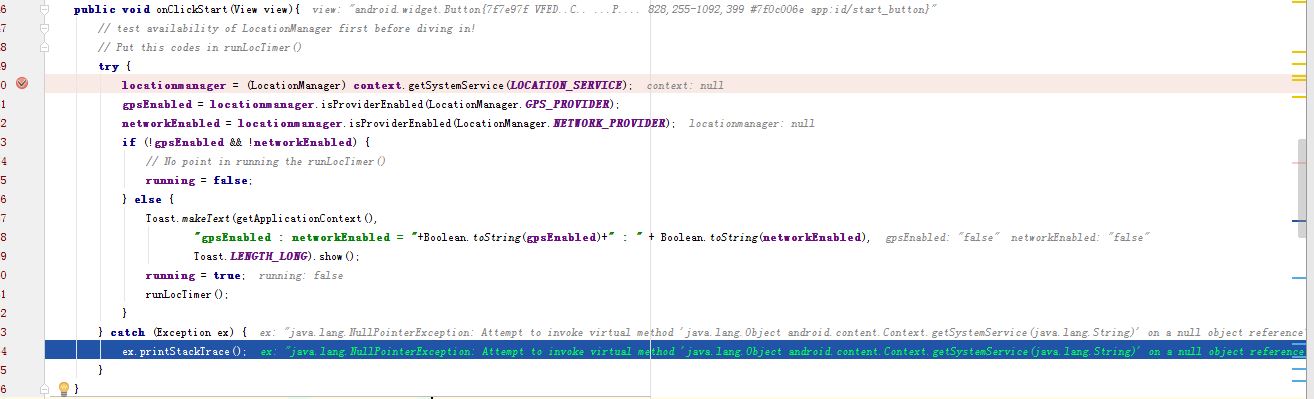
I am running this tethered to my Android smartphone indoor. Might that be a problem because I cannot get a GPS indoor?
Have I missed something in the manifest, perhaps ?
I've been working on this for a while, so any help would be appreciated.
Manifest follows:
Code:
<?xml version="1.0" encoding="utf-8"?>

<manifest xmlns:android="http://schemas.android.com/apk/res/android"
    package="com.example.testhandler">
    <uses-permission android:name="android.permission.INTERNET" />

    <uses-permission android:name="android.permission.ACCESS_NETWORK_STATE"/>
    <uses-permission android:name="android.permission.ACCESS_FINE_LOCATION"></uses-permission>

    <application
        android:allowBackup="true"
        android:icon="@mipmap/ic_launcher"
        android:label="@string/app_name"
        android:supportsRtl="true"
        android:theme="@style/AppTheme">
        <activity
            android:name=".MainActivity"
            android:label="@string/app_name"
            android:theme="@style/AppTheme.NoActionBar">
            <intent-filter>
                <action android:name="android.intent.action.MAIN" />

                <category android:name="android.intent.category.LAUNCHER" />
            </intent-filter>
        </activity>
    </application>

</manifest>
This is my module's build.gradle, I have commented out " compile 'com.google.android.gms
lay-services:9.2.1' " because I don't want to use it for now:
Code:
apply plugin: 'com.android.application'

android {
    compileSdkVersion 23
    buildToolsVersion "23.0.3"

    defaultConfig {
        applicationId "com.example.testhandler"
        minSdkVersion 17
        targetSdkVersion 22
        versionCode 1
        versionName "1.0"
        // Enabling multidex support.
        multiDexEnabled true
    }
    buildTypes {
        release {
            minifyEnabled false
            proguardFiles getDefaultProguardFile('proguard-android.txt'), 'proguard-rules.pro'
        }
    }
}
dependencies {
    compile fileTree(dir: 'libs', include: ['*.jar'])
    testCompile 'junit:junit:4.12'
    compile 'com.android.support:appcompat-v7:23.4.0'
    compile 'com.android.support:design:23.4.0'
    // compile 'com.google.android.gms:play-services:9.2.1'
}
Code:
// tidied up codes

import android.content.Context;
import android.os.Bundle;
import android.os.Handler;
import android.util.Log;
import android.view.View;
import android.app.Activity;
import android.widget.TextView;
import android.widget.Toast;

import android.location.Location;
// import com.google.android.gms.location.LocationListener;
import android.location.LocationListener;
import android.location.LocationManager;

public class MainActivity extends Activity implements LocationListener {

    private Context context;
    private double dd = 0.0;
    private boolean running;
    private static final String TAG = "ACDebug";

    LocationManager locationmanager;
    Location location;
    Boolean canGetLocation = false;
    Boolean gpsEnabled = false;
    Boolean networkEnabled = false;

    Double dlatitude, dlongitude;
    String latitude, longitude;

     @Override
    protected void onCreate(Bundle savedInstanceState) {
        super.onCreate(savedInstanceState);
        setContentView(R.layout.activity_main);
    }
    @Override
    protected void onPause(){
        super.onPause();
        running = false;
    }
    @Override
    protected void onResume(){
        super.onResume();
     }
    public void onClickStart(View view){
        // test availability of LocationManager first before diving in!
        // Put this codes in runLocTimer()
        running = true;
        runLocTimer();

    }
    public void onClickStop(View view){
        running = false;
    }
    public void onClickReset(View view){
        running = false;

    }
    private void runLocTimer() {

        final TextView sysmsgview = (TextView) findViewById(R.id.sysmsg_view);
        final TextView latitudeview = (TextView) findViewById(R.id.latitude_view);
        final TextView longitudeview = (TextView) findViewById(R.id.longitude_view);

        try {
            locationmanager = (LocationManager) context.getSystemService(LOCATION_SERVICE);
            gpsEnabled = locationmanager.isProviderEnabled(LocationManager.GPS_PROVIDER);
            networkEnabled = locationmanager.isProviderEnabled(LocationManager.NETWORK_PROVIDER);
            if (!gpsEnabled && !networkEnabled) {
                // No point in running the runLocTimer()
                running = false;
            } else {
                Toast.makeText(getApplicationContext(),
                        "gpsEnabled : networkEnabled = "+Boolean.toString(gpsEnabled)+" : " + Boolean.toString(networkEnabled),
                        Toast.LENGTH_LONG).show();

                // if we have GPS signal
                final Handler handler = new Handler();
                handler.post(new Runnable() {
                    @Override
                    public void run() {
                        //TODO
                        String slat = String.valueOf(dd);
                        sysmsgview.setText(slat);
                        latitudeview.setText(latitude);
                        longitudeview.setText(longitude);
                        if(running){
                            dd++;
                        }
                        handler.postDelayed(this, 1000);
                    }
                });
            }
        } catch (Exception ex) {
            ex.printStackTrace();
        }
    }

    @Override
    public void onLocationChanged(Location location) {
        //TODO
    }
    @Override
    public void onStatusChanged(String provider, int status, Bundle extras) {
        //TODO
    }
    @Override
    public void onProviderDisabled(String provider) {
       // TODO
    }
    @Override
    public void onProviderEnabled(String provider) {
        // TODO
    }


} // END of MainActivity
This is the output from debugger, the null object reference seems to be my LocationManager
this = {MainActivity@4389}
view = {Button@4392} "android.widget.Button{7f7e97f VFED..C.. ...P.... 828,255-1092,399 #7f0c006e app:id/start_button}"
ex = {NullPointerException@4445} "java.lang.NullPointerException: Attempt to invoke virtual method 'java.lang.Object android.content.Context.getSystemService(java.lang.String)' on a null object reference"
running = false
Last edited:

