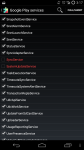
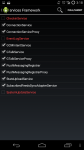
No, it should be red and unchecked. I must have unchecked more than just that. I worked on this at two separate times. The first time it didn't work, and last time, when I unchecked the one in my first reply it finally went away.
Let me look in a bit to see what else I unchecked.
Alright, see the two screenshots below to see which services I have disabled. The last service I disabled was the one I mentioned in my first post and when the update nag finally stopped. I assumed it was that one that did the trick, but it must have been a combination. I haven't had any side effects of other things not working.
This site uses cookies to help personalise content, tailor your experience and to keep you logged in if you register.
By continuing to use this site, you are consenting to our use of cookies.