
Sorry about the newbie question but I haven't been able to figure this one out yet. When I'm playing MP3's using Mediascap (only player I've tried) the player stops whenever the phone goes to lock. I have my phone set for a 30 screen fade and then it locks soon after that. This means I have to poke the phone every 30 seconds to keep the song playing. I did a search and found something about adding the application to the task killer ignore list by doing a long press on the app and selecting ignore, however when I long press Mediascap I simply get a trash can popping up. Any help would be appreciated.
Install the app
How to install the app on iOS
Follow along with the video below to see how to install our site as a web app on your home screen.
Note: This feature may not be available in some browsers.
-
After 15+ years, we've made a big change: Android Forums is now Early Bird Club. Learn more here.
You are using an out of date browser. It may not display this or other websites correctly.
You should upgrade or use an alternative browser.
You should upgrade or use an alternative browser.
Help Mediascap Stops When Phone locks
- Thread starter Jcol
- Start date

clockwork58
Android Enthusiast
Do yourself a favor and download Mixzing from the market.
It's free, an awesome music player and has a widget.
I use it every single day.
It's free, an awesome music player and has a widget.
I use it every single day.

X10iUser
Android Expert
Hi.I did a search and found something about adding the application to the task killer ignore list by doing a long press on the app
You don't long press the app shortcut, you run the app, open your task killer where you should now see it running, long press on the entry and select ignore...


X10iUser
Android Expert
Do it, will take you all of 5/10 minutes to root change your font and unroot. SimplesSOOOO Tempted to root my phone just to get that SE font


MrWomble
Android Expert
Do it, will take you all of 5/10 minutes to root change your font and unroot. Simples
But i'm under warranty and insurance - doesn't that affect it ?
Cos knowing my luck i'll need to claim afterwards lol
X10iUser
Android Expert
It does yes which is why I suggested the one click method, as you can unroot and delete the app. Face your fears.But i'm under warranty and insurance - doesn't that affect it ?

MrWomble
Android Expert
It does yes which is why I suggested the one click method, as you can unroot and delete the app. Face your fears.
Ok drop the app and instructions, will consider it
And font location if possible
Hehehe never ask for much
MrWomble
Android Expert
See attachment for both font and one click app (which I used), and HERE for how to install your fonts once you've rooted.
So i can root by installing an app - change the font through SUPERUSER and then UNROOT straight after by uninstalling?
grrrr i hat new instructions outside comfort zone - suppose if it goes wrong i could drop it, smash it and get a new one lol
X10iUser
Android Expert
So i can root by installing an app
Once you've rooted, you need to install the following...change the font through SUPERUSER and then UNROOT straight after by uninstalling?
Superuser Permissions
BusyBox
TypeFresh
AndExplorer (required for TypeFresh)
...then you can change your fonts, unroot, and uninstall all of the above, if you want to.
That's one way I guess, but wouldn't worry too much.grrrr i hat new instructions outside comfort zone - suppose if it goes wrong i could drop it, smash it and get a new one lol
MrWomble
Android Expert
Once you've rooted, you need to install the following...
Superuser Permissions
BusyBox
TypeFresh
AndExplorer (required for TypeFresh)
...then you can change your fonts, unroot, and uninstall all of the above, if you want to
Ok have clicked on root - do i need busybox ?? wasn't mentioned on XDA

X10iUser
Android Expert
I would install it, it's brought up further in the thread that installing it has helped, or you can leave it and come back to it I suppose. So you're now rooted, how does it feel.Ok have clicked on root - do i need busybox ?? wasn't mentioned on XDA
X10iUser
Android Expert
Should do.do that 1 clic root works on X10a?
Are you sure?, I've just clicked backup but it doesn't give an option which to backup to and does it to the SD card.well ignored it and rooting opened that file anyway - trying to backup the fonts to memory card but is only allowing to back up to system
MrWomble
Android Expert
Should do.
Are you sure?, I've just clicked backup but it doesn't give an option which to backup to and does it to the SD card.
Well when i click on backup - it backs up, but not to the SD card - went through the steps anyway and selected the new Font from my sd card - no change
X10iUser
Android Expert
Not sure what it does, but if you root it seems to be essential for some programs.Installing busybox enabled fonts to backup to SD Card
EDIT:
Now you can install "ShootMe" and post some screenshots.

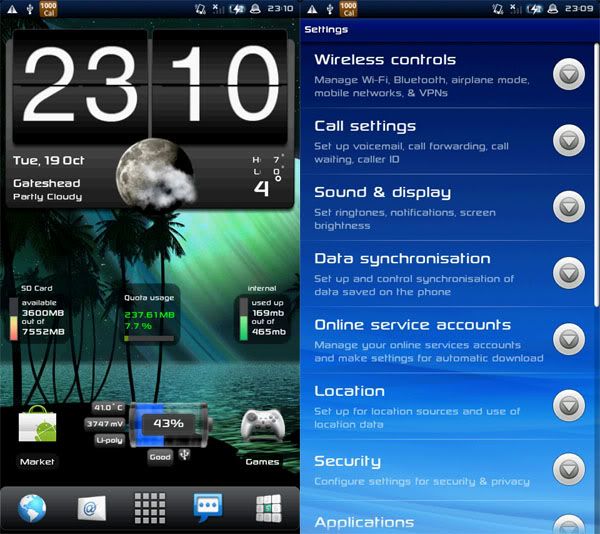
X10iUser
Android Expert
I don't mind the size, small and sleek. Can you use ADB then, how about changing your framework-res now?Just a shame ya can't change the font size in general just in certain apps
MrWomble
Android Expert
I don't mind the size, small and sleek. Can you use ADB then, how about changing your framework-res now?
Ha - change my what ???
Handcent SMS allows font size to be changed, bolded or italic'd too
X10iUser
Android Expert
LOL.Ha - change my what ???
Basically the gui of the phone which includes things like your statusbar, menu icons ect, all those can be changed by editing your framework-res.