• After 15+ years, we've made a big change: Android Forums is now Early Bird Club. Learn more here.

Help Multitasking & Memory/App Management

Need more information.

Did you uninstall the file?

What "icon pack" is it?

What's your carrier and which model HTC one do you have?

Are you rooted?

What version of Android?

Did not uninstall the file.
It's the Goolors icon pack.
Carrier is AT&T and i have the 32gb HTC One.
Not rooted.

This same situation happened two day ago as well. Deleted some unused apps.
 
well if it happened after the pack was installed, uninstalling it should verify if the issue goes away.

if it does, re-install. if the issue comes back, then you know.
 
well if it happened after the pack was installed, uninstalling it should verify if the issue goes away.

if it does, re-install. if the issue comes back, then you know.

That was the issue. Uninstalled then reinstalled and got the same low storage warning. Couldn't even download any other apps. So I deleted it again and tested it on a game download that was 1.08gb and it downloaded just fine. Even tried with 6 more apps and had no issues. And just to check again, I downloaded Goolors again and got the same low storage warning. Weird.
e5uzujyg.jpg


Well damn. Just tried installing Widget Locker and got the warning again. I think something is up with my phone.
 
See if you can tinker around and get Elixir 2 installed.

Go to info, then tap on your internal storage.

Clear cache.

Then go to Storage Settings - hopefully my HTC isn't too different - and Make more space, clear caches for all apps.

Hope this solves it for you.
 

Attachments

  • 1380864362075.jpg
    1380864362075.jpg
    75.8 KB · Views: 212
  • 1380864386025.jpg
    1380864386025.jpg
    56 KB · Views: 178
See if you can tinker around and get Elixir 2 installed.

Go to info, then tap on your internal storage.

Clear cache.

Then go to Storage Settings - hopefully my HTC isn't too different - and Make more space, clear caches for all apps.

Hope this solves it for you.

Got it installed and cleared the cache. Still getting that warning though. And I noticed I only get it with apps to personalize my phone. So lock screen widgets, icon packs, etc... Don't get it. Still have plenty of storage left.
 

Attachments

  • uploadfromtaptalk1380865316411.jpg
    uploadfromtaptalk1380865316411.jpg
    39.9 KB · Views: 168
Those numbers don't tell the whole story, it's an old Android problem.

Did you clear all of your app caches as well?

Well when I go into manage my apps, the "clear cache" icon isn't highlighted. So I can't select it unless I'm doing something wrong?
 

Attachments

  • uploadfromtaptalk1380896239771.jpg
    uploadfromtaptalk1380896239771.jpg
    50.1 KB · Views: 211
Not all apps have a cache and doing it through app management is ok but tedious.

Under your main settings, do you have Storage, and if so, do you have Make more space (or similar) as shown in my second screenshot?

Sorry, but you're on a newer version of Sense than I am, so I have to ask. :o
 
Not all apps have a cache and doing it through app management is ok but tedious.

Under your main settings, do you have Storage, and if so, do you have Make more space (or similar) as shown in my second screenshot?

Sorry, but you're on a newer version of Sense than I am, so I have to ask. :o

I do. But only have the option to delete apps in that menu option
 
Check out "Clean Master (Cleaner) - FREE"

https://play.google.com/store/apps/details?id=com.cleanmaster.mguard

Please only use the option to clean out junk files to start.

And personally I think that a backup is in order before going further.

Check out "Helium - App Sync and Backup"

https://play.google.com/store/apps/details?id=com.koushikdutta.backup

You'll be needing to add a bit to your PC if you're not rooted but that's no big deal to get a comprehensive backup happening.

Plus, good idea to backup your pictures, etc etc, from your internal storage.

Then if that problem persists even after Clean Master, you can take your phone to a completely clean state with a factory data reset and then restore your apps and data from the backup.
 
Check out "Clean Master (Cleaner) - FREE"

https://play.google.com/store/apps/details?id=com.cleanmaster.mguard

Please only use the option to clean out junk files to start.

And personally I think that a backup is in order before going further.

Check out "Helium - App Sync and Backup"

https://play.google.com/store/apps/details?id=com.koushikdutta.backup

You'll be needing to add a bit to your PC if you're not rooted but that's no big deal to get a comprehensive backup happening.

Plus, good idea to backup your pictures, etc etc, from your internal storage.

Then if that problem persists even after Clean Master, you can take your phone to a completely clean state with a factory data reset and then restore your apps and data from the backup.

Awesome. Thanks for all the info! I'll give all that a shot and see what happens. And you mentioned to back everything up first. Should I do that before I clean up the junk files?
 
Awesome. Thanks for all the info! I'll give all that a shot and see what happens. And you mentioned to back everything up first. Should I do that before I clean up the junk files?

Yeah, I would.

I checked that app and the dev before recommending but I don't have your exact model, I have last year's.

So I think a backup first just to be on the safe side is your best bet.

I don't think you'll have any trouble with the app.

But I never say never, I'm a backup kind of guy. :)
 
Hello All,

I just installed 3G watchdog pro on my HTC One to monitor the data usage on my plan and I noticed that the application "Android System" is using up large chunks of my data. Is there any way to see which features are using all the data and disable them? I have a feeling it would be Blinkfeed running in the background because I don't use any other android processes that require a data connection (at least not to my knowledge).

Thanks in advance for your help.
 
I played around with a bunch of monitors before I found one that gave a better breakdown .. unfortunately, I don't recall which one I wound up using :eek:

So I'd suggest: just try a few other tools - there are quite a few free ones around ;)

You could also try turning off Sync, see if that helps (easiest way is via the Power widget).
 
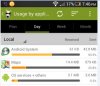
I tried putting Blinkfeed to Wifi only but the Android System "app" is still chewing through a fair chunk of my data. The strange thing is that 3G watchdog records the usage as being "Sent" instead of "Received". Also note that the usage bar is the light orange (background task) instead of the darker orange like when I was using the Maps app.

Is it possible that android is backing up files from my phone to some server without me knowing about it?
 

Attachments

  • 1.JPG
    1.JPG
    27.6 KB · Views: 171
Does your stock usage tool show the same ?.

I check mine now and again. I reckon it's accurate although it doesn't break it down to sent and received.

In this current month (9 days usage) my Android OS app has used 587 kb compared to 8.46 mb used by Maps.
Android OS, HTC Services and Google Services are all about the same usage.
:)
 
I tried putting Blinkfeed to Wifi only but the Android System "app" is still chewing through a fair chunk of my data. The strange thing is that 3G watchdog records the usage as being "Sent" instead of "Received". Also note that the usage bar is the light orange (background task) instead of the darker orange like when I was using the Maps app.

Is it possible that android is backing up files from my phone to some server without me knowing about it?

Hi, I don't know whether this will help you, but the HTC stock data logger monitors both mobile data and wifi, and stores the results - I can go back to June when I got my One.

Having checked back, Android OS (assuming that is what your 3g watchdog calls Android System) has never used more than 5% of the total data usage in any period, on either mobile data or wifi and, as you point out, is all background data. The heavy data users are as you would expect - maps and navigation, internet, playstore etc.

(Incidentally, my One shows the Auto daily backup as using wifi only).

It may be worthwhile checking your historic usage if you haven't already done so, compare it to your 3g watchdog results and if there is something amiss you should, hopefully, be able to identify it.

:)
 
Hi guys. Had my HTC One for a couple of months, and going to check out all the tips and advice here to get the best out of it.

One question in the meantime, something that really bugs me.

If I've had an app running, and I pause it, as you'll know you can resume it by double tapping the home key to view the recent apps, and selecting the app you want to resume. When I do this, it displays an image taken from the moment the app was last paused, for a good couple of seconds before allowing the app to properly resume itself.

I hate this, and have only ever seen this on HTC One. It makes it look like you can press something when you can't, a really bad user experience. And as a developer, I hate it even more.

What's going on with this? Can it be disabled to behave 'normally'?

Many thanks in advance.
 
ive seen it on prior htc handsets and i think it started after a certain android os version rather than a handset (it behaves this same way on the one max for example). i have used htc handsets exclusively since 2001 so thats all i know. what you speak of is baked into the ROM and a part of the way sense works.

if you root your device, you may be able to open up other opportunities, but in the stock configuration, there is no way to change this from what I know.

if the app management hasnt dumped/flushed the app from running, that same screen is still going to be there when i tap to go back to the app.

this method has helped me when im, say, trying to read something from an app to transcribe to another app. I can open up the recent apps page there, and visually see what i am trying to copy and it has really helped! I know this is not a "feature" but i take advantage of it when i can..

so no, can't change the behavior the app management uses for that in stock form...
 
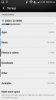
I've got an AT&T HTC One and took a look the "Storage" menu from "Settings." It reports that Photos & videos are taking up a whopping 12.87 gigabytes. However, I have only 14.5 megabytes worth of photos on my phone. What on earth would be hogging up 40 percent of my 32GB of storage on this phone and how do I clear out some of it?
 
Anyone any ideas?

I've scanned using CM anti virus. All appears ok. When I look at the minute logs, it looks like background os process spent 30 mins downloading data
 

Attachments

  • Screenshot_2015-02-04-21-55-30.png
    Screenshot_2015-02-04-21-55-30.png
    157.5 KB · Views: 188
Last edited by a moderator:
Back
Top Bottom