
Install the app
How to install the app on iOS
Follow along with the video below to see how to install our site as a web app on your home screen.
Note: This feature may not be available in some browsers.
-
After 15+ years, we've made a big change: Android Forums is now Early Bird Club. Learn more here.
You are using an out of date browser. It may not display this or other websites correctly.
You should upgrade or use an alternative browser.
You should upgrade or use an alternative browser.
Need help with my tablet!
- Thread starter IAPD3000
- Start date
-
- Tags
- general tablet talk

It would be helpful if you could give us the make and model of the tablet, as well as the version of android you were running, if you can remember.
There can be several reasons why a device gets stuck at the boot screen. Sometimes it's simply a failed update. It could be a corrupt system file or even a hardware failure. Without more information and troubleshooting, there's really no way to tell.
There can be several reasons why a device gets stuck at the boot screen. Sometimes it's simply a failed update. It could be a corrupt system file or even a hardware failure. Without more information and troubleshooting, there's really no way to tell.

IAPD3000
Newbie
It would be helpful if you could give us the make and model of the tablet, as well as the version of android you were running, if you can remember.
There can be several reasons why a device gets stuck at the boot screen. Sometimes it's simply a failed update. It could be a corrupt system file or even a hardware failure. Without more information and troubleshooting, there's really no way to tell.
My tablet is the V703 MODEL and Verison 4.0, that's far I can tell. It's an Android device that I use on my Google account last year.
Last edited:
I've looked up some general information about that tablet. Just to confirm, is it this one?
http://dqvtech.com/products/v703-7-tablet
You could try pressing and holding the power button until it reboots to see if that will put you into a recovery menu.
I don't read Chinese but there might be a small hole which is a reset button that you use a pin or paperclip to press and hold until it reboots.
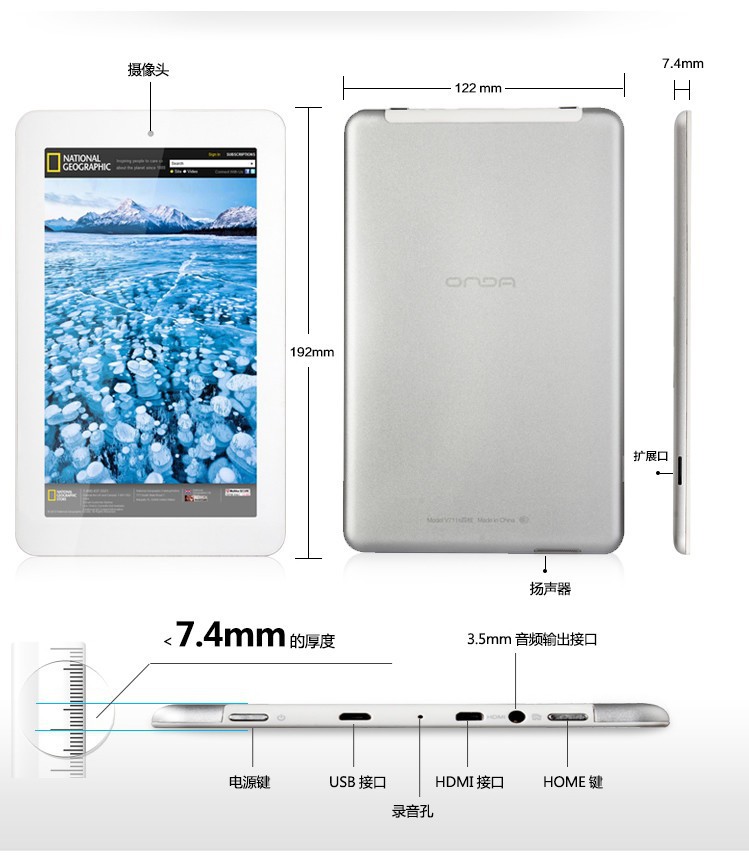
But be careful, too. That hole could easily be a microphone hole which means if you insert anything into it, you could damage the microphone.
Sorry I couldn't be more help.
http://dqvtech.com/products/v703-7-tablet
You could try pressing and holding the power button until it reboots to see if that will put you into a recovery menu.
I don't read Chinese but there might be a small hole which is a reset button that you use a pin or paperclip to press and hold until it reboots.
But be careful, too. That hole could easily be a microphone hole which means if you insert anything into it, you could damage the microphone.
Sorry I couldn't be more help.
IAPD3000
Newbie
I've looked up some general information about that tablet. Just to confirm, is it this one?
http://dqvtech.com/products/v703-7-tablet
You could try pressing and holding the power button until it reboots to see if that will put you into a recovery menu.
I don't read Chinese but there might be a small hole which is a reset button that you use a pin or paperclip to press and hold until it reboots.
But be careful, too. That hole could easily be a microphone hole which means if you insert anything into it, you could damage the microphone.
Sorry I couldn't be more help.
Mine doesn't have a microphone, but speaker without a button. It only has the reset button.
I tried pressing the button and nothing worked.

BRAINZ2013
Extreme Android User
Which model do you have some Dont have volume buttons and need the reset button or flashing a firmware to clear the tablet
IAPD3000
Newbie
How long did you press it? Sometimes you have to hold them down for upwards of 30 second for them to reset the device.
I had been pressing more like 5 minutes. It's been three hours.
IAPD3000
Newbie
Which model do you have some Dont have volume buttons and need the reset button or flashing a firmware to clear the tablet
http://dqvtech.com/products/v703-7-tablet
I had been pressing more like 5 minutes. It's been three hours.
Have you tried contacting the manufacturer and asking how to reset it? There is contact information on that website. Unfortunately the manual they have there is very basic with no troubleshooting at all.
BRAINZ2013
Extreme Android User
Try holding down power button and the reset button for a 55sec countHave you tried contacting the manufacturer and asking how to reset it? There is contact information on that website. Unfortunately the manual they have there is very basic with no troubleshooting at all.
BRAINZ2013
Extreme Android User
Feel free to try the firmware can't help all the way cause I need to see if its v1or v2 but your tablet is at the bottom of the page
http://susutun1.blogspot.com/2014/03/android-onda-tablet-firmware.html?m=1
http://susutun1.blogspot.com/2014/03/android-onda-tablet-firmware.html?m=1