• After 15+ years, we've made a big change: Android Forums is now Early Bird Club. Learn more here.

NEW Software Upgrade for Hero

MR_COATES

Well-Known Member
Hello peeps.

Haven't seen this mentioned anywhere (apologies if I've missed it) but I randomly thought I'd check for updates on my unbranded Hero and something actually came up!

It's a G-Sensor calibration tool so nothing exciting but I wasn't expecting anything ever again after getting 2.1!

Screen:


I had no data loss problems whatsoever during the update.

Uploaded with ImageShack.us

Nice new updating screen too:


Uploaded with ImageShack.us

Will post what's happened after the update completes.

Update:

Took about five minutes for the device to fully reboot into the phone after the progress bar reached the end so don't be tempted to turn it off during this process.

I was then presented with this screen:


Uploaded with ImageShack.us

And within Settings> Sound & display you now have:


Uploaded with ImageShack.us

And:


Uploaded with ImageShack.us
 
Nothing new on my Orange, 2.1 either. Though I'm pretty sure I had that calibration thing already from 1.5... or did I lose it with the update and not notice?
 
Erm... this has always been there, hasn't it? I've seen it before, anyway... maybe it just wasn't on unbranded units...

(Orange 2.1 updates are numbered 3.35XXX so, I guess, are set after this one...)
 
how do you check for updates manually ?
Since you're on 1.5 and i am guessing you're running stock 1.5 (3's version) then the option isn't there. It's only on unlocked/generic roms i think
Newb question but what does this G-Sensor calibration tool do?
Is it even worth updating to my phone?
It's like in the images, it's a kinda spirit level and when the phone's apps use tilt it aids that
Nothing new on my Orange, 2.1 either. Though I'm pretty sure I had that calibration thing already from 1.5... or did I lose it with the update and not notice?
Calibration tool is missing from 2.1. It was in 1.5, there was a thread from a member on here who was none too pleased, contacted HTC. Perhaps it's his and other's efforts we have it.
Erm... this has always been there, hasn't it? I've seen it before, anyway... maybe it just wasn't on unbranded units...

(Orange 2.1 updates are numbered 3.35XXX so, I guess, are set after this one...)
Again, it was in 1.5 but was missing from the 1st releases of 2.1
 
I've just updated to this calibration tool and it's wiped the clock,and numerous other widgets from my home screens.
My advice is make sure you save the theme before you do it.
I know it's hardly something major but it's a bit of a pain once you have all your screens set up how you like them and they get wiped.
 
Any Slovak/Czech who got this update or all from UK? (the old trick with the date doesnt work for me :( )
 
Its great having an g-calibration, when half of the htc widget are missing...

The Clock, and Calender widget from HTC disapeared from the homescreens and arent available in the add menu either. (I'm not able to get them even with the update function).

Any Ideas? Would like to have my widgets back.
 
Okay, so maybe I should have looked before I posted last - This already does exist in the Orange 2.1 update...

(Can't help with the widgets)
 
Its great having an g-calibration, when half of the htc widget are missing...

The Clock, and Calender widget from HTC disapeared from the homescreens and arent available in the add menu either. (I'm not able to get them even with the update function).

Any Ideas? Would like to have my widgets back.


Which country you are from? I want the G-sensor too.
 
So today I got an answer (for my 2 months old question) from htc that the FOTA is getting official, asked her if she can give me more info. Will see :D. I still dont have it though. Anyone got it?
 
Ah I got it too (after installing I rooted back :p) (Slovakia , Stock 2.1, Unbranded rooted with 1 click) but it didnt stall. It took it half an hour to install. I think when rebooting 10-15 mins. (Someone said its erasing the cache.)

How long you waited?
 
That's the thing, 20-something minutes and nothing.

Removed the battery, started it up again - the same. HERO logo and nothing.
 
Hmm, give it 25 ? No idea what else I could tell you :( .

Just checked my logs I wrote to a friend about the progress. So 30 mins the install. And 20 mins for the logo with "quietly brilliant" .

Give it more time. I guess you have nothing to loose. Till the experts come :)
 
I don't even get to the "quietly annoy... i mean, brilliant" sign.

It's on, I'll let it work for some half an hour and see what happens.
 
lol :P (okay I dont remember which it was (was white thats all I know for sure) I wouldnt bet my hand on it :D) But write how it gone after the 30 mins.
 
Yeah, it's "quietly brilliant", I just modified it a bit :D

Restarted it, this time on the charger. We'll see what happens.

EDIT: Jesus H. Christ this is taking forever. :mad:

EDIT 2: so, ok, apparently, this update killed my phone. I'm going to drink someone's blood at HTC.
 
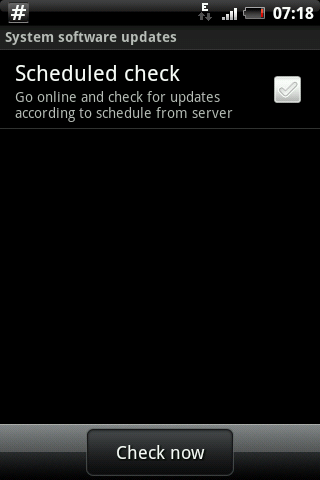
how to check updates manually??


If you have 2.1

Settings >>> About Phone >>> System software Updates >>> Check now
snap20100820_071836.png
 
Its great having an g-calibration, when half of the htc widget are missing...

The Clock, and Calender widget from HTC disapeared from the homescreens and arent available in the add menu either. (I'm not able to get them even with the update function).

Any Ideas? Would like to have my widgets back.
when home screen is shown, menu-settings-programs-administer programs,in there find htc sense and press clear data,same for the weather widget in there , then you will get it back!
 
Back
Top Bottom