
• After 15+ years, we've made a big change: Android Forums is now Early Bird Club. Learn more here.

Root [ODIN] not working for me - just crashes (solved)

I am trying to root my Rush by following the root guide posted by Shabbypenguin. The problem I am having is that Odin crashes when I hit 'Start'. I have used 3 different PC's each with a different OS: Win7, Vista and then XP. I am not sure what I am doing wrong and would appreciate any advice.

edit: CWM can now be pushed to the Rush via Odin. Thanks Shabbypenguin for helping us root this phone!
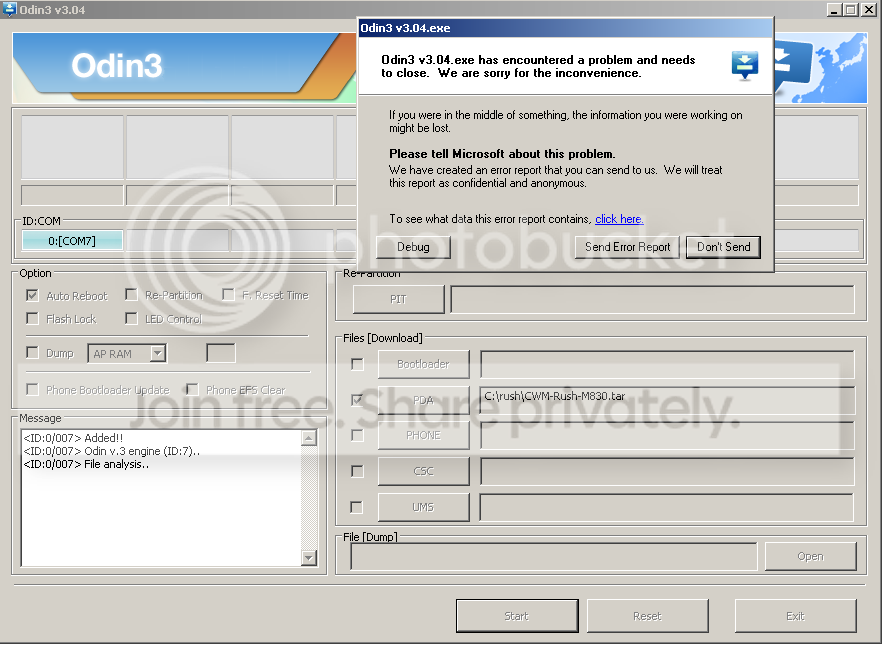

ODINcrash.png
 
The test version in the cwm thread does the same thing for me. (The one that says don't restore unless you are willing to risk a brick)
 
Yea i just tried using odin myself, same problem :( looks like i can't pull the file yet until i get it working, will the file work with an older version of odin maybe?
 
unofrtunatly making the tars themselves apparently has become an issue for my computer.

i had what may have been a perfectly working cwm, but i got word that it wasnt so i deleted it. then it came to light the error may not have been cwm... so now im trying to backtrack and get things situated :/
 
I think its important to always appreciate someone's hard work! To criticize someone work especially someone who has contributed so much to forum isn't nice.let's be nice and show our devs support.
 
Hello everyone, I'll be coming to this forum officially the first or second week of January, just waiting for my friend to get her new phone then I'll have the Rush that she had, but is it possible that the CWM file might work with a newer version of ODIN?? Just a question, trying to drum up some possibilities for this issue... :)

the issue is that i updated to linux mint 14 and it seems its not playing nice with making an odin tar like 13 and earlier did :/

sadly that is all, i have teh source and a what i believe working cwm just need to package it up :P
 
I've got Ubuntu 12 and im willing to tar it up if need be

hell I'll even set up a ftp account for you on my server and take some of the load off your bandwidth
 
you mean inside the tar you have another folder with a file inside? i may be wrong, shabby correct me, but I believe it should be a file in the tar and not a folder with a file
 
That's what I thought.. I messed it up.. I used one utility that automatically stuffs it in a folder when uncompressed and then used 7-Zip to re-compress.. I'll redo.

Edit: Okay I fixed it.. just recovery.img.. no folder
[removed link]

Are we sure that the recovery.img file isn't corrupt?
 
looking at shabby's tar I see a folder in a folder in a folder in a tar... I'll try to flash both ways when I get off and see how it goes I guess
 
I won't have my phone till the 24th.. maybe Robertech can when he gets home. I noticed the extension changed.. is that correct?
 
Back
Top Bottom
