• After 15+ years, we've made a big change: Android Forums is now Early Bird Club. Learn more here.

Help OTA 4.0.4 update. (caution s-off/root user. Ringtone issue)

I wonder if this could fix my network issues. I suppose i'll try this before a factory reset.


Right off the bat, the phone seems a heck of a lot quicker and seems to multitask better. But that could just be the effects of a recent rom install? Will see how it fares in the next few days.

EDIT: The difference borders on spectacular. My stuck text problem seems to have been resolved and I am able to turn roaming back on for the time being. Hope it lasts!
 
Not sure if this is old news, but I didn't see any recent posts about it.

Anyway, one thing I was disappointed with on the newer phones is the lack of the Menu button, which I used all the time on my original Evo. However, after updating my new Evo LTE, I noticed a new option appear under "Display, gestures, and buttons" (before the updates it was just called "Display and gestures") and there is now an option to set your application switching button to one of these three settings:

1. Switch applications (the default)
2. Press for menu, hold for switching
3. Press for switching, hold for menu

I assume the updates brought this change, because it wasn't there before. Just though I'd post this in case anyone else likes the Menu button and was unaware of it.

(I just discovered this option after a frustrating time trying to figure out how to bring up the menu in the Internet app, because tapping the screen didn't always do it!)
 
Yep, the newest OTA brought this. :) It wasn't explicitly stated anywhere before though. Great info and directions on how to get it.

If you don't mind, we'll merge this into the OTA thread so its there for anyone else reading about the newest update
 
Not sure if this is old news, but I didn't see any recent posts about it.

Anyway, one thing I was disappointed with on the newer phones is the lack of the Menu button, which I used all the time on my original Evo. However, after updating my new Evo LTE, I noticed a new option appear under "Display, gestures, and buttons" (before the updates it was just called "Display and gestures") and there is now an option to set your application switching button to one of these three settings:

1. Switch applications (the default)
2. Press for menu, hold for switching
3. Press for switching, hold for menu

I assume the updates brought this change, because it wasn't there before. Just though I'd post this in case anyone else likes the Menu button and was unaware of it.

(I just discovered this option after a frustrating time trying to figure out how to bring up the menu in the Internet app, because tapping the screen didn't always do it!)


It's been reported in this thread:

OTA 4.0.4 update out. (s-off/root users may need to hold off) [8-29-12]

Maybe a mod will merge this into the existing thread.
 
I can not assign ring tones by person in my phone. When I assign a ring tone to a person it checks out ok but, when they call it just rings the default tone. Any one else seeing this?
 
I can not assign ring tones by person in my phone. When I assign a ring tone to a person it checks out ok but, when they call it just rings the default tone. Any one else seeing this?

Is your disc mounted? Meaning is it attached to your computer.
 
Is your disc mounted? Meaning is it attached to your computer.

Not connected to computer. just as normal when I look up joe smith and check it is assigned a ring tone but, when joe calls just the regular ring tone is heard do not want to do another factory reset if other have the same problem.
 
this is a bug HTC recognized and it will be fixed in the next MR...

Thanks.....I have been on the phone with HTC and they have escalated it and said I would hear back in 24 to 48 hours.

They had me move and create contacts in Google rather than phone and that did not help so they escalated it.

Just received phone call from HTC level 2 and they acknowledge this is a software problem and they are working on it.
 
I like that there gone too but out of habit I am used to them and keep forgetting to hit the recent app button to get to the menu now. LOL! My sense was reloading every so often and hasn't done it since so I hope that's fixed for me. I can't wait till Jelly Bean.

Nice, isn't it? :)
 
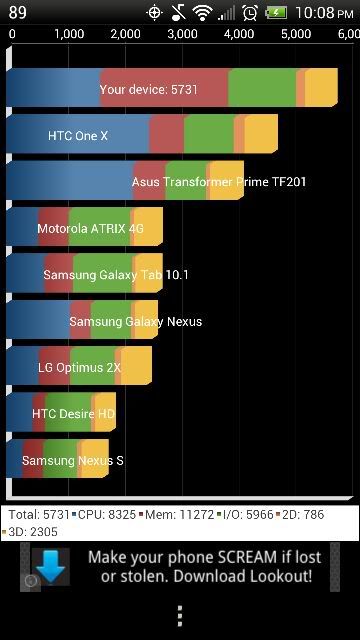
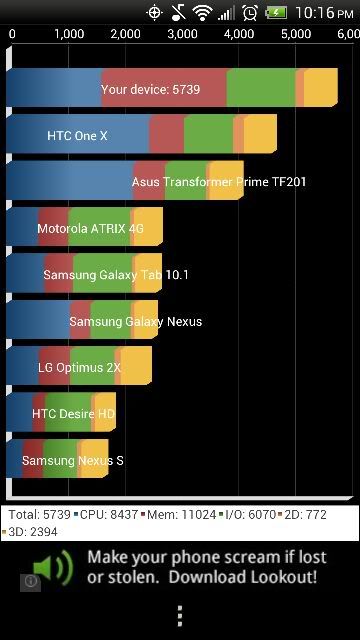
Wow this update is great, before the update the highest number I could remember getting on Quadrant Standard was 5088, now its over 5700. And I ran it again after a reboot just to make sure it wasnt a fluke and slightly higher results :)
imagepng_2.jpg


2nd run after a reboot
imagepng_21.jpg
 
Anyone else notice Contacts are different? I noticed a weird triangle in the bottom right of my text messages on the photo ID part. I noticed in Contacts now you can click a message button to the right of the persons #. I swear before I always had to long press the # and then select New Message. Can anyone confirm that I am not losing my mind.lol I am sure it is part of the Sense update, but like it.
 
The little talking bubble on the right of a contact phone number line in People?? That was there...

Wow. Then I am an idiot for long pressing.lol Ok. so on the square contact(photo or default) in the text message. Is that shaded bottom right corner new? That is what caught my attention and was wondering what changed.
 
Wow. Then I am an idiot for long pressing.lol Ok. so on the square contact(photo or default) in the text message. Is that shaded bottom right corner new? That is what caught my attention and was wondering what changed.

Not really, lol, it seems there's often two or three ways to do do the same thing in Sense - I used to long-press that myself.

Sorry, don't shoot me, I'm only the piano player - but that lower right triangle on a contact In Messages - also not new. (if it makes you feel any better, I didn't know about that until you asked)

However - any time a software update makes features obvious that weren't so before - that counts as an honest improvement. True story.
 
I haven't installed any of the updates so far. Do I need to install them in order? I can't get this one to show up. It still shows 1.22.651.3 available. I really want the youtube app option and the multitasking and menu bar, etc.

I am not rooted, but I will eventually. Should I root first and then flash a rooted update? I don't plan on installing custom roms.
 
I haven't installed any of the updates so far. Do I need to install them in order? I can't get this one to show up. It still shows 1.22.651.3 available. I really want the youtube app option and the multitasking and menu bar, etc.

I am not rooted, but I will eventually. Should I root first and then flash a rooted update? I don't plan on installing custom roms.

Absolutely do not accept the OTA. It'll make your rooted life a lot more painful. If you wish to get all of the updated goodies, I would suggest rooting now rather than later.
 
Seems like after our recent update, my stock messaging app is slower. Does anyone else experience this problem?

Specifically, when I hit "Send", it takes a while for the message to actually show up in the above 'history' part. Also, when I open up a conversation, it will hang and wait with a blank white screen for up to 15-20 seconds before opening and showing the conversation.

Seems to happen with ChompSMS also.

Before our recent update, everything was running smooth as butter.. not sure what happened?

Any help would be appreciative!
 
Back
Top Bottom