
Install the app
How to install the app on iOS
Follow along with the video below to see how to install our site as a web app on your home screen.
Note: This feature may not be available in some browsers.
-
After 15+ years, we've made a big change: Android Forums is now Early Bird Club. Learn more here.
You are using an out of date browser. It may not display this or other websites correctly.
You should upgrade or use an alternative browser.
You should upgrade or use an alternative browser.
Root [OUDHS] Clockworkmod Recovery 6.0.1.9
- Thread starter Shabbypenguin
- Start date
-
- Tags
- samsung galaxy rush

Lordvincent 90
▓▓▓▓▓▓▓▓▓▓▓▓▓▓▓▓▓▓▓▓
It say E:signature failed to verify error. I followed all steps but no joy.
Does it say clockwork mod recovery?
If not, then the auto reboot is the problem. The phone has a file inside it that replaces the stock recovery when the phone boots. You need to uncheck that option.
Then once Odin successfully installs cwm, unplug the phone & pull the battery.
Now replace the battery and hold volume up and then hold power. Continue to hold power until you see the Samsung logo and then release power but continue to hold volume up until you see cwm.
Now you can flash the su.zip and once you select reboot system, you should be prompted to 'disable recovery flash'
You are going to want to select yes. This will allow you to keep cwm
jrsummersill1
Member
Figured it out! So my camera button was stuck so I took the back cover off and removed the button.
I flashed custom touch with odin and like usual everything flashes fine.
I pulled the usb cord and pulled the battery
As soon as I put the battery in I held Vol Up and Power and to no avail it booted to the boost logo. So I tried one more time.
Flashed, pulled battery, held vol up and power as soon as the samsung logo disapeared and didn't let me into recovery i yanked the battery BEFORE the boost logo and put it back in, held vol up and hit power again without flashing and low and behold cwm came up! I am now flashed and rooted thanks!
Step 1 flash with odin
Step 2 pull battery and unplug cord
step 3 hold vol up and power
step 4 if the samsung logo comes up and no recovery IMMEDIATELY pull the battery
step 5 re-insert battery hold vol up and power and you should get cwm like I did.
I tested this method twice. I flashed cwm and let boost re-flash my recovery to stock and reflashed with cwm again and it did the same thing it kept going to boost logo so I pulled the battery right after the first samsung logo put it back in and voila was able to get into cwm.
Thank you!!!! This finally worked !
ok so I ran Odin and followed the instructions...then when I hold volume up and power I get the android reboot screen, NOT clockwork...I was able to access the SDCard directory but when I choose the SuperUser directory it doesnt allow me to select any files to load the update...can someone PLEASE advise me on what Im doing wrong???

K Rize
Android Enthusiast
ok so I ran Odin and followed the instructions...then when I hold volume up and power I get the android reboot screen, NOT clockwork...I was able to access the SDCard directory but when I choose the SuperUser directory it doesnt allow me to select any files to load the update...can someone PLEASE advise me on what Im doing wrong???
Read the post above yours, step 4 and 5, maybe your not popping the battery out?
treyweez11
Newbie
So guys i think i screwed myself. As i booted into CWM for the first time i wiped the stock rom out. As i tried to flash another custom rom, it gave me an aborted error. I cant mount usb mass storage in CWM??? And i cant flash a zip! Any one click restores for this phone? or maybe another way i could flash a customer rom?
Ok so i got project butter to install but i have no root? It says i dont have SU binary installed? What shall i do?
NVM GOT IT!!!
Ok so i got project butter to install but i have no root? It says i dont have SU binary installed? What shall i do?
NVM GOT IT!!!
treyweez11
Newbie
.....delete please
bobbyy1990
Lurker
Hi!
I had done the Clockworkmod process days ago, but did not have an external sdcard to root (I thought it was necessary). When I got it today, I divided my sdcard into two partitions, one being 21GB, fat32, primary, and the other one 9 GB, ext4, with the MiniTool Partition Tool. I copied the SU file into the sdcard, entered in recovery mode, and selected to install from external storage, and selected the SuperSU file. Shortly afterwards, it showed --between the yellow lines -- a red line saying something like E:// was not available, readable, or something along those lines, and it powered the device off. It didn't root.
Could you please tell me what I should do to root?
Thanks,
Matheus
I had done the Clockworkmod process days ago, but did not have an external sdcard to root (I thought it was necessary). When I got it today, I divided my sdcard into two partitions, one being 21GB, fat32, primary, and the other one 9 GB, ext4, with the MiniTool Partition Tool. I copied the SU file into the sdcard, entered in recovery mode, and selected to install from external storage, and selected the SuperSU file. Shortly afterwards, it showed --between the yellow lines -- a red line saying something like E:// was not available, readable, or something along those lines, and it powered the device off. It didn't root.
Could you please tell me what I should do to root?
Thanks,
Matheus


Lordvincent 90
▓▓▓▓▓▓▓▓▓▓▓▓▓▓▓▓▓▓▓▓
PM me and I'll tell you how I did it I did not know where to post it I'm some kind of freaked out it's so fast
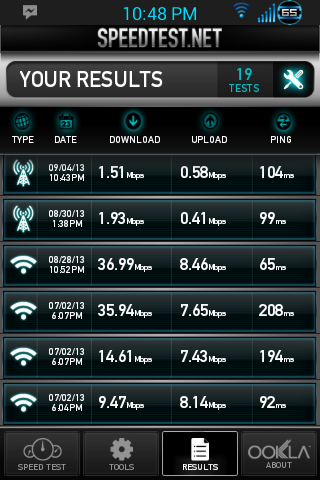
Results screen or it didn't happen

(this screen)

Shabbypenguin
Extreme Android User
Results screen or it didn't happen
(this screen)
that page is just as easy to spoof

Shabbypenguin
Extreme Android User
that throttle folder does nothing these days. its all server side that they throttle you.
and why do i say its spoofed? because you are on a 3g only phone claiming to get speeds comparable to verizon LTE. sprints evdo rev a is capable of maxing out under PEAK conditions at 3.1mbps.
Evolution-Data Optimized - Wikipedia, the free encyclopedia
to further my case about peak conditions;

im on my porch and that is my local sprint/att tower and i get 1.2mbps on 3g.
and why do i say its spoofed? because you are on a 3g only phone claiming to get speeds comparable to verizon LTE. sprints evdo rev a is capable of maxing out under PEAK conditions at 3.1mbps.
Evolution-Data Optimized - Wikipedia, the free encyclopedia
to further my case about peak conditions;
im on my porch and that is my local sprint/att tower and i get 1.2mbps on 3g.

codester0869
Member
Thank you guys for making this happen it took me a few tried to get cwmr to take but it finally did then root was easy now I'm running the explosion rom... and happier than ever. Thanks again everyone!

blaqueknight
Well-Known Member
The links in the OP are not working.
Shabbypenguin
Extreme Android User
i moved file hosting companies. the transition was yesterday (hence now why all my links are broken.) im still uploading files and ill link back here when i have em up.
edit: back up , lemme know if there is more you find anywhere. its not easy remembering all the places i gutta fix/upload files.
edit: back up
, lemme know if there is more you find anywhere. its not easy remembering all the places i gutta fix/upload files.monticello
Well-Known Member
Does the free unused data from backup in cwmr something that helps or does it cause problems. Not exactly sure what it does exactly.
Shabbypenguin
Extreme Android User
not sure what the issues is, links are working just fine here.

kalynn1015
Newbie
i have done all these steps several times and its no bueno. When i go to the boot up menu its just the regualar recovery mode for the phone. i click on the superuser zip and it tells me that the esignature cannot b verified. What am I doing wrong? pls help...
Lordvincent 90
▓▓▓▓▓▓▓▓▓▓▓▓▓▓▓▓▓▓▓▓
i have done all these steps several times and its no bueno. When i go to the boot up menu its just the regualar recovery mode for the phone. i click on the superuser zip and it tells me that the esignature cannot b verified. What am I doing wrong? pls help...
This thread may help you with your problem
http://androidforums.com/showthread.php?t=734114
kalynn1015
Newbie
where do I find this signature verification switch? That is one of the problems I am having rooting my phone. Also I hav tried the steps several times. I canot get into cwmr. It is really frustrating. Its making me feel like an idiot.install zip from sdcard >
toggle signature verification (Look for it to say, "Signature Check: Disabled" >
then go ahead and try to flash that zip file.