
Install the app
How to install the app on iOS
Follow along with the video below to see how to install our site as a web app on your home screen.
Note: This feature may not be available in some browsers.
-
After 15+ years, we've made a big change: Android Forums is now Early Bird Club. Learn more here.
You are using an out of date browser. It may not display this or other websites correctly.
You should upgrade or use an alternative browser.
You should upgrade or use an alternative browser.


If you are still looking for this: Check out the app Number Saver. It is actually designed to do something different - it gives you a place to ENTER a number while on a call, and then dial it or save it afterward - but, if you launch Number Saver, it will pick up a number from the clipboard, and allow you to dial it. Great little tool. I'm going to make a donation - if you all like it, you should do that to.
BTW - I have nothing to do with the software or the author - I just think we should show our appreciation to app developers.
Dan
BTW - I have nothing to do with the software or the author - I just think we should show our appreciation to app developers.
Dan
froyo 2.2 finally has this feature.
How do you use it? I am running 2.2, and I can't figure out any way to do a paste ...
Dan
leecavturbo
Newbie
froyo 2.2 finally has this feature.
did this really work? how?
did this really work? how?
Doesn't work for me - or I cannot figure out HOW to do it.
I use an app called Number Saver - has a number of features, including dialing the # that's in the clipboard. I also use an app called Clipper+ which saves multiple clipboard entries.
Dan
leecavturbo
Newbie
gingerbread 2.3 has this now
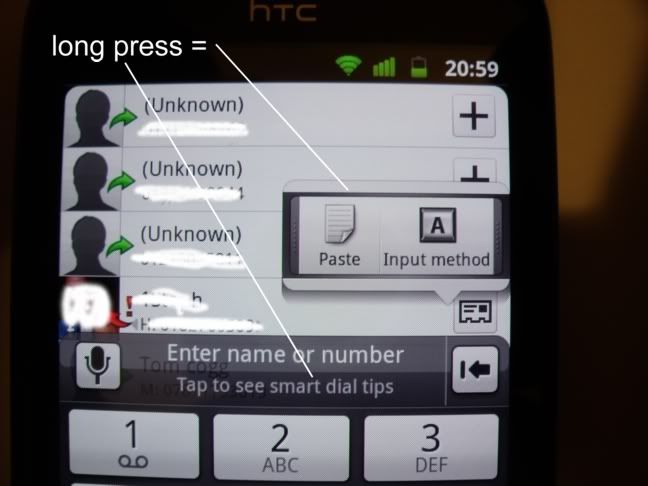
yeah, I have gingerbread 2.3.6 on SGS2 but my dialer is not the same as in the image posted and does not have the item to be long-pressed. I did just find a work around. The 0 on the dialer has a + long press for adding numbers into the contacts... if you long press this, then long press the + it will bring up the paste prompt, paste the number, then instead of pressing "add to contact" simply press the dial button, it will go through. Much easier than adding new app or pasting into separate app to dial.
daniellopaz
Lurker
Try 'My Sales Dialer