• After 15+ years, we've made a big change: Android Forums is now Early Bird Club. Learn more here.

Root Prls to the test!

BrandonOptimus

Android Enthusiast
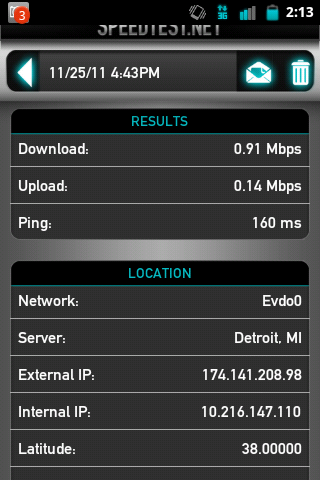
There are many prls concerning with the 3G speeds. So I've decided to how good the speeds are in certain places :P Either post your best speed so far you've gotten or your worst, and what prl you are using :P

Here's mine:
screenshot-1322334824008.png


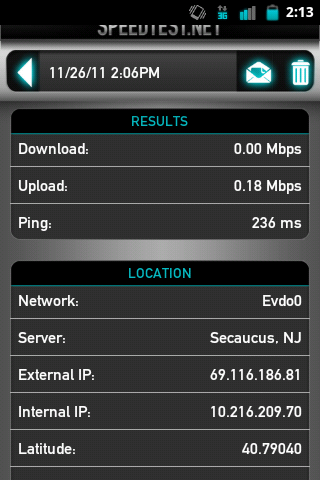
And my worst:
screenshot-1322334797097.png


I'm on prl 3024. I had a speed of 1.4mb, but I did it on another nandroid backup(which I deleted due to the slowest response"It was if it was clocked at @128" xD

Prl 3025 isn't really the best one for me, 3024 and 3023 are the best ones right now. Speedtest is somewhat accurate, there are others but they don't let you choose which location you want soooo I guess this is the best one for right now.

Let's see that hype we've been getting from those prls Lol.

Update:
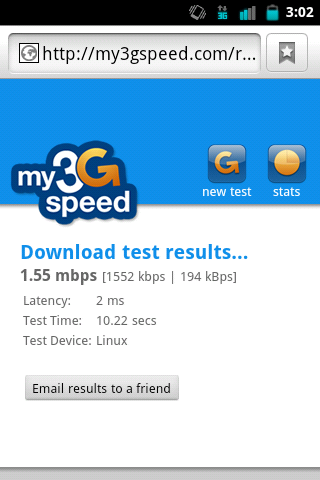
screenshot-1322337727248.png


Now I'm really confused on the accuracy of speedtest -_-
 
I'm currently on 3025 in the metro detroit area and get results as low as 4 kbps! My highest was 330 kbps I believe. I have posted this in a few other threads, but think the speedtest app isn't accurate either. The ping test will fly by, but the download wont even start counting until the test reaches like 80%. So I get speeds anywhere from 4 kbps to 150 kbps. 95% of the time I wont even get about 40 kbps. So I'm gonna put 3024 on tonight and see if there is any difference for me.
 
Being that I live in the greater Flint area that MetroPCS seems to despise, I can almost literally walk to the public library and get online faster than I can surf the web on my phone. Tethering is a joke. Dial up is faster.

Doesn't matter what PRL I'm on. We don't have any towers that are 3G capable. We're stuck with 1X for eternity as MetroPCS has no plans to upgrade, according to headquarters for my area.

It would seriously take forever for me to upload a picture.
 
1x was a pain lol. I was always on wifi. At home,school, friends everywhere. That 1x haunted me. I was mad happy when 3G came and it worked instead of giving me no bars. I wish there's an app that's like, Get his speeds on your phone LOL. Find the number one Guy with best speeds, get his apn settings and hope for awesome data lol.
 
I hopped on wifi and downloaded the speedtest app. Wouldn't even find the nearest server after I disabled wifi and let mobile connection take over.

I'm seriously considering flashing to Cricket and dropping MetroShitCS
 
I hopped on wifi and downloaded the speedtest app. Wouldn't even find the nearest server after I disabled wifi and let mobile connection take over.

I'm seriously considering flashing to Cricket and dropping MetroShitCS


It'd have to be speedtest :P try the my3gspeed.com My friend at metro says that half of the evdo towers to test the speed aren't accurate since metro isn't fully evdo for everyone.
 
It'd have to be speedtest :P try the my3gspeed.com My friend at metro says that half of the evdo towers to test the speed aren't accurate since metro isn't fully evdo for everyone.


I don't think that website will work, as I don't have and according to Metro will never get 3G.

Rep said my area would get 4G, not 3G. And not for a long time.
 
I still have the same problem no matter which prl I use past 3019 my battery life suffers drains ten times faster only with a 3g prl and my speed is worse then originally and I cannot send or recieve mms. It has even manually updated on its own through the night and same problem
 
I still have the same problem no matter which prl I use past 3019 my battery life suffers drains ten times faster only with a 3g prl and my speed is worse then originally and I cannot send or recieve mms. It has even manually updated on its own through the night and same problem


I use juicedefender ultimate. Helps aaaa lot. The automatic prls updating to 3019 must be a pain... and I can't live without mms. I send like 80 pics in a week lol.
 
Yes I tried juice defender no help it only automatically updated once to 3025 but wen I called for update roaming list it went bak to 19 but I wonder why that all happens maybe something wrong with data on my phone?
 
Yes I tried juice defender no help it only automatically updated once to 3025 but wen I called for update roaming list it went bak to 19 but I wonder why that all happens maybe something wrong with data on my phone?


You've never updated through qpst and lgnpst?? The roaming list is wayyy outdated. Ima tell my friend at metro to complain about this to the staff. Maybe he can try to change it from 3019 to 3025.. Also are you on stock rom or rooted?
 
Im rooted and is the same problem with all cm7 roms and sense rom and it happened when it randomly updated on its own to the 25 prl and also when I used qpsnt ( I think its called) to manualy udate to 23,24,and 25 all do the same so im like stuk in the mud
 
Im rooted and is the same problem with all cm7 roms and sense rom and it happened when it randomly updated on its own to the 25 prl and also when I used qpsnt ( I think its called) to manualy udate to 23,24,and 25 all do the same so im like stuk in the mud

I think theres a setting in LGNPST the nv settings i think. It can configure your prl settings.
 
can you walk me through updating the prl through lgnpst? and how to edit the prl settings like you said? please and thanks


I'd be glad to help but I'm a little busy. It shouldn't be hard to change though. Upload to latest Prl, open the phone settings, it'll ask for your spc code. You enter it and then it opens the NV settings you click read and it retrieves all the info then you go to the Prl tab and make sure it all says like 0x3a and 3128 for proxy, wap.metropcs.net and all that.
 
I'd be glad to help but I'm a little busy. It shouldn't be hard to change though. Upload to latest Prl, open the phone settings, it'll ask for your spc code. You enter it and then it opens the NV settings you click read and it retrieves all the info then you go to the Prl tab and make sure it all says like 0x3a and 3128 for proxy, wap.metropcs.net and all that.


And for updating Prl you would open the lgnpst.exe then look on the bottom where it says Prl you click it and check the Prl button and then select the Prl file and then make sure Eri or Erl is off and update it through there. Its so simple. Plug, connect go to tab, select Prl click update put in spc code and bam. You got a Prl being updated.
 
Thanks I tried it I seems to work better then with the other program my batterylife is still normal I can still send oils although speed a little slow a huge improvement thanks so much
 
Back
Top Bottom