dalinian
Lurker
Dear Androidsters,
I'm very much enjoying my Samsung Galaxy Note (running stock Android 4.1.2, rooted), and it's waaay better than all my previous 11 palmtop computers put together. [1]
I have four apps which effectively make my Notification Menu into my app launching mechanism, since I find this to be quicker and more efficient than the default Home Screens paradigm. I have explored using various app-launching Home Screen replacement apps (such as GO Launcher EX, 3D Home, etc., &c., all of which stick to using the Home Screens paradigm), but I much prefer to use the Notification Menu to launch apps.
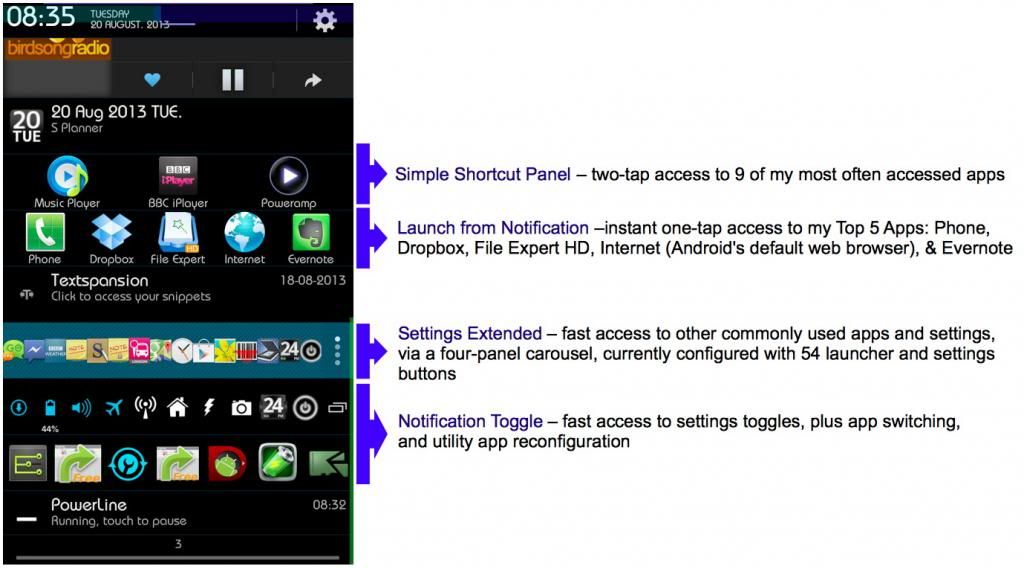
Notification menu app-launching utilities
Android is justly famous for its 'Customise Everything!' abilities, but search as I may, I cannot find a way of customising a single press on the Home Button. The final finesse would be that, in any and every situation (including when apps are running full screen, where the Notification Bar method of accessing the Notification Menu is absent), a single press on the Home Button shows the Notification Menu instead of the Home Screen (or whichever replacement app-launching Home Screens app it currently launches).
So does anybody know of a customising utility app which will allow me to remap a single press on the Home Button to show the Notification Menu?
Thanks in advance for your help.
[1] A Samsung Galaxy Note running Stock Android 4.1.2 is waaay better than all my previous 11 palmtop computers put together:

I'm very much enjoying my Samsung Galaxy Note (running stock Android 4.1.2, rooted), and it's waaay better than all my previous 11 palmtop computers put together. [1]
I have four apps which effectively make my Notification Menu into my app launching mechanism, since I find this to be quicker and more efficient than the default Home Screens paradigm. I have explored using various app-launching Home Screen replacement apps (such as GO Launcher EX, 3D Home, etc., &c., all of which stick to using the Home Screens paradigm), but I much prefer to use the Notification Menu to launch apps.
Notification menu app-launching utilities
Android is justly famous for its 'Customise Everything!' abilities, but search as I may, I cannot find a way of customising a single press on the Home Button. The final finesse would be that, in any and every situation (including when apps are running full screen, where the Notification Bar method of accessing the Notification Menu is absent), a single press on the Home Button shows the Notification Menu instead of the Home Screen (or whichever replacement app-launching Home Screens app it currently launches).
So does anybody know of a customising utility app which will allow me to remap a single press on the Home Button to show the Notification Menu?
Thanks in advance for your help.
[1] A Samsung Galaxy Note running Stock Android 4.1.2 is waaay better than all my previous 11 palmtop computers put together: