
What weather and battery app are you using? Looks awesome.Love this app!! I have been testing a new version, and yes it looks like the 'tool mode' bug is fixed!!
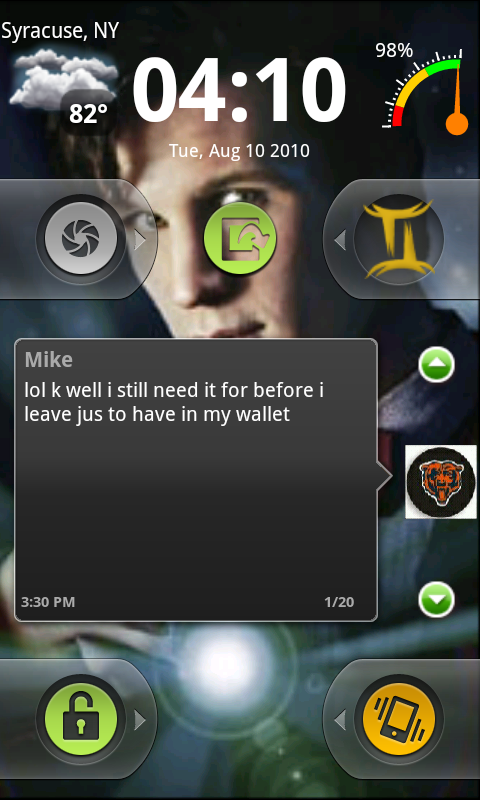
Here is my current lock screen:
Install the app
How to install the app on iOS
Follow along with the video below to see how to install our site as a web app on your home screen.
Note: This feature may not be available in some browsers.
-
After 15+ years, we've made a big change: Android Forums is now Early Bird Club. Learn more here.
You are using an out of date browser. It may not display this or other websites correctly.
You should upgrade or use an alternative browser.
You should upgrade or use an alternative browser.
Replace HTC Lockscreen, an Incredible Find!
- Thread starter whitewallman
- Start date
-
- Tags
- htc droid incredible

DROIDdidME
Well-Known Member
Does anyone else notice slower scrolling between screens with this app? Also, when I'm on my home screen and hit "home" it lags a bit in showing me all my screens.
I uninstalled to see if it would make a change, and it was back to being fast like before. Am I the only one with this issue?
Off topic but I also with the trackpad wake would work 100% of the time! I know dev is working on it, but when it's fixed it's going to be GREAT!
I uninstalled to see if it would make a change, and it was back to being fast like before. Am I the only one with this issue?
Off topic but I also with the trackpad wake would work 100% of the time! I know dev is working on it, but when it's fixed it's going to be GREAT!

syrguy1969
Well-Known Member
What weather and battery app are you using? Looks awesome.
Battery app is Guage Battery :Gauge Battery Widget - Android app on AppBrain
and the weather is weather bug Elite (small): WeatherBug Elite - Android app on AppBrain
Does anyone else notice slower scrolling between screens with this app? Also, when I'm on my home screen and hit "home" it lags a bit in showing me all my screens.
I uninstalled to see if it would make a change, and it was back to being fast like before. Am I the only one with this issue?
Off topic but I also with the trackpad wake would work 100% of the time! I know dev is working on it, but when it's fixed it's going to be GREAT!
I haven't really noticed a lag on mine, and yes it is pretty much fixed, but I found out that if you use that feature you lose the locked incoming call screen. May not be important to all, but I needed it...he is working on a way around that as well though.
Battery app is Guage Battery :Gauge Battery Widget - Android app on AppBrain
and the weather is weather bug Elite (small): WeatherBug Elite - Android app on AppBrain
I haven't really noticed a lag on mine, and yes it is pretty much fixed, but I found out that if you use that feature you lose the locked incoming call screen. May not be important to all, but I needed it...he is working on a way around that as well though.
Thank you!!!
gimmiefuel
Lurker
For what ever reason, after buying Weather Bug elite, I don't have the small widget option. Any help?

kevin@teslacoilsw
Well-Known Member
Does anyone else notice slower scrolling between screens with this app? Also, when I'm on my home screen and hit "home" it lags a bit in showing me all my screens.
I'd be surprised if slower scrolling between screens was caused by WidgetLocker.
The Home button while already at Sense Home is an issue. What happens is WidgetLocker HomeHelper gets the Home command, then it reactivates Sense UI back up and then sends it the command. However Sense won't accept the command with 500ms of activation, so WidgetLocker has to pause 500ms before sending the Home command again to cause the all-screens thing to appear. This is not an issue on Launcher Pro or ADW or similar as they accept the command instantly after activation (so WidgetLocker sends it instantly).
I'm hoping I find a way around the 500ms delay in Sense but I'm not sure I'll be able to.
syrguy1969
Well-Known Member
For what ever reason, after buying Weather Bug elite, I don't have the small widget option. Any help?
I'm sorry, I had switched weather widgets from my last layout. I do like the small widget in Weatherbug as well (more detail and centers more on my precise location) but the one I have on that screenshot is more image than info (which is pretty cool for a lockscreen).
Here it is: Weather & Toggle Widget - Android app on AppBrain


JoeIncredible
Newbie
Just discovered the interactions toggle swipe. The only widgets I have on the lock screen are music ones so I can see what song is playing, etc., but I had interactions turned off to avoid accidentally starting music, etc. "If only there was some way to use the music widgets but only when needed," I long lamented. But the answer was there all along. Thanks Kevin!

poshpepper
Newbie
thanks Kevin: Version 1.2.5 Aug 15, 2010 Fixed Desire Alarm HTC Sense Weather Animations behave more similar to stock German & Spanish translations Other miscellaneous fixes
The Weather Animation fix is awesome! Thank you Kevin!!!!
Wow this is an awesome find. I bought it on saturday and have loved it. The weather animation was my only problem with it and now that's fixed. The only thing that could make this better would be a slider option to toggle gps on and off. Other than that, I love it.
syrguy1969
Well-Known Member
Well you could put a GPS widget on the lockscreen and enable interactions. Not a slider, but it would work.The only thing that could make this better would be a slider option to toggle gps on and off. Other than that, I love it.

Well you could put a GPS widget on the lockscreen and enable interactions. Not a slider, but it would work.
How would I go about that? The htc widgets don't work with WL
syrguy1969
Well-Known Member
How would I go about that? The htc widgets don't work with WL
This is the first one that popped up in my search, I am sure there are quite a few others, but you can use one from the market like this one:
GPS OnOff - Android app on AppBrain


nebler
Android Enthusiast
hi guys, this is a great app, can you tell me how to get the clock in the middle of the screen please, and also when i have the mail and sms icons on the custom slider it doesnt tell me which one has received a message when i have, if you see what i mean, is that normal?
cheers
ben
cheers
ben


AnotherHiggins
Android Enthusiast
If you're talking about the default "Lock Screen Clock" that comes with WidgetLocker, it's a 1x3 widget, meaning it takes up 3 of the 4 "columns" available on the screen. Therefore it can't be centered horizontally. But you can find other clocks in the Market that might work for you. (I assume you aren't talking about centering it vertically - but just in case, you just drag and drop like any other icon/widget).can you tell me how to get the clock in the middle of the screen please...
I'm not sure if I follow.... I don't know how it would denote which account the message is for on a slider? I use GMail Unread Count which allows me to put multiple icons on the screen, each associated with a different GMail account. That obviously doesn't help you if you don't use GMail - sorry. But I'm sure similar fixes are available....and also when i have the mail and sms icons on the custom slider it doesnt tell me which one has received a message when i have, if you see what i mean, is that normal?
cheers
ben
nebler
Android Enthusiast
ok thanks for your help. ill look out for a 1x2 or 1x3 clock widget.
with regards to the mail and sms. on the normal home screen the icons will get a number on them which relates to how many messages i have received. if i have the mail icon and the sms icon on the custom slider, and my notification noise goes off, i dont know which type of message i have recieved without unlocking the phone. sorry im struggling to explain it very well,lol. ( and im being fussy )
with regards to the mail and sms. on the normal home screen the icons will get a number on them which relates to how many messages i have received. if i have the mail icon and the sms icon on the custom slider, and my notification noise goes off, i dont know which type of message i have recieved without unlocking the phone. sorry im struggling to explain it very well,lol. ( and im being fussy )
AnotherHiggins
Android Enthusiast
Yes, that should work. I've used GMail Unread Count and set up separate icons for my two accounts. The number will show unread emails for each account on the respective icon. I'm sure you could use the default icons as well.