• After 15+ years, we've made a big change: Android Forums is now Early Bird Club. Learn more here.

Replace HTC Lockscreen, an Incredible Find!

Okay, I got it, I had changed the option in look and feel to Rotary Slider, which puts the non-removable rotary slider at the bottom of the lockscreen. I just changed that option back to No Slider. But is there a way to choose No Slider (giving me control of my layout) and add rotary sliders instead of regular ones? It seems that if you select No Slider, the add option does not provide anyway to select Rotary. Am I missing something? If not, that would be a nice option to add Kevin, the rotary is pretty cool.
 
there are still issues with the htc weather animations with the new update. even if i set them to display on "home only", they still show up on other screens when i unlock the phone. if i set widgetlocker to force the phone to unlock straight to home, the weather animations don't work at all. can you resolve this?
 
I love this app, but I've been experiencing a problem with it lately...

If I have an app opened and the screen goes to sleep, when I wake the phone, I'm taken back to the home screen instead of the open app. My Incredible (running stock 2.2, and the most recent version of WidgetLocker) is rooted, so I'm using the "Root Bypass of Five Seconds" instead of the HomeHelper, and I have LauncerPro set as my default launcher. On the Advance Menu, I have "Always unlock to home" unchecked. If it makes any difference, I also have a security pattern enabled.

As long as I have WidgetLocker enabled, I'm always returned to my home screen instead of the open app. I've tried using Sense instead of LauncherPro, turning off the security pattern, clearing the app's data, and tinkering with all of WidgetLocker's settings - everything to no avail. The only time I'm returned to an open app instead of the home screen is if I have disabled WidgetLocker, and I like this app way too much to disable it.

I can't tell you the exact date when I began experiencing this issue, and I'm unsure if this related to any of the apps on my phone. For what it's worth, here is a list of apps on my phone.

So, any suggestions? Much appreciated. :o
 
With the latest update and the rotary slider, is anyone experiencing and issue when they set an alarm that they can't turn it off? Just happened to me this morning and I had to turn the phone off to get it to stop. :(
 
If I have an app opened and the screen goes to sleep, when I wake the phone, I'm taken back to the home screen instead of the open app.

There's a few special cases that will cause this. One is if the tutorial or something is still open then WidgetLocker will detect it's about to unlock into itself and instead go to home. It seems something might cause it to get stuck in this state. You can try opening the tutorial and exiting from the skip button to try to reset it, or reboot the phone. Another special case is if it's about to unlock into the NoLED program, which I don't imagine you are running. finally if for some reason WidgetLocker was unable to put itself into the background, i think this could only occur if there were no other tasks in history.

whats the chances of being able to customize the Rotary slider:D

Planned, I just have to figure out the physics of it if it's to have more than 2 items.

With the latest update and the rotary slider, is anyone experiencing and issue when they set an alarm that they can't turn it off? Just happened to me this morning and I had to turn the phone off to get it to stop. :(

Sense alarm? Can you send a Settings > Report bug? There should have at least been a notification you could activate to dismiss it.

there are still issues with the htc weather animations with the new update. even if i set them to display on "home only", they still show up on other screens when i unlock the phone. if i set widgetlocker to force the phone to unlock straight to home, the weather animations don't work at all. can you resolve this?

You mean any home screen? or another application? Are you using QuickDesk or something? That could maybe throw off the Home detection.
As for the always unlock to home breaking animations, that's a bug and will be fixed in the next update.
 
There's a few special cases that will cause this. One is if the tutorial or something is still open then WidgetLocker will detect it's about to unlock into itself and instead go to home. It seems something might cause it to get stuck in this state. You can try opening the tutorial and exiting from the skip button to try to reset it, or reboot the phone. Another special case is if it's about to unlock into the NoLED program, which I don't imagine you are running. finally if for some reason WidgetLocker was unable to put itself into the background, i think this could only occur if there were no other tasks in history.
Thanks for the suggestions. I reboot the phone almost every morning after a bump charge, and I tried opening and exiting the tutorial as well. Sadly, WidgetLocker is still taking me to the home screen instead of the open app. I also tried uninstalling WidgetLocker, rebooting the phone, then reinstalling it, but no luck with that either. And you're correct: I'm not running NoLED. I'm really trying to find out what the problem is so I can avoid a doing factory reset, but I'm beginning to think that's going to be my only option.

Also, is it normal for the "Block home in other app" option in the Advance menu to be grayed out?
 
You mean any home screen? or another application? Are you using QuickDesk or something? That could maybe throw off the Home detection.
As for the always unlock to home breaking animations, that's a bug and will be fixed in the next update.

sorry, i meant any home screen. i'm completely stock. is anyone else experiencing this problem?
 
also i have wl to hide incoming calls. i noticed that whenever i slide to unlock, the answer call screen is inconsistent. sometimes it's the sense slide down to answer and sometimes it's the the screen that has the "answer" and "ignore" buttons. is there any way to have it default to the latter?
 
So I am beyond annoyed with this. It seems like such a good idea, and it obviously works for many of you, but it causes so many problems for me. Beside the PIn entry issue above (the dev responded to that here), it just makes my phone slower. I start up, and it flashes the notification bar and then makes it disappear. When I unlock it flashes the home screen then goes to stock unlock. It is just plain bad. It may be my ROM (CM 6.0.2) is the problem. At one point it just became unresponsive and I had to battery pull.

Anyway, just wanted to share my problems. I really hope this works soon as I love the idea and the rotary lock screen.

-Nkk
 
It may be my ROM (CM 6.0.2) is the problem. At one point it just became unresponsive and I had to battery pull.
-Nkk

Nikk, I'm willing to bet that's what probably is causing the issue. Their window manager might be intercepting events fired by the system that widget locker is expecting.
 
only problem ive had lately is that when i wake the phone up using WL, it shows the list of "recent apps" asking if i want to use one of those... is this from WL?
 
thumb_550_droid-x-lockscreen.jpg
 
What does that look like? I downloadedit before but I hate howyou can't change the slider looks.

There are currently 5 different sliders in Widget Locker. Or you can use the extra "custom slider" option which allows you to change the functions of the slider.
 
I am not referring to the sense ui or rotary lock screen thing but the loof the"custom sliders"when you add the ones on the left and right side. I hate that look. I would prefer they not be slide its at all but something different. Does that make sense? If not, I well post a picture up.
 
I am not referring to the sense ui or rotary lock screen thing but the loof the"custom sliders"when you add the ones on the left and right side. I hate that look. I would prefer they not be slide its at all but something different. Does that make sense? If not, I well post a picture up.

Sorry, I am not sure what you are talking about.

So you have the custom slider. With that, you can edit the functions of the two sliding points.

Is it the look of the custom slider you don't like? Or is it the fact that it "slides"? Would you rather just push a button and not slide it?

I'm confused :rolleyes: LOL!

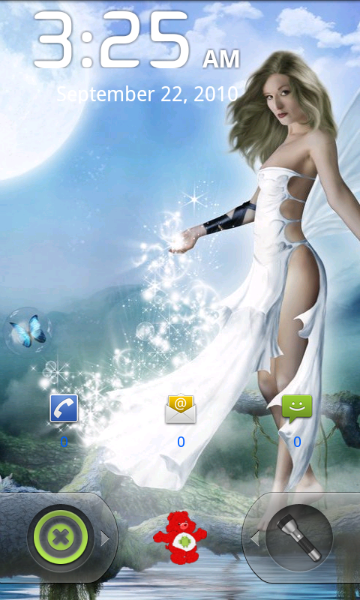
ETA: Attached is a pic of the custom slider. I have the unlock on the left and the flashlight app on the right. The little Care Bear in the middle is an app called MySettings.

Which part do you not like?

snap20100922_032542.png
 
Back
Top Bottom