• After 15+ years, we've made a big change: Android Forums is now Early Bird Club. Learn more here.

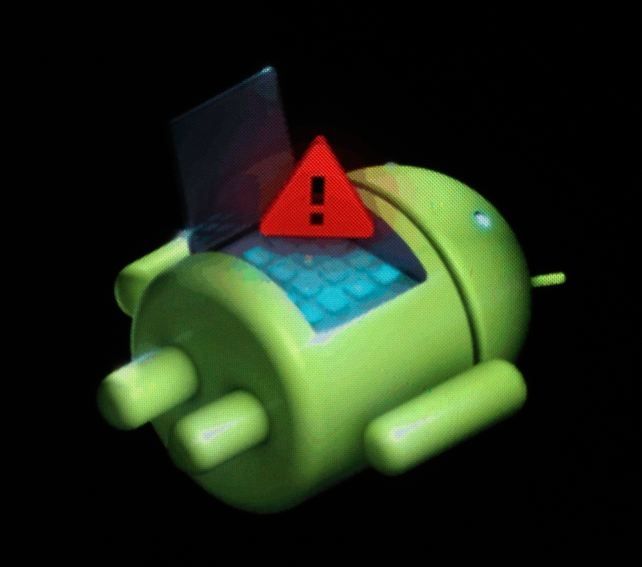
Help Resting green robot (android)

Status
Not open for further replies.
Hi! I have a rooted phone. I tryed to do an ota update (I don't know what I was thinking). It downloaded and at the instalation it stopped, the update wasn't finished yet. I opened it and after my phone name apears, it apear the android robot resting with a red (!) and under him "No command ". What can I do now?

 
Hmm, OP's profile says "Vonino Zun Xpo" (made in Romainia?)...not familiar with that device...:confused:

Hopefully, the OTA simply failed in the verification phase and didn't actually update anything.

I assume you've tried restarting the device (not sure if you have a removable battery or not to do a battery pull).
 
I tryed to restart the device, also wipe data and wipe cache, but I can't get through. It still shows me the resting android with that red (!) and under "No command". I seen on web another method with flashing rom. I have the stock firmware of my phone (has scatter text). This should work?
 
If that device is running a somewhat stock AOSP version of Android, when you get the robot with the red exclamation point and 'no command' try holding the power button and tapping the volume up button once. It might get you into recovery mode. From there you should be able to reset.
 
I already entered in the recovery mode, but I tryed anything I could like wipe data and wipe cache. I understand that my solution is to flash with stock firmware . I already have the stock firmware, but I don't know what I should use for flash - I have a scatter file in the firmware too. I saw that is sp flash tool for firmwares with scatters, but I only see people with mtk devices use it. Should I try with my device too? And one more question: I can flash with stock rom while my device is still rooted?
 
Last edited:
With your device being region specific and since you receive OTA's shouldn't there be a local service center? I'm sorry for not being more helpful but I can't find much to go on. Have you tried a battery pull? That is if the battery can be pulled.
 
The problem is that my device is still rooted... And the service center don't repair rooted. I said that I have the firmware, but I don't know what I should use for reflash (firmware has scatter txt). Any solution exist? ( I wiped data, cache, I made a battery pull)
 
Unfortunately every brand is going to have a specific utility or method for flashing the firmware. If we don't know the correct way to do it with your model, then guessing or suggesting things you might try would be a recipe for disaster. I'm not sure why the service center refuses to flash your phone for you since they'd most likely reflash the factory firmware, which is all you want anyway.

Are there no other shops around that might be able to fix it for you, even for a small fee?
 
I don't say they won't gonna reflash, but I don't think they gonna do that with a rooted device. They can reflash it with stock if my device is still rooted?
 
It's just resting....

dead-android-h1.jpg
 
Seriously guys I put resting green robot because when I search about what error I have on web, this is what appeared.
image-2_zps0de7d136.jpg
Just stop this f***in thread and put it resolved because I went to the service.
 
Status
Not open for further replies.
Back
Top Bottom