
Install the app
How to install the app on iOS
Follow along with the video below to see how to install our site as a web app on your home screen.
Note: This feature may not be available in some browsers.
-
After 15+ years, we've made a big change: Android Forums is now Early Bird Club. Learn more here.
You are using an out of date browser. It may not display this or other websites correctly.
You should upgrade or use an alternative browser.
You should upgrade or use an alternative browser.
Root <ROM> Samsung Gravity Smart T589 <10/26/11>
- Thread starter Arhtard
- Start date
I need help installing this.
How exactly does the partitioning thing work? I followed a link on XDA on how to partition it, but then MiniTool Partition Wizard tells me my computer won't be able to read the partitioned SD card. If my computer can't read it, how the hell am I supposed to get the ROM onto it? Also, do I drag the zip file inside the SD card, or the contents of the SD card?
Thanks in advance. I tried winging it and nearly bricked my SD card, and it was a pain trying to get it working again. I'd like to be sure of what I'm doing before I do it again.
How exactly does the partitioning thing work? I followed a link on XDA on how to partition it, but then MiniTool Partition Wizard tells me my computer won't be able to read the partitioned SD card. If my computer can't read it, how the hell am I supposed to get the ROM onto it? Also, do I drag the zip file inside the SD card, or the contents of the SD card?
Thanks in advance. I tried winging it and nearly bricked my SD card, and it was a pain trying to get it working again. I'd like to be sure of what I'm doing before I do it again.
samsudroid
Lurker
Thank you so much for the custom ROM. I just installed it yesterday and it works flawlessly on my Fido network. The only tweaks I made so far was to remove the T-mobile apps. I've gotten used to the old themes though; is there any way to go back the old themes by removing the:
- themed icons through the IC Menu;
- themed framework to a black "Sense" theme; and
- themed battery and wireless icons?
- themed icons through the IC Menu;
- themed framework to a black "Sense" theme; and
- themed battery and wireless icons?
Dude, you just saved my life. We just replaced my wife's phone (cat had spilled water on it) and I was going a little too fast deleting stock apps and managed to make it stop booting. Fortunately the recovery image still booted, and I was able to use your custom ROM to get the phone booting again. Thanks for your work!
I need help installing this.
How exactly does the partitioning thing work? I followed a link on XDA on how to partition it, but then MiniTool Partition Wizard tells me my computer won't be able to read the partitioned SD card. If my computer can't read it, how the hell am I supposed to get the ROM onto it? Also, do I drag the zip file inside the SD card, or the contents of the SD card?
Thanks in advance. I tried winging it and nearly bricked my SD card, and it was a pain trying to get it working again. I'd like to be sure of what I'm doing before I do it again.
MiniTool Partition Wizard warns you that Windows will only read the first partition. This is why you must create the FAT32 partition first, and then the ~512MB EXT2 partition. The phone will see the 2nd partition; Windows will not.
After you create and format the partitions, you copy the update.zip to the drive letter assigned to the SD card, eject the SD card (via "safely remove hardware"), then put it in your phone. Now put it in the phone and follow the instructions in the OP to flash update.zip to your phone.
This ROM not only worked perfectly to repair my boot-looped phone (wish I had seen the information about the two files that look like calendar files but aren't BEFORE I moved them  ), but it is faster than it was! First time ever installing a ROM, excellent experience. Learned a lot too. I have had ZERO issues.
Thank you!
), but it is faster than it was! First time ever installing a ROM, excellent experience. Learned a lot too. I have had ZERO issues. Thank you!
Wanted to let folks know - if you suddenly start having memory problems on your T589, look for a purple and black "Group Text" icon, app by ZipWhip. This was an unasked for push by TM and Google - massive memory killer. Just removing that app made the problem go away - but you have to have Root to uninstall it. Even so, it still shows in Play/Market as one of my installed apps, and updates appear in my update list. The APK/ODEX is not even there anymore, so not sure why the market shows it installed.
Arhtard- You wouldn't happen to have the stock ROM for this phone would you??? If not, could you please tell me where or how I can get it?
If anyone else has the same information, I would appreciate it.
Information on the stock ROM and recovery can be found here:
Gravity Smart Wiki
Hi people, i'm back here...Unfortunately with a doutb :S Issues about the space, even when Link2SD link the apps to the 2nd partition of the SD card, all the data and cach
Because everything in Arhtard's ROM is deodexed, the Dalvik cache still ends up getting full from all the libraries, even though the apps' dex files are linked to the SD card. I recommend using my ROM instead, which has everything odexed and will let you get the most out of your phone.
Ok, thank you very much for your answer, the Arhtard's ROM simply works great on my phone, I love the performance but the space issue is really a huge problem
 because at this time is being a while since I started in Android so I want all the app I can install in it xD. I will check your update ROM
Look in the settings.. I can't remember where it is, but I know I had the same problem and I was able to fix it. I think it required going into the app that generated the notification and changing the notification color. Sorry, my memories are fuzzy but I hope it get you pointed in the right direction.
Hey guys, after a while using this ROM I strongly recommend you for the space problem that 1) even when Link2SD tell you that the app was linked try to linked to the SD once again sometimes is like not everything was linked and 2) after you link the apps reboot your phone because I'm now with 60+ MB =) The last time I used this ROM with the same apps and not following this steps I always got space problems.
Has anyone tried to make a theme for this phone with this ROM?? Using UOT Kitchen? I made one but I'm scared to try it LOL
xD maybe in the weekend I'll try it
xD maybe in the weekend I'll try it
francisco12
Lurker
I installed it and is working great. Is it possible to install dsp manager, or beats audio on this?
francisco12 said:I installed it and is working great. Is it possible to install dsp manager, or beats audio on this?
Check out with this two applications:
https://play.google.com/store/apps/details?id=com.tbig.playerpro.soundpack&feature=search_result
https://play.google.com/store/apps/...esult#?t=W251bGwsMSwxLDEsImhyLnBvZGxhbmljYSJd
Even when in my case the 2nd tells me that is not compatible with my provider
If you wanna chance the theme of the ROM a little bit check out this thread:
http://androidforums.com/samsung-gravity-smart/396025-uot-kitchen-theming.html
Works perfectly for the Gravity Ask any question you have in case you wanna try it
http://androidforums.com/samsung-gravity-smart/396025-uot-kitchen-theming.html
Works perfectly for the Gravity
Ask any question you have in case you wanna try itPeople I'm back with this ROM
Try the twframework apk
Try the twframework apk
Yep, like I mentioned we are able to do it with the uot kitchen, the bad thing is that the process delete all the data...But what you mean trying that? Like editing with apktool?
Sorry that you dont have time to work with the device because you are the most advanced Gravity Smart student LOL but well you have a job
Hey, does anyone knows where I can find the basic wallpapers of this ROM? Is there a route on the device where this images are located? Specially the default one:
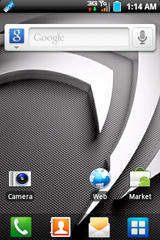
Is the only one that doesn't appear on the availables to select
copy framework-res.apk from the /system/framework/ folder to your pc and look for "default_wallpaper" inside the /res/drawables/ folder i believe it was. i use winrar for stuff like this.