Blackhawk1969
Well-Known Member
When I install super su through twrp am I supposed to navigate to that update super su v.2.46.zip using the install option in twrp?
Follow along with the video below to see how to install our site as a web app on your home screen.
Note: This feature may not be available in some browsers.
Already got the file from the link you posted at the top of the thread. just wanted to make sure I can install it by Navigating from install button in twrp.. thx manIf you go to Google and Google SuperSU xda find chainfire xda thread download SuperSU 2.46 zip install from twrp and you are done


We are going to need more info than just that screenshot before we can help you. What did you do so far? Have you been able to temp root your phone? Did you use the twrp apk to install twrp recovery before uninstalling kinguser? How far did you get through the rooting process before you had this problem?HELP:
We are going to need more info than just that screenshot before we can help you. What did you do so far? Have you been able to temp root your phone? Did you use the twrp apk to install twrp recovery before uninstalling kinguser? How far did you get through the rooting process before you had this problem?
Thank you for the info this helps a lot. You just need to download the SuperSU zip from the link in the op and then boot into twrp manually and flash it. You can boot into twrp manually by fully shutting your phone down and then holding power and volume up for about 3 or 4 seconds after you feel the phone vibrate. Once you are in twrp recovery, select "install" and navigate to the folder that the SuperSU zip is in and select and flash it.1. I achieved temp root with Kingroot after many tries.
2. Right after, I installed twrp recovery from the apk, successfully.
3. After that, deleted Kingroot, kinguser, and some chinese character app.
4. Went back to twrp recovery, tried to reboot, but it did not do anything.
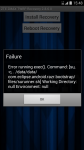
5. Then I manually rebooted the phone, went back to twrp apk, and got this error message.
Does this help?
Thank you.
Thank you for the info this helps a lot. You just need to download the SuperSU zip from the link in the op and then boot into twrp manually and flash it. You can boot into twrp manually by fully shutting your phone down and then holding power and volume up for about 3 or 4 seconds after you feel the phone vibrate. Once you are in twrp recovery, select "install" and navigate to the folder that the SuperSU zip is in and select and flash it.
Delete /system/media/audio/ui/VideoRecord.oggYayyyy! I got root!!! THANK YOU! You have been very helpful.
Now I gotta figure out how to turn off the video camera record/stop buttton sound...
Whenever I start having problems that I cannot diagnose, I backup all my user apps, call logs, and text messages with titanium backup(make sure that you put your TitaniumBackup folder on your SD card). Then I use Root Explorer to move any files that I don't want to lose to my external SD card. Finally I reboot to TWRP recovery and format system, data, and cache, and then reflash the ROM, gapps, and SuperSU(optional if you don't like the built in superuser). I then set up my google account and reinstall titanium backup and restore all of my user apps, call logs, and text messages, and then set up all of my settings again. This usually fixes my problems.Okay here is a totally Noob question. I am hoping someone can answer. I have root and have used three rom's so far, BN V1 and V2 and PAC. I have been having some random issues and then a read someone mention deleting the Android folder on the internal storage. That cleared my WiFi problem up. (not sure why,but hey) Any way, I am still having some issues. I get a solid red LED w/blank screen when I get home. I can reboot, but it goes back to red shortly. I think it has something to do with making my home network a safe place. That was some time ago.
My question, What can I safely remove from internal storage, or what should I not touch?
Whenever I start having problems that I cannot diagnose, I backup all my user apps, call logs, and text messages with titanium backup(make sure that you put your TitaniumBackup folder on your SD card). Then I use Root Explorer to move any files that I don't want to lose to my external SD card. Finally I reboot to TWRP recovery and format system, data, and cache, and then reflash the ROM, gapps, and SuperSU(optional if you don't like the built in superuser). I then set up my google account and reinstall titanium backup and restore all of my user apps, call logs, and text messages, and then set up all of my settings again. This usually fixes my problems.
Well you got the talking over withyo FVK ROOTING THIS PHONE MAN. THIS IS MAD ANNOYING B. IVE TRIED ATLEAST 20 FVKING TIMES ID RATHER JUST GET ANOTHER PHONE. HARDEST ONE TO ROOT OUT OF ALL THE ONES IVE HAD
Lost my head for a minute, but is there anything else i can do?Well you got the talking over with
Finally got it to work, thanks a lot manEvery time it fails, clear data for kingroot and uninstall kinguser and kingmaster if they are installed. Then turn your phone off all the way then turn it back on and run kingroot again.