
• After 15+ years, we've made a big change: Android Forums is now Early Bird Club. Learn more here.

Root Rooting help

Phubu

Android Enthusiast
I've tried every posible root method supplied here for a friends droid 2 and non have been succesful. The phone is on 2.3.4 so im guessing its gingerbread. Now i tried the gingerbread root method also but nothing. Can anyone please help me threw. Im not a noob as i have rooted and flashed plenty of times on a wildfire s, optimus m and ascend but this one seems more complicated.
 
ok just got back home, i will be trying this root cd image see how it goes cuz i tried another boot image to no success either.
 
Nothing :/

every script i run reboots the phone several times as if its working and nothing, also tried the boot image..same with the reboots and nothing. I just need to give it back rooted and by Monday, any help?


System Version: 4.5.629.A956.Verizon.en.US
Model Number: DROID2 GLOBAL
Androis Version: 2.3.4

Hope that can help.
 
reboots and nothing
what does that mean, did superuser get pushed?
are you
check usb debugging (settings/apps/development)
select charge only usb mode or try pc mode

edit: and I posted this method here http://androidforums.com/droid-2-all-things-root/603504-ezsbf-root-2-3-4-4-5-629-magic-md5.html
and here Magic MD5 Root 2.3.4 for D2, R2D2, D2G, DX and 2.3.5 for DX2 - Google Docs

if nothing works use sbf
read The DROID Wiki
and use 1FF-p3_droid2we_cdma_droid2we-user-2.3.4-4.5.1_57_D2GA-59-120117-test-keys-signed-Verizon-US.sbf, Motorola Drivers, RSD Lite 5.6
 
Nothing :/

every script i run reboots the phone several times as if its working and nothing, also tried the boot image..same with the reboots and nothing. I just need to give it back rooted and by Monday, any help?


System Version: 4.5.629.A956.Verizon.en.US
Model Number: DROID2 GLOBAL
Androis Version: 2.3.4

Hope that can help.

Had a buddy bring over his droid 2 global : same system version, model, and android OS. The link i posted before did not work for me for some reason. However, after a bit we were able to successfully root by using this guide ---> http://androidforums.com/droid-2-all-things-root/603504-ezsbf-root-2-3-4-4-5-629-magic-md5.html

Seems that droids that took the update OTA have had problems similar to yours. Good luck bro
 
what does that mean, did superuser get pushed?
are you
check usb debugging (settings/apps/development)
select charge only usb mode or try pc mode

edit: and I posted this method here http://androidforums.com/droid-2-all-things-root/603504-ezsbf-root-2-3-4-4-5-629-magic-md5.html
and here Magic MD5 Root 2.3.4 for D2, R2D2, D2G, DX and 2.3.5 for DX2 - Google Docs

if nothing works use sbf
read The DROID Wiki
and use 1FF-p3_droid2we_cdma_droid2we-user-2.3.4-4.5.1_57_D2GA-59-120117-test-keys-signed-Verizon-US.sbf, Motorola Drivers, RSD Lite 5.6

I found that post of yours earlier and it worked for us. I was just promoting it for you lol . Good looking out btw.
 
Seems that droids that took the update OTA have had problems similar to yours
D2, R2D2, D2G, DX, DPro, & DX2 all had updates that could not be rooted by known methods
 
d2g, needs d2 bootstrap, to access cwm
if you want to use rom manager, install and use d2 bootstrap first, then, update cwm through rom manager with dx 2nd init
 
d2g, needs d2 bootstrap, to access cwm
if you want to use rom manager, install and use d2 bootstrap first, then, update cwm through rom manager with dx 2nd init

Im able to access a recovery holding x & power button.

Code:
Android system recovery <3e>

Android system recovery utility

reboot system now
apply update from sdcard
wipe data/factory reset
wipe cache partition

do i still need to do that?

Never mind, i got that done thx...

WOW :D i just installed CM9 on it....looks awesome :car:!
 
Im able to access a recovery holding x & power button.

Code:
Android system recovery <3e>
 
Android system recovery utility
 
reboot system now
apply update from sdcard
wipe data/factory reset
wipe cache partition

do i still need to do that?

Never mind, i got that done thx...

WOW :D i just installed CM9 on it....looks awesome :car:!

congrats man.
 
OK so again i need help...why is droid 2 global so freaking complicated to do anything? lol..... Well after i flashed CM9 everything was great until i tried using droid2bootstrap to go into CWM recovery and BAM! I guess a soft brick or hard brick whatever it might be, the case is it gets to the m logo and nothing after that. I have been trying to unbrick by sbf flashing but i get all sorts of errors the last error on the boot loader is:

Bootloader
DO.11

Corrupt Code

blah blah battery good and ready to program.

Now it doesn't even want to get to the m logo and rsdlite is not reading the phone...

Im never getting a droid 2g, im glad im just doing this for a friend or else it would have been smashed on the floor LMAO j/k. :D
 
cm9 and most moto custom roms, have a built in bootstrap
just press power/reboot/cwm
installing d2 bootstrap may or may not work

likley need to sbf
Now it doesn't even want to get to the m logo and rsdlite is not reading the phone...
one did you install moto drivers, read The DROID Wiki, you can only use 629 sbf aka 1FF-p3_droid2we_cdma_droid2we-user-2.3.4-4.5.1_57_D2GA-59-120117-test-keys-signed-Verizon-US.sbf

or try "ezSBF&#8221; & Root 2.3.4/ 4.5.629 no drivers,sbf, or rsd lite needed

note: battery will not charge in that state
and sbfs found here www.1kds.tk

have you tried wiping data and or cache?
 
Didn't know about the built in bootstrap

I know i def. need to sbf.

Yes to drivers

rsdlite is recognizing the phone again.

also i forgot to mention im bypassing the battery, since it was low, working fine.

yeah i did data and cache several times already.

how can i do the "ezSBF&#8221; & Root 2.3.4/ 4.5.629 method if one of the requirements is to turn on usb debugging, the phone doesnt boot up all the way.

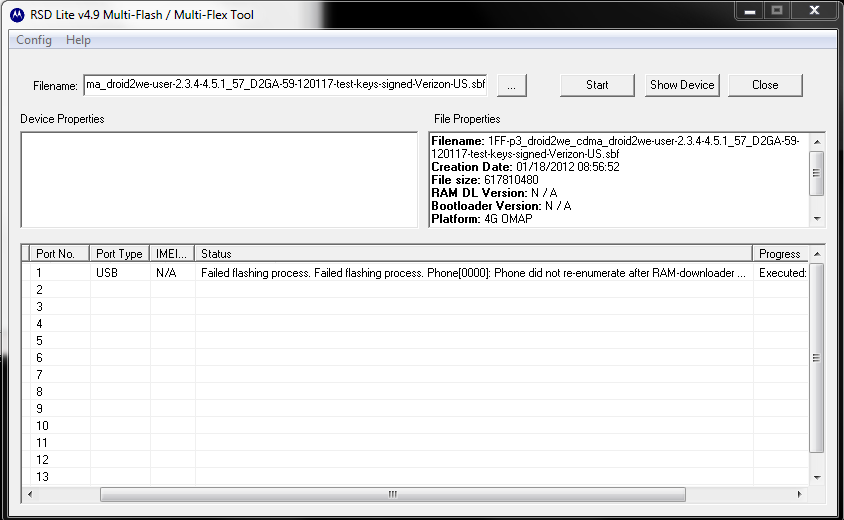
I just noticed i had the: 1FF-p3_droid2we_cdma_droid2we-user-2.3.4-4.5.1_57_D2GA-59-120117-test-keys-signed-Verizon-US.sbf...already tried flashing i still get a fail message on rsdlite.
 
Just tried flashing again, FAIL:

Capture_zpsbfbfc3fc.png


now phone has a flashing black screen.
 
your using wrong iso or option

should have 2 or 3 options
1 recovery/sbf
2 root
3 reboot

if you don't see those try different download should be over 100mb
 
Back
Top Bottom