• After 15+ years, we've made a big change: Android Forums is now Early Bird Club. Learn more here.

Help RUU link please.

Foxspeed

Android Enthusiast
I need to try an RUU install to try and help stop my battery drainage. I am a total noob to this kind of thing and need someone to hold my hand.

My current system:-

Android version: 2.2
Baseband version: 32.49.00.32u_5.11.05.27
Kernel version: 2.6.32.15-gf5a401c
Build number: 2.29.405.5 CL293415
Software number: 2.29.405.5

I'm more scared of installing the wrong RUU than actually doing it!

My phone was left un-connected with a full charge yesterday and only used for one very quick call and to view three pictures in the Gallery very briefly, last night the battery was totally empty and re-connecting isn't showing any LED lights or will not turn on. I presume it needs a really long charge.
My old battery is currently fitted.

Thanks in advance.
 
Am I right in thinking this is the correct one although it says Bravo? My phone is a Desire!

Capture-31.jpg


Capture2-4.jpg
 
The Desire was called the Bravo before it was released and in all the code of the android operating system on the desire, is still refered to as Bravo ;)
 
Right, thanks for that.

Just one more question before I get on with it. My workmate seems to think that I need other Android software drivers on my PC for it to work. I don't synch my phone to my PC so do I need anything installing first?

Thanks.
 
Downloaded and installed HTC Synch, and I have the right RUU.

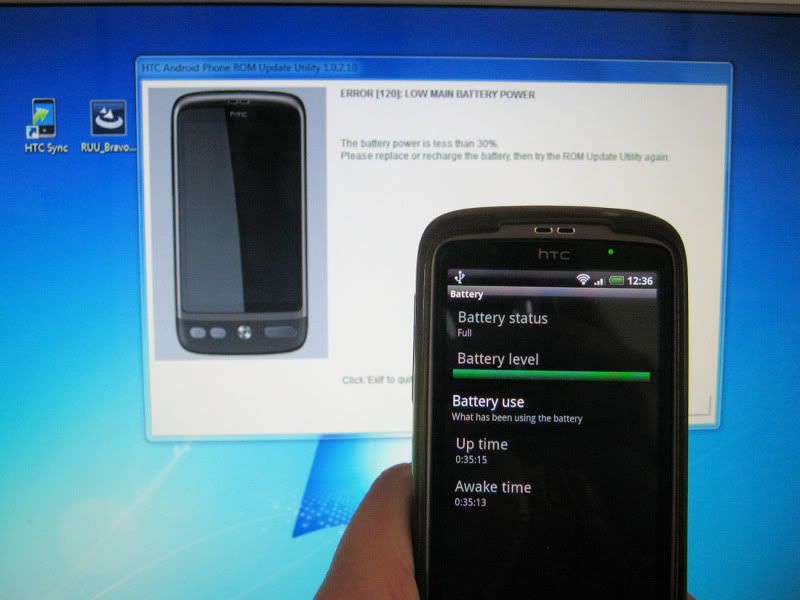
Upon executing the procedure, I immediately received this error telling me that the battery was less than 30%. The phone has been on charge all night and shows 100% full. I guess this is part of my problem so any ideas where I go from here?

Thanks.

Fail.jpg
 
Yep, Try the PB99IMG.zip method. Download the PB99IMG.zip from teh toolbox thread and rename it exactly "PB99IMG.zip" capital letters and everything.

Put it on the root of your SD card (i.e. not in any folder.

Boot to Hboot (vol down and Power from Off).

After 7 seconds, Hboot should look for and flash PB99IMG.zip
 
Sorry to be slow with this but I really don't want to do any more harm. Does this look right before I go any further?

Capture-32.jpg
 
Sorry had to check in the app as some images are blocked at work. Yes, perfectly right. You can't mess that up to be honest, if its not exactly right it just wont find it.

When you do this, as with an RUU, ensure you do not lose battery power or anything.
 
OK so far so good. Next question, do I access this file via Linda File Manager (that I have installed) then run from there and not through the PC?

Thanks and sorry for dragging this out.
 
Just noticed in file manager that I renamed it wrong. PB99IMG.zip.zip

I'm at work now so will let you know when I get chance to do it.

Thanks.
 
All back to stock now eventually and waiting to see how the battery performs. One thing to note is that the phone didn't recognize the headset jack again unless I leave them plugged in then reboot the phone.
 
Probable final update:

I had the phone fully charged at midnight last night (I work night shifts) and used it for web surfing a few times, by 2am there was only half charge left and by 4am it was hitting yellow.
Left it in stand-by (not charging) woke up at 13:15 and the phone was dead. This is straight after an RUU install.

Also, I have the same problem with the headset not being recognized unless I leave it plugged in and reboot the phone.

I think this finally makes the problem a hardware one and nothing I can do personally.

Word of warning, anyone using PowerAmp app make sure you are charging your phone from the mains and not a USB port !!!

Thanks SUroot for all the time and help you have given me and obviously many others.
 
No big deal really but after installing the RUU, when I reboot the phone I get a notification asking me to choose the right carrier for my network. My carrier is not on the list. Any ideas how I get this to stop popping up?
Thanks.

BTW, I'm with T-Mobile.
 
Back
Top Bottom