
Here are a couple to mods to keep us entertained. None of these require root... These changes worked fine on my phone but very well may blow yours up, and I can't be held responsible for what you do to your phone.
If you have root and want to make these a part of the system, as any legacy Commando owner can tell you, making changes to the system may result in you not being able to take a future system update but I don't really care about that.
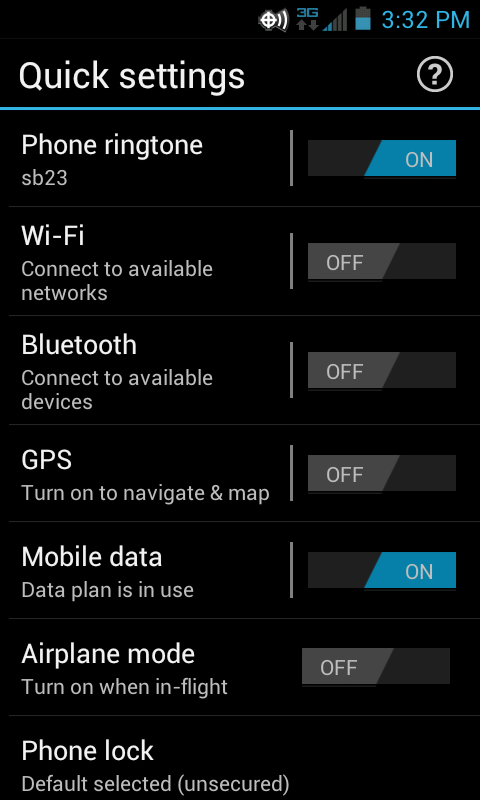
The Motorola Razr M with Circle Widget and quickveiw settings
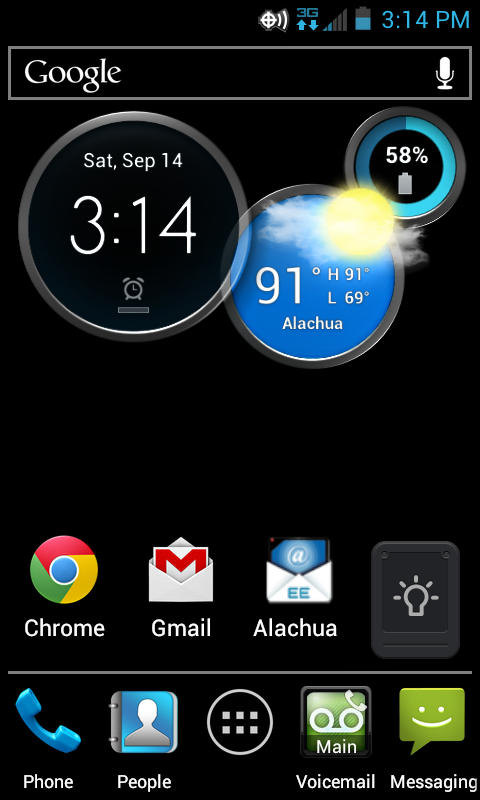
The Circle Widget is a pretty cool widget. I had this on my Razr Maxx and really liked it so I extracted the apks out of the zip I had and installed them as regular apps. Unfortunately the icons were too big for the Commando's screen and there was a lot of overlap. When I searched for instructions on how to resize the homescreen I found where a guy on XDA had already done this for a different phone. That link is here:
http://forum.xda-developers.com/showthread.php?t=1925609
Download the zip, unzip it and then install the 4 apks like any other sideloaded app. When you press the home button you will be asked to pick between homescreen or launcher. Pick homescreen. If you like it, put a check in the box and make it more permenant.
As a regular user app you will have a two step process to install any widget, and trying to switch the GPS on and off in the quickview settings will result in a force close. If you are rooted you can use Titanium to make the four apks into system apps and this will no longer be a problem, but again, as any legacy Commando owner can tell you, making changes to the system may result in you not being able to take a future system update.
Anyhow, here is a look at the quickview settings:
And the circle widget:
The Google Edition Camera:
Here is a link to the Google Edition Camera. It seems better, and the Photosphere works on the Commando.
http://forum.xda-developers.com/showthread.php?t=2341996
Unitypunk reports that the video recording does not work on this camera, and he is right. The photosphere is neat though. I'm going to keep both.
***DO NOT, under any circumstances, make the Google Edition Camera a system app*** Doing so will not make the video recorder work and if you try and remove it this will likely brick your phone. At least it did mine...
Enjoy!
If you have root and want to make these a part of the system, as any legacy Commando owner can tell you, making changes to the system may result in you not being able to take a future system update but I don't really care about that.
The Motorola Razr M with Circle Widget and quickveiw settings
The Circle Widget is a pretty cool widget. I had this on my Razr Maxx and really liked it so I extracted the apks out of the zip I had and installed them as regular apps. Unfortunately the icons were too big for the Commando's screen and there was a lot of overlap. When I searched for instructions on how to resize the homescreen I found where a guy on XDA had already done this for a different phone. That link is here:
http://forum.xda-developers.com/showthread.php?t=1925609
Download the zip, unzip it and then install the 4 apks like any other sideloaded app. When you press the home button you will be asked to pick between homescreen or launcher. Pick homescreen. If you like it, put a check in the box and make it more permenant.
As a regular user app you will have a two step process to install any widget, and trying to switch the GPS on and off in the quickview settings will result in a force close. If you are rooted you can use Titanium to make the four apks into system apps and this will no longer be a problem, but again, as any legacy Commando owner can tell you, making changes to the system may result in you not being able to take a future system update.
Anyhow, here is a look at the quickview settings:
And the circle widget:
The Google Edition Camera:
Here is a link to the Google Edition Camera. It seems better, and the Photosphere works on the Commando.
http://forum.xda-developers.com/showthread.php?t=2341996
Unitypunk reports that the video recording does not work on this camera, and he is right. The photosphere is neat though. I'm going to keep both.
***DO NOT, under any circumstances, make the Google Edition Camera a system app*** Doing so will not make the video recorder work and if you try and remove it this will likely brick your phone. At least it did mine...
Enjoy!