• After 15+ years, we've made a big change: Android Forums is now Early Bird Club. Learn more here.

Help Someone help me. Phone will boot to bootloader but won't startup.

When did you get those errors? What exactly led up to it?

And no worries. I'm not a pro either, just done it a few times and trying to help. I know how hard it can be when you have no idea what to do.:)
 
hmmm. I would delete the files it extracted and try again. If you get the same thing (errors) try 7zip to extract it.

EDIT:
HOLD ON! I can't get it to extract properly either. Gimme a sec...

EDIT2 I had the wrong password :o it is "androidsamurai" without the quotes of course.

Now erase what it had extracted and try again :D
 
Next go to your start menu on the pc and right click "My Computer" and click "properties"

Select the "Advanced Settings" tab

Select "Environment Variables"

Click "New" under system Variables and input:

Variable: adb
Value: C:android-sdk-windows\platform-tools

Save that (if there is a button for that I can't remember.)

Open up command prompt.
 
Type the following without the quotes:

"cd\" Press enter You should see C:\>
"cd android-sdk-windows\platform-tools" Press enter. You should see C:\android-sdk-windows\platform-tools>
"adb.exe" Press enter

You should see a bunch of stuff fly by. Good.

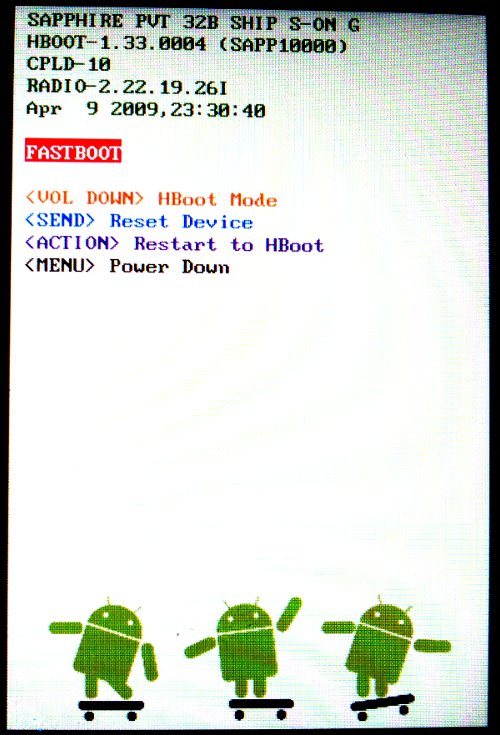
Make sure your phone is booted into Fastboot: From OFF press the down volume and hold it. Press the power button and hold it too for a slow 5-count then release only the power button. you can release the volume button only when the HBOOT screen comes up. Let it cycle it's attempt to find a PG32 file or whatever.Select FASTBOOT and you should now have a highlighted FASTBOOT where you before had HBOOT (about 1/4-1/3 down from the top)

EDIT: I changed the commands a little...
 
if it dont work can i pull the battery and retry

now it wont boot up at all the charge light comes on but nothing happens

ok without it plugged in to cpu i can get it in bootlogger, but connected i can not just the light

edit: the script runs phone not responding when i attempt to boot after running, is this normal
to be sure 1 phone off 2 run script 3 plug phone into usb 4 boot into boot loader, and let it do its thing? is this correct
 
what was the old command this ones not working and i tried to go back and duplicate, with no luck

edit i can get in to fastboot\bootloader
 
"cd\" Press enter
That should put you at the root of the C drive.
"cd android-sdk-windows\platform-tools" Press enter
That should get you into the platform-tools folder.
"adb.exe" Press enter.
That should make a whole bunch of stuff scroll by.

(I forgot a "cd " when I tried to fix the commands the first time. Before that I had it wrong too.) I'm trying here...
 
ok i have tied
phone off run script then turn it on charge light but no activty
while in bootloader nothing happens
reboot bootloader nothing
and seeing as i cant get past the htc load screen i cant change any settings on phone.

so any ideas
 
With the volume down button held down when you turn it on it goes to a screen similar to this?
hboot.png
 
ya i posted what was on that screen in a earlyer post

revolutionary-
vivo_w xb ship s-off rl
hboot-6.13.1002
radio- 1.09.01.0622
emmc-boot
apr 1 2011, 18:34:39
 
yes

i have to get up for work soon so im going to call it good for today ill be back tomorrow around 4 mi time

again thank you for all your help.
 
IN command prompt type "fastboot erase recovery" press enter

Then "fastboot flash recovery 4xt-recovery.img" press enter

Then from your phone reboot bootloader, then choose recovery on the phone HBOOT menu after it does the PG32 file check.
 
Back
Top Bottom