
Install the app
How to install the app on iOS
Follow along with the video below to see how to install our site as a web app on your home screen.
Note: This feature may not be available in some browsers.
-
After 15+ years, we've made a big change: Android Forums is now Early Bird Club. Learn more here.
You are using an out of date browser. It may not display this or other websites correctly.
You should upgrade or use an alternative browser.
You should upgrade or use an alternative browser.
Spell Check not Working
- Thread starter Soapm
- Start date

Except for a few manufacturer-specific implementations, I believe the spell check function is integrated into the software keyboard. Not using the software keyboard means you don't get spell check. 
I thought for sure that had changed, but apparently (based on ~15 minutes of poking around the Internet instead of doing work ) it hasn't. I find a lot of folks asking for that functionality, but no real solution as of yet. That sucks.
Wish I had better news!
I thought for sure that had changed, but apparently (based on ~15 minutes of poking around the Internet instead of doing work
) it hasn't. I find a lot of folks asking for that functionality, but no real solution as of yet. That sucks.Wish I had better news!
Actually, I may have found a possible answer via @Mr. Lucky in another thread:
Could be worth a shot!
It's not perfect, but Smart Keyboard allows spell check with a physical keyboard:
https://play.google.com/store/apps/details?id=net.cdeguet.smartkeyboardpro
(Settings Reference - Smart Keyboard)
Could be worth a shot!

funkylogik
share the love peeps ;)
Hmm I haven't actively noticed with my bt keyboard and SwiftKey on a 4.2 Android tv stick but I'm fairly sure it's there and is part of the rom and not the keyboard.
(think of Samsungs which don't have the native spellcheck no matter what keyboard you use until you put on a more aosp based rom)?
(think of Samsungs which don't have the native spellcheck no matter what keyboard you use until you put on a more aosp based rom)?

Soapm
Newbie
Hmm I haven't actively noticed with my bt keyboard and SwiftKey on a 4.2 Android tv stick but I'm fairly sure it's there and is part of the rom and not the keyboard.
(think of Samsungs which don't have the native spellcheck no matter what keyboard you use until you put on a more aosp based rom)?
This is what I have, a Samsung Galaxy Tab S 8.4. I bought and loaded the "smart keyboard pro" and gained a lot of other features but still no spell check. And now that I notice I don't think I have spell check with the on screen keyboard, it's more of an auto correct...
My tablet is rooted but I am new to android, where can I learn more about "aosp based rom" so I can enable this feature since it's native to Android? Why would Samsung turn off such a valuable feature? What do these developers be thinking?
funkylogik
share the love peeps ;)
Who knows what Samsung are thinking lol.
Best place to start would be in your device's own sub forum. See if there's a root section at the top
Best place to start would be in your device's own sub forum. See if there's a root section at the top
funkylogik
share the love peeps ;)
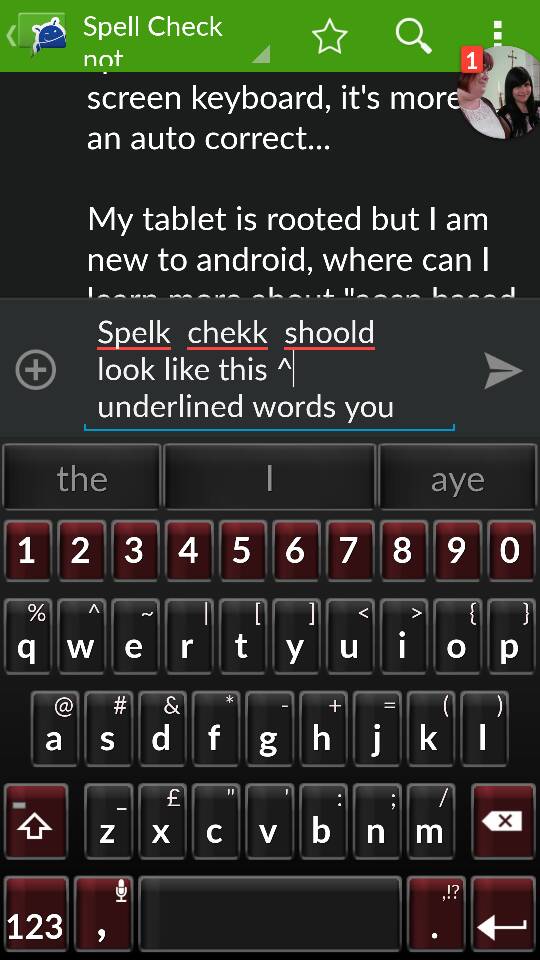
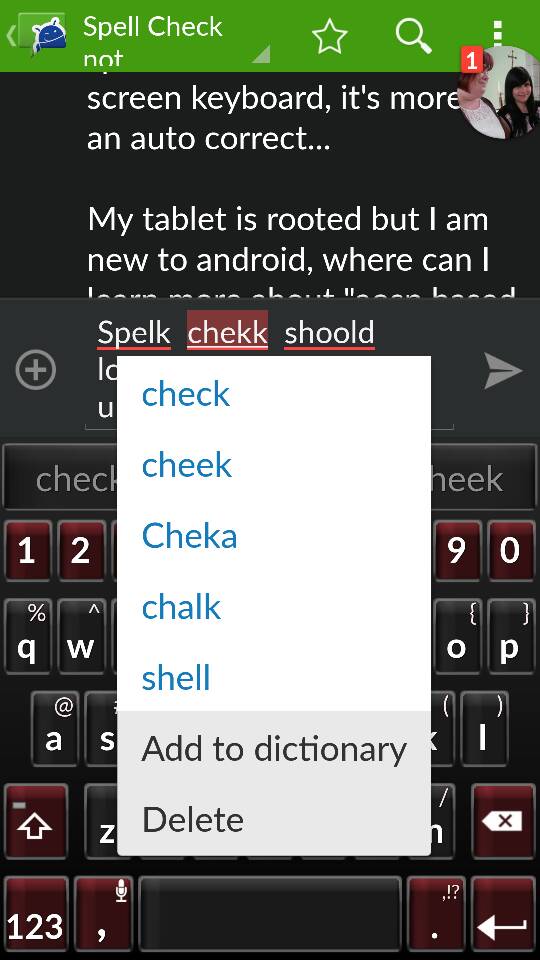
Spelk chekk shoold look like this. underlined words you can tap and are offered suggestions.
Tbh though, I don't find it very good usually (bad suggestions)
Tbh though, I don't find it very good usually (bad suggestions)
Soapm
Newbie
Spelk chekk shoold look like this. underlined words you can tap and are offered suggestions.
Tbh though, I don't find it very good usually (bad suggestions) View attachment 91305View attachment 91306
What keyboard are you using? I've tried several keyboards to include swiftkey, google, Touchpal, logitech but all offer predictive text but no spell check. I prefer to finish my thought then go back and fix the red squiggly lines than to correct as I go along and lose my train of thought...
Soapm
Newbie
Hmm I haven't actively noticed with my bt keyboard and SwiftKey on a 4.2 Android tv stick but I'm fairly sure it's there and is part of the rom and not the keyboard.
(think of Samsungs which don't have the native spellcheck no matter what keyboard you use until you put on a more aosp based rom)?
Can someone recommend a AOSP ROM that's basic for a newbie with a tablet (don't need phone stuff) but has spell check active? I otherwise like the basic tablet as it is to include TouchWiz but I have to get spell check since this is driving me crazy...