
• After 15+ years, we've made a big change: Android Forums is now Early Bird Club. Learn more here.

Help Stuck on M, tried everything I could find

dgdave

Well-Known Member
I was reloading a backup and half way through it took me to the moto logo and won't go past it. I can boot into recovery and to the boot loader, so I figured no biggie. I got the newest SBF and RSDlite. I moved the pst_flasf.ini. When I connect my phone, here is what happens in RSD (pic below) I am running Win7 64 bit. I have the correct drivers and I am running as admin. Any advice here? Did I just over look something? Thanks, guys. I'm sure this gets very tedious, but I really appreciate your help.
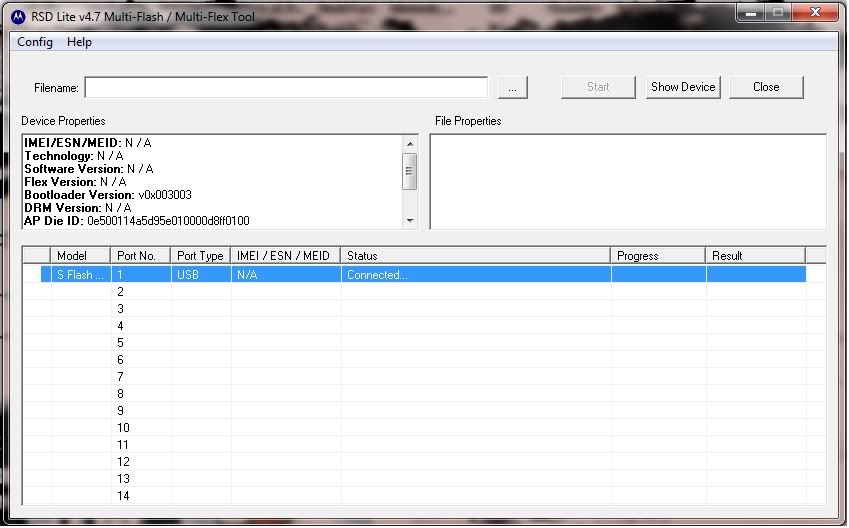
RDSShot.jpg
 
You know you have to select the SBF file using the "..." next to filename and and then click start, right?

If you're having trouble, rename the file to something short. I don't know why but people were having file path troubles. Just call it "22sbf.sbf" or something.

That looks perfectly normal. Now you just have to flash the SBF files.
 
I do have the SBF. I just hadn't selected it yet when I took that screen shot. It doesn't change when I select it.
 
The start button is never pressable.

Did you try renaming it?

Also, if you're trying to load the 2.2 SBF, you shouldn't be using RSD 4.7, you should be using 4.8 - which doesn't require the .ini modification. If you are using 4.8 and you modified the .ini file, try uninstalling and reinstalling it.
 
So are you saying it is still not working with a fresh 4.8?

Must be a driver problem. Did you install the Motoconnect drivers? You could try reinstalling them, and also try plugging into a different USB port and observe the installation message (it'll either report successful or report failure).
 
I went to Verizon and the rep talked to tech support and they told him to do the RSD. I came back in about an hour and he said that the flash totally crashed the system. He just swapped me out phones.
 
Back
Top Bottom