
Install the app
How to install the app on iOS
Follow along with the video below to see how to install our site as a web app on your home screen.
Note: This feature may not be available in some browsers.
-
After 15+ years, we've made a big change: Android Forums is now Early Bird Club. Learn more here.
You are using an out of date browser. It may not display this or other websites correctly.
You should upgrade or use an alternative browser.
You should upgrade or use an alternative browser.
Root super user with no root access
- Thread starter grashan
- Start date
-
- Tags
- zte warp sequent

ah, sorry, just read through the entire post. Have you tried this on a different computer? If the machine is old it may have usb 1.1 ports and i vaguely remember junkie having a problem with those. Even if it's a newer machine it might help to start with a clean slate.
also in the superuser app both "-rwxr-xr-x" and "rootshell" have always been highlighted red.
and /system/bin/su is highlighted green
they should all be green. try "tap to check for updates". prolly won't work but it's worth a shot.

junkie2100
Android Expert
k ive updated my modular tool to HOPEFULLY work right, dont see why it wouldnt work at this point. but at the same time how you could have gotten the su binary or superuser.apk without root in the first place is beyond me. that would require root privlidges
junkie2100
Android Expert
just wyi, i fixed two potential problems, one i dont think is a problem because it got as far as it did but who the hell knows... the other is that instead of using file names in the push command it used .s so i changed that. other than that i have no idea why it would get stuck pushing busybox unless there is something seriously wrong with your tmp partition
how long ago was the update because i tried three days ago using the very first aio tool at the top of the page in yourlink for the root, unroot tool
he updated it yesterday, so you probably don't have the newest one.
junkie2100
Android Expert
yea that one i updated like yesterday. might work might not, not sure really. i cant figure out where the problem would be
junkie2100
Android Expert
its just you im sorry to say. and fastboot needs the proper drivers, check your device manager with it on the black screen with the green android guy
i m still running the stock rom
On stock rom, get into fastboot by typing "adb reboot bootloader" in terminal.
once in fastboot, type "fastboot devices" in terminal. The terminal is on your computer, not the phone
birenregmi
Lurker
I can't able to register in Xperia flash tools. It must need before start unlocked bootloader. there is no option for skip. I can not make password where I was followed the instructions. Plz help me.
I can't able to register in Xperia flash tools. It must need before start unlocked bootloader. there is no option for skip. I can not make password where I was followed the instructions. Plz help me.
I apologize in advance if this sounds rude, but I have no idea what you are referring to. If you are trying to root your phone please see Junkie's AIO Tool thread
edit*
ok,
can you do me a favor so i can make sure im not wasting my own and everyone elses time, because i think i have everything but im not 100% sure.
please if you have the time take screen shots of the drivers that im supposed to have and the location the drivers are in so i can see if anything is identical.
because at this point im thinking my phone is just useless or its just my computer
ok,
can you do me a favor so i can make sure im not wasting my own and everyone elses time, because i think i have everything but im not 100% sure.
please if you have the time take screen shots of the drivers that im supposed to have and the location the drivers are in so i can see if anything is identical.
because at this point im thinking my phone is just useless or its just my computer
junkie2100
Android Expert
actually im not even sure thats the right phone hes talking about. first of all what kind of phone do you have birenregmi? if its not the zte warp sequent you are in the wrong section, if it is then you have the wrong tools, dont just go download some random xperia tool set, use my tool or the specific doomlord script built for the xperia but posted on this section and proven to work for us. other ones wont work and may break your phone
also, if you are trying to unlock the bootloader on a warp sequent you should just give up now kuz ur gonna break something. the sequent doesnt have a locked bootloader and youre heading the right direction for a bricked phone
general rule, dont use stuff from other phones unless specifically instructed. you broke rule #1 and thats a good way to end up with a phone you cant even turn on anymore. only use things you find on this section of the forum, never use tools designed for other phones, never install kernels or roms or cwms for other phones, even using things from the warp will completely destroy your phone, after that you cant fix it
also, if you are trying to unlock the bootloader on a warp sequent you should just give up now kuz ur gonna break something. the sequent doesnt have a locked bootloader and youre heading the right direction for a bricked phone
general rule, dont use stuff from other phones unless specifically instructed. you broke rule #1 and thats a good way to end up with a phone you cant even turn on anymore. only use things you find on this section of the forum, never use tools designed for other phones, never install kernels or roms or cwms for other phones, even using things from the warp will completely destroy your phone, after that you cant fix it
please if you have the time take screen shots of the drivers that im supposed to have and the location the drivers are in so i can see if anything is identical.
Can't help you with drivers as i am a linux user. I believe Junkies AIO Tool has a link to the drivers you need though.
junkie2100
Android Expert
well screw you and your linux  lol nah but give me a few i gotta reboot the phone
lol nah but give me a few i gotta reboot the phone
junkie2100
Android Expert
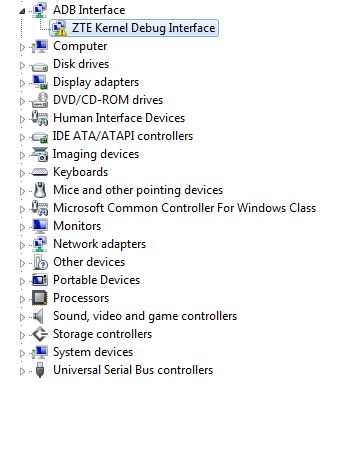
that is the fastboot driver as seen in the device manager. youll notice mine is broken, i fixed it by updating the driver manually. if it has that little yellow warning sign like mine, or if its named something else, youll have to follow the directions ive given to manually update the driver to the correct one
junkie2100
Android Expert
side note, for that to show up youll have to try the fastboot method of installing a recovery, that will put you into fastboot mode, once in fastboot mode with just andy sitting there staring at you check your device manager and if it isnt correct youll have to look at my posts about manually forcing the drivers earlier in this discussion