
Install the app
How to install the app on iOS
Follow along with the video below to see how to install our site as a web app on your home screen.
Note: This feature may not be available in some browsers.
-
After 15+ years, we've made a big change: Android Forums is now Early Bird Club. Learn more here.
You are using an out of date browser. It may not display this or other websites correctly.
You should upgrade or use an alternative browser.
You should upgrade or use an alternative browser.
Swap internal/External Insufficient Storage
- Thread starter alexcool25565
- Start date
-
- Tags
- lg optimus f6
I will upload a copy of it in a little bit
Thanks

hubsabubs
Android Enthusiast
http://mikesdragonpages.homestead.com/files/11extsd2internalsd.zip
Make sure you have a folder named init.d in your system/etc/ directory. If not mount it as R/W and create it. Then extract this and move it or copy it to your system/etc/init.d/ directory. Hold click 11extsd2internalsd and set permissions and make sure everything is checked as far as Read, Write, and Execute (all 9 boxes need to be checked).. Click Ok. Download and Open SManager with root access, Navigate to your /system/etc/init.d within SManager and click on 11extsd2internalsd, Click at the top where it has Su and Boot (icons will then become colored when active) then hit save and then exit and reboot.
Make sure you have a folder named init.d in your system/etc/ directory. If not mount it as R/W and create it. Then extract this and move it or copy it to your system/etc/init.d/ directory. Hold click 11extsd2internalsd and set permissions and make sure everything is checked as far as Read, Write, and Execute (all 9 boxes need to be checked).. Click Ok. Download and Open SManager with root access, Navigate to your /system/etc/init.d within SManager and click on 11extsd2internalsd, Click at the top where it has Su and Boot (icons will then become colored when active) then hit save and then exit and reboot.
http://mikesdragonpages.homestead.com/files/11extsd2internalsd.zip
Make sure you have a folder named init.d in your system/etc/ directory. If not mount it as R/W and create oit. Then extract this and move it or copy it to your system/etc/init.d/ directory. Hold click 11extsd2internalsd and set permissions and make sure everything is checked as far as Read, Write, and Execute all 9 boxes.. Open SManager with root access, Go to /system/etc/init.d and click on 11extsd2internalsd, Click at the top where it has Su and Boot and hit save and then exit and reboot.[/QUOTE
Thanks so much.
I will do it again. I will you know how it goes.
http://mikesdragonpages.homestead.com/files/11extsd2internalsd.zip
Make sure you have a folder named init.d in your system/etc/ directory. If not mount it as R/W and create oit. Then extract this and move it or copy it to your system/etc/init.d/ directory. Hold click 11extsd2internalsd and set permissions and make sure everything is checked as far as Read, Write, and Execute all 9 boxes.. Open SManager with root access, Go to /system/etc/init.d and click on 11extsd2internalsd, Click at the top where it has Su and Boot and hit save and then exit and reboot.[/QUOTE
Thanks so much.
I will do it again. I will you know how it goes.
Thanks so much
I will do it again.
Let me ask should I download and install the uni-initv1.0.apk again them follow the next steps? 2 to 13?
hubsabubs
Android Enthusiast
Ok, as I said, the phone is working now but I did not reboot I just turned it off, what will happen if I leave like that without reboot it.
What do you mean leave like that without reboot it if you did it the way I said you should be able to reboot it
Ok, as I said, the phone is working now but I did not reboot I just turned it off, what will happen if I leave like that without reboot it.
Thanks so much. My phone is working. Thanks for your help.

RelZeshi
Well-Known Member
Followed all the steps for the app and script. It shows on my phone storage that it's working. Play store gives insufficient error. And my desktop shows my empty External SD is full?
Attachments


hubsabubs
Android Enthusiast
I've been trying to get this to work for a few hours. 11extsd2internalsd keeps saving as a .txt file, no matter what I do. -_-
http://mikesdragonpages.homestead.com/files/11extsd2internalsd.zip
Shouldn't save anything as a .txt if you extract it.. Its been archived without a file extension.. Most times when you download something if you go to the drop down menu, and click all files and just save it as is without typing a file extension.
RelZeshi
Well-Known Member
http://mikesdragonpages.homestead.com/files/11extsd2internalsd.zip
Shouldn't save anything as a .txt if you extract it.. Its been archived without a file extension.. Most times when you download something if you go to the drop down menu, and click all files and just save it as is without typing a file extension.
Well, that didn't work. Storage shows properly like before, but still get insufficient errors from play store. Hate being limited to how much I can mod this phone. -_- (Girlfriends phone, I'm using temporarily.)
hubsabubs
Android Enthusiast
I download and install apps and games daily, hell my asphalt 8 updated three different times my warring empires updated like 4 times. I never have insufficient memory issues haven't gotten one yet.
I don't know what I'm doing so much differently than everybody else. I don't know if it's because I've been at this a lot longer than most people have. I mean I've been modding in rooting and doing this stuff with phones for over 6 years now. Also like I said I use the app2externalSD mod hand in hand with Link2SD.
I don't know what I'm doing so much differently than everybody else. I don't know if it's because I've been at this a lot longer than most people have. I mean I've been modding in rooting and doing this stuff with phones for over 6 years now. Also like I said I use the app2externalSD mod hand in hand with Link2SD.
Attachments


hubsabubs
Android Enthusiast
Yeah there was a device list leaked and the F6 was 2nd to last on the list for getting the kitkat update but it most likely wont be until June or July.
Also LG wont confirm or deny the update. Still havent gotten a response from them regarding the email I sent them 3 weeks ago inquiring about kit kat.
At least when I contacted Coolpad Americas about an update for there Quattro 4G I got an email in 2 days telling me no update was coming. So I remain hopefull about the F6.
Also LG wont confirm or deny the update. Still havent gotten a response from them regarding the email I sent them 3 weeks ago inquiring about kit kat.
At least when I contacted Coolpad Americas about an update for there Quattro 4G I got an email in 2 days telling me no update was coming. So I remain hopefull about the F6.
I got both mods going, and no dice. Tried formatting my external sd a few different ways to be sure. Either I'll have a different phone, or hopefully they'll update the F6 to Kit Kat.
What does Internal and external read in storage?
RelZeshi
Well-Known Member
What does Internal and external read in storage?
Internal was 7.40 gigs, and external was 1.27 gigs. Everything I would install, would continue installing on the "true" internal. Checking the SD card on my computer, it showed a couple of empty folders (i.e. lost.dir) but nothing else. I'm currently using the Link2SD method used on the F3 forums (did not install that until I gave up and removed the other methods).
I can help you some what. See the 1.27gb external storage. That's the problem. You can search my post and find the fix for this. I have posted it 2x, so no need to post it a 3rd time in a 3rd different thread. In my eyes it works better than the more recent memory hack and it's a step further than the one I got from f3 forums. If you can't find my post let me know and I'll direct you to it. Check these screenshots and you'll notice the difference. ;-)
CLICK THE "HIDE" TO VIEW IMAGES
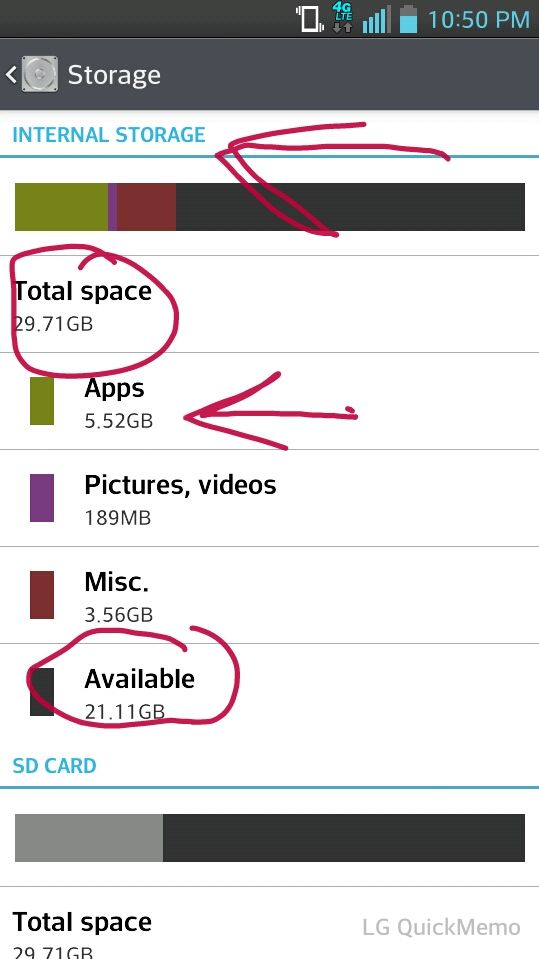
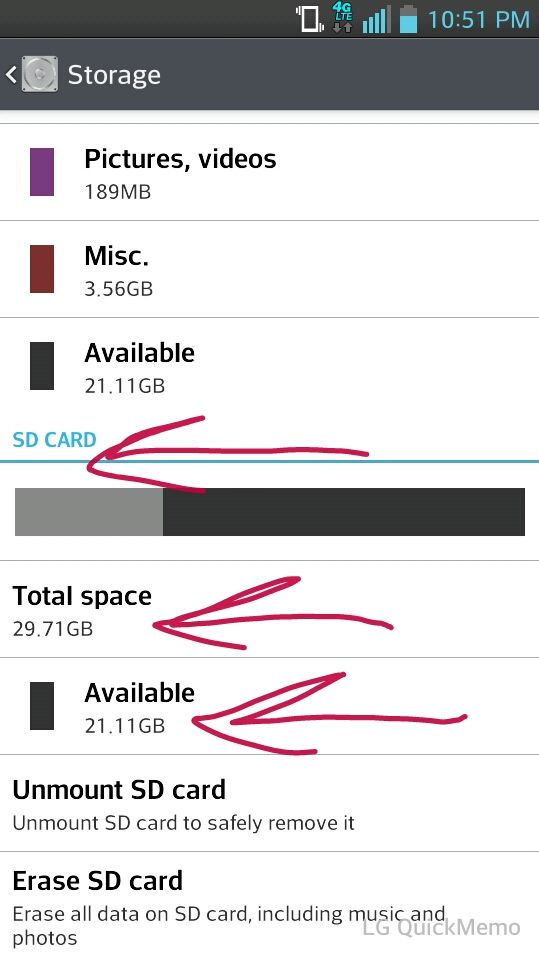
CLICK THE "HIDE" TO VIEW IMAGES
I tried adding as attachments first, but I couldn't for some reason. (I used to own a forum, so don't think it's user error after 3 try.) With that said I decided to use bbcodes and the pics are hug. Can I resize through editing post, or have to do manuel?
Guess hide will work. Mods/Admin, the image resize bbcodes would be a nice bbcode for this forum due to high volume of picture uploads. Just saying.. ;-)
Guess hide will work. Mods/Admin, the image resize bbcodes would be a nice bbcode for this forum due to high volume of picture uploads. Just saying.. ;-)
1) Download Uni-init v1.0.apk
2) Install like a regular apk and open it
3) Click on Activate and allow with super user
4) Click on Verify to make sure init.d is enabled
5) Reboot your device
6) Download any Root Browser you like from the play store
7) Download 11extsd2internalsd and copy it to your sd card
8) Open Root Browser and copy 11extsd2internalsd and paste it /system/etc/init.d folder
9) Hold click 11extsd2internalsd and set permissions and make sure everything is checked as far as Read, Write, and Execute
10) Download Smanager from the google play store and open and allow with root access
11) Go to /system/etc/init.d and click on 11extsd2internalsd
12) Click at the top where it has Su and Boot and hit save and then exit
13) Reboot your device and your all done!
Did all of those but didnt realize until after that i had to change the .txt on it. i redid all the steps again when i did it.
Worked like a charm, Alex. Thanks, my man!