• After 15+ years, we've made a big change: Android Forums is now Early Bird Club. Learn more here.

Help Tasker and S3 Don't get along....

We're talking about 2 issues:

1 - Yes I have a profile that turns off my pattern lock when I am connected to my Home WiFi.

I have a second profile that turns on my pattern lock when I am NOT connected to my home WiFi.

I use secure settings and it works PERFECTLY!!! I have NO issues with random lock screen appearances.


2 - Yes, I have a profile that takes a photo of anyone who has 2 failed log on attempts and emails it to me. Again, this works PERFECTLY!!!
 
1 - Yes I have a profile that turns off my pattern lock when I am connected to my Home WiFi.

I have a second profile that turns on my pattern lock when I am NOT connected to my home WiFi.

Oh. I was creating a single profile with an exit task to turn it off. I wonder if that is the reason.

So are your individual profiles activated by triggers (connecting and disconnecting) rather than states (connected and disconnected)?
 
Oh. I was creating a single profile with an exit task to turn it off. I wonder if that is the reason.

So are your individual profiles activated by triggers (connecting and disconnecting) rather than states (connected and disconnected)?

They're both controlled by the state "connected" however I "invert" so it becomes "NOT" to enable pattern
 
They're both controlled by the state "connected" however I "invert" so it becomes "NOT" to enable pattern

Thank you for your patience... this is so frustrating.

I've set up two profiles

Home Unlock:
Context - State> wifi connected (set to specific SSID)
Task - Plugin> Secure Settings> keyguard Disabled/BG

Outside Lock:
context - State> wifi not connected to specific SSID (using invert)
Task - Plugin> Secure Settings> Keyguard Enabled

I have enabled Tasker and Secure Settings in Security>Device Administrators

I have both profiles enabled in Tasker, Tasker activated (On button)

I am connected to my network and my Home Unlock profile is green (active)

When I wake the phone I'm confronted by a lock screen. :confused:

How different is this to your setup?


EDIT: Restarted my phone and it worked... until I tapped on a notification for market updates...
 
Originally Posted by SUroot<br />
They're both controlled by the state "connected" however I "invert" so it becomes "NOT" to enable pattern
<br />
<br />
Thank you for your patience... this is so frustrating.<br />
<br />
I've set up two profiles<br />
<br />
Home Unlock:<br />
Context - State> wifi connected (set to specific SSID)<br />
Task - Plugin> Secure Settings> keyguard Disabled/BG<br />
<br />
Outside Lock:<br />
context - State> wifi not connected to specific SSID (using invert)<br />
Task - Plugin> Secure Settings> Keyguard Enabled<br />
<br />
I have enabled Tasker and Secure Settings in Security>Device Administrators<br />
<br />
I have both profiles enabled in Tasker, Tasker activated (On button)<br />
<br />
I am connected to my network and my Home Unlock profile is green (active)<br />
<br />
When I wake the phone I'm confronted by a lock screen. :confused:<br />
<br />
How different is this to your setup?

I'm using secure settings "pattern lock" enabled or disabled. Not "keyguard".

Lets also differentiate between the pattern lock and the lock screen.

Normal operation. Press power, swipe unlock, enter pattern. I only remove that last step
 
I'm using secure settings "pattern lock" enabled or disabled. Not "keyguard".

I was afraid you were going to say that.

I don't have an option for "pattern lock" in Plugin>Secure Settings

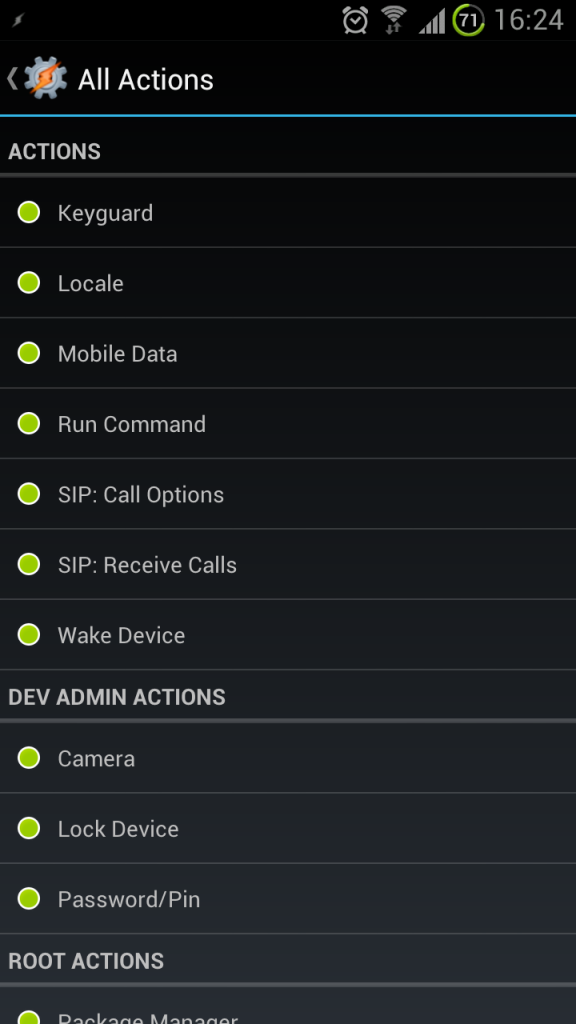
Here is a screenshot of the options when I edit Configuration of Secure Settings:

2012-08-03162412.png


Is this different from yours?
 
I was afraid you were going to say that.

I don't have an option for "pattern lock" in Plugin>Secure Settings

Here is a screenshot of the options when I edit Configuration of Secure Settings:

2012-08-03162412.png


Is this different from yours?

At the bottom of your shot is root actions. After that is helper options. Its under that heading
 
Well have you installed the settings helper, via the helper tab on the first page?

That doesn't ring a bell...

Doing that now. Didn't think to open Secure Settings itself as I thought it was just a plugin.

Rewritten my profile.

It works! Thanks dude. That was the missing key.

It has fixed the notification bug as well. Brilliant. :D


EDIT: My phone now feels more like a computer!
 
That doesn't ring a bell...

Doing that now. Didn't think to open Secure Settings itself as I thought it was just a plugin.

Rewritten my profile.

It works! Thanks dude. That was the missing key.

It has fixed the notification bug as well. Brilliant. :D


EDIT: My phone now feels more like a computer!

show me your steps lol i suck at this and the thread is pretty long i cant keep up because poeple started talking about different things...

by the way my phone is not rooted
 
Besides that video, are there any other threads/sites you can link to me for beginner help with Tasker, or sample profiles?

Also, have you noticed any other glitches within Tasker on the GS3? or is it safe to purchase it?

Thanks. Id love to get into Tasker, just cant quite place what id use it for. Some sample profiles would be awesome.

Disregard, i found this thread:
http://androidforums.com/android-applications/158265-what-tasker-profiles-everyone-using.html
 
I cant install Helper i guess because im not rooted... is it necessary?

What happened when you tried to install it? Do you have Dropbox installed? Or is that the problem?

Without Helper, you don't have the ability to control Pattern Lock. When it's installed loads of extra options appear.

If it turns out to be the only solution then I say why not root? It's easy and it's just as easy to unroot for warranty purposes if need be. Very easy, and once you've rooted, you'll never want to go back :)

The thing about rooting is it's scary the first time. Like losing your virginity. But then you want to keep on doing it.
 
What happened when you tried to install it? Do you have Dropbox installed? Or is that the problem?

Without Helper, you don't have the ability to control Pattern Lock. When it's installed loads of extra options appear.

If it turns out to be the only solution then I say why not root? It's easy and it's just as easy to unroot for warranty purposes if need be. Very easy, and once you've rooted, you'll never want to go back :)

The thing about rooting is it's scary the first time. Like losing your virginity. But then you want to keep on doing it.

hahahahaha

i know how to root the reason i dont is because i dont want to unroot for updates and root again too much work lol ....
 
You don't need to unroot for updates. Use custom roms instead. They have all the benefits of the latest official roms but tweaked for performance and battery life
 
hey guys, new on tasker. i want to turm on the gps automatically when i use my Sygic navigator. any help? many thanks

Gps is one of the few settings that tasker can't turn on without root access.

However, do you know that the gps setting can be left on all the time without affecting battery life? It's not using power unless an app is actively finding your gps location, which will only be when you're using something like sygic, four square, maps, etc.
 
Gps is one of the few settings that tasker can't turn on without root access.

However, do you know that the gps setting can be left on all the time without affecting battery life? It's not using power unless an app is actively finding your gps location, which will only be when you're using something like sygic, four square, maps, etc.

And it's good to leave it on for remotely tracking your phone if it is stolen.
 
Gps is one of the few settings that tasker can't turn on without root access.

However, do you know that the gps setting can be left on all the time without affecting battery life? It's not using power unless an app is actively finding your gps location, which will only be when you're using something like sygic, four square, maps, etc.

thanks for this, i figured it out but it needs rooting.

thanks for the idea about the GPS On.
 
Gps is one of the few settings that tasker can't turn on without root access.

However, do you know that the gps setting can be left on all the time without affecting battery life? It's not using power unless an app is actively finding your gps location, which will only be when you're using something like sygic, four square, maps, etc.

This is sort of false. You need secure settings installed and it works just fine. In tasker go to plug-ins and select secure settings, gps is one of the settings. However can't figure out a way to turn on other gps such as Verizon

Below is my settings that created and put on an nfc tag for my car. Other toggle on tag is to turn off gps

1893b472-4bc8-935f.jpg
 
Pattern lock should disable when connected to home WiFi. Works sometimes, but also very random. I will ckeck out Secure Connections.

The other one that doesn't work:
Sleep Profile => Time of Day: Set Call Volume 0; Notification Volume 0;Vibrate Off; Mobile data off; wifi off; gps off; sync off. So far so good.

2nd profile: VIP Caller
Event: Phone Ringing, Caller = Wife / Parents ==> Call Volume = 7; Vibrate = On

Also tried
Event: Incoming Call, Caller = Wife / Parents ==> Call Volume = 7; Vibrate = On

Either option for 2nd profile worked on my Droid X and on the Razr. neither works on my S3

3 Questions: Thought Anyone? Why is the S3 different? What else should work but won't?

Thanks in advance
 
Back
Top Bottom