• After 15+ years, we've made a big change: Android Forums is now Early Bird Club. Learn more here.

Text Message Alert on Locked Screen

roadkeel

Lurker
I have just switch from the iPhone to the Note 2. My wife and I were both due for an upgrade so we got her the Galaxy 3. On her phone when she recieves a message a circle appears on her locked screen to let her know she has a new message. Is there any way to set the Note 2 to have the same circle alert?
Thanks...
 
I tried this but I still do not get the circle on the locked screen stating I have a new message. On my locked screen I have 5 icons at the bottom, phone, text message, Google, email and camera. Could this be the problem? On my wife's GS 3 she does not have any icons on her locked screen.
 
My Note 2 has that feature. Circle pops up. If I swipe the messege icon with the little notification bubble it takes me to the messeging app But if I swipe the pop up circle it takes me straight to the latest message. So their is a way to set it up.
 
I have just switch from the iPhone to the Note 2. My wife and I were both due for an upgrade so we got her the Galaxy 3. On her phone when she recieves a message a circle appears on her locked screen to let her know she has a new message. Is there any way to set the Note 2 to have the same circle alert?
Thanks...

Does it have an envelope within the circle w a number underneath? Or a message within the circle?
 
When I get a text message it places a number in a very small red circle on top of the text message icon (open envelope) that is located at the bottome of the screen with the other 4 icons.
 
Does it have an envelope within the circle w a number underneath? Or a message within the circle?

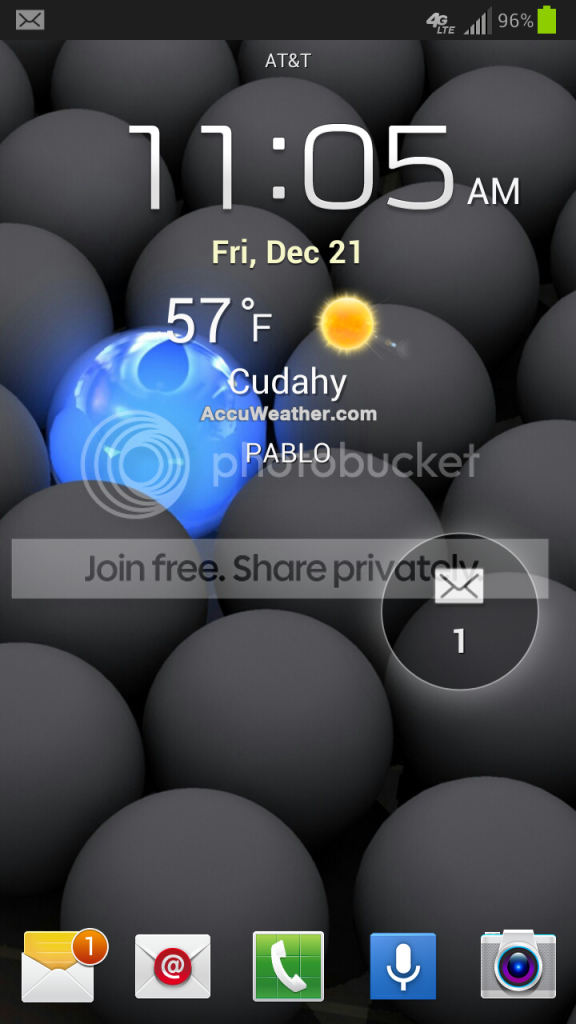
I get the red circle on the icon at the bottom and a there is also a see thru circle with a envelope and a 1 under it about halfway between the clock and bottom icons on the right side.


Screenshot_2012-12-21-11-05-18_zps7179156c.png
 
One thing I can't figure out is how to draw on a picture. I does not give you that option
when you bring up the menu when viewing a pic in the gallery. I think its missing on att note 2's I've seen it on other note 2s I think it's called quik edit or something.
 
Same reason they took out the 4x4 SPlanner widget and Blocking mode. Who knows why Verizon chopped this up. It has great features, but we can't use them.
 
I'm also on verizon with the Note 2 and I have the feature checked in the settings and mine doesn't do the popup either.
 
Same reason they took out the 4x4 SPlanner widget and Blocking mode. Who knows why Verizon chopped this up. It has great features, but we can't use them.

That is crazy I figured all carriers would keep all features for their users. Hopefully Verizon will release those features in an update.
 
First of all Thanks so much for all of the replies. You guys and girls are great.

I do have Verizon, so it sounds like I may be out of luck. It is just kind of bizarre that my wife has that type of notification on her GS 3 which is also on Verizon. But as I understand it she has a different OS on her GS 3.

BTW, the post at 1:00 CST by Pablo is exactly what I was asking about.

Secondary question, how do you get the phone to display your name on the locked screen?

Thanks again everyone.. I will probably have tons of other questions. I am just not very tech savvy...:rolleyes:
 
First of all Thanks so much for all of the replies. You guys and girls are great.

I do have Verizon, so it sounds like I may be out of luck. It is just kind of bizarre that my wife has that type of notification on her GS 3 which is also on Verizon. But as I understand it she has a different OS on her GS 3.

BTW, the post at 1:00 CST by Pablo is exactly what I was asking about.

Secondary question, how do you get the phone to display your name on the locked screen?

Thanks again everyone.. I will probably have tons of other questions. I am just not very tech savvy...:rolleyes:


"Secondary question, how do you get the phone to display your name on the locked screen?"

Settings>Lockscreen>Owner Information.

CoughThanksButtonCough.....:D>>>>>>>>>>>>>>>>>>>>>>>>>>>>>>>>>>>>>>>>>
 
First of all Thanks so much for all of the replies. You guys and girls are great.

I do have Verizon, so it sounds like I may be out of luck. It is just kind of bizarre that my wife has that type of notification on her GS 3 which is also on Verizon. But as I understand it she has a different OS on her GS 3.

BTW, the post at 1:00 CST by Pablo is exactly what I was asking about.

Secondary question, how do you get the phone to display your name on the locked screen?

Thanks again everyone.. I will probably have tons of other questions. I am just not very tech savvy...:rolleyes:

Well Verizon Galaxy S3s just got updated to Jelly Bean so unless she hasn't performed the update yet she is actually on the same OS as you.
 
That is crazy I figured all carriers would keep all features for their users. Hopefully Verizon will release those features in an update.

Yeah, I love the SPlanner full screen widget and I was really looking forward to Blocking Mode. I saw videos with all these cool features only to find that they weren't on the Verizon version. It never occurred to me that they would do that.

I rooted my phone to plug the security hole and added ths SPlanner widget while I was at it. But I'm still very disappointed at Verizon for hacking this great device for no good reason.
 
Back
Top Bottom