• After 15+ years, we've made a big change: Android Forums is now Early Bird Club. Learn more here.

Up Time vs. Awake Time

Hey all new to the forum. Had a quick question about battery usage.

My up time is significantly higher than my awake time (over 4x). I have read that this can be a huge issue with battery usage. Are there any ways to significantly reduce this?

Thanks
 
Oh well good, glad I had it backwards. It hard to use it that little but im really trying to get a good battery test on standby. Thanks for the help.
 
Actually its displaying since you last plugged in.
No, it's since you last booted the phone up.

Ex...I'm plugged up right now, so according to you it would be zero.

54b7bb20.png
 
This morning my uptime and awake time were exactly the same ... I restarted and it was fine after that.

Right now my awake time is half of the up time. I'm thinking 50% isn't all that good b/c I was hardly on it today. Any thoughts?
 
Something probably running in the background. Get a task killer and see what apps are running. I've been noticing the Sprint bloatware likes to open itself up and run in the background several times a day!
 
Personal choice, both accomplish the same thing. If you know how to do it, then why ask the question to begin with?
 
hmmmm

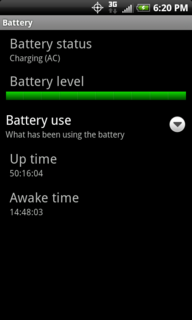
my stats
71 uptime
52 awake time.

its at least off for ~7hrs when i sleep. so thats 21hours when the display should be off which doesnt add up. and obviously i dont use it straight when im awake.
 
Pull up

Settings>About Phone>Battery>Battery Use

And see what's keeping it awake.

but thats only useful for the last time i charged my phone.
but here it is nonetheless
snap20100607201852.png


im not gonna worry about it yet as i get decent battery life so far (10-12hrs; 50-100 texts, receiving ~75-125 emails, send about 5-10, casual browsing. though mostly on wifi. i had a vacation day today so ill know tomorrow how it will last on a work day on 3g).

seems like wifi keeps the device awake when i charge it overnight
 
I would definitely start by shutting off the wifi off when not in use at night, the camera too. I use my camera a lot and I've never seen it even at 1%. Are you leaving it open?
 
Personal choice, both accomplish the same thing. If you know how to do it, then why ask the question to begin with?


I didn't ask about task killers, I was asking if anyone could shed some light on the situation with personal experience. Maybe someone had the same issue that got resolved. That's all.

Calm down lol.
 
I would definitely start by shutting off the wifi off when not in use at night, the camera too. I use my camera a lot and I've never seen it even at 1%. Are you leaving it open?

i occasionally close tasks with system panel (to which i occasionally monitor my cpu activity). i prefer not to close anything and let android do its thing.

im used to having my pre with bluetooth (only active when its in my car) and wifi (since its actually better than 3g when it comes to battery life) on all the time
 
Back
Top Bottom