• After 15+ years, we've made a big change: Android Forums is now Early Bird Club. Learn more here.

Updated Market

I wish there was a way to limit searches to apps. I'm never going to buy videos or books from the Market and it would be great to have a configuration item to disable them. Others might want those things so I'm not suggesting they be eliminated, just have the ability to be disabled.
 
At first it seemed like too much, but after getting use to it I really like it. It has a lot of nice bells and whistles. Plus one of the first things I noticed was being able to change your account by email is great! I like being able to see what is trending and everything on my phone and not have to go online to see that. I will give them a thumbs up on the update. I have heard others talk about the speed, but with the X everything seems to load fairly quickly still.
 
I like it but since I am unable to update apps on it I went back to 2.3.6 until there is a fix. Running Apex 2.0 RC2 btw.
 
i like it a lot...the only problem is that i can only update my apps if there is more than one that needs an update at any given time...

if its only one app there is no "update" button to press...but if there is more than one i can click "update all"
 
i like it a lot...the only problem is that i can only update my apps if there is more than one that needs an update at any given time...

if its only one app there is no "update" button to press...but if there is more than one i can click "update all"

Same problem here....:confused:
 
Mine updates just fine when there is only one app to update. I just go to "My apps" and select the app to update:


snap20110714_094758.png


Or maybe I'm misunderstanding something here?
 
Mine updates just fine when there is only one app to update. I just go to "My apps" and select the app to update:


Or maybe I'm misunderstanding something here?

right...but when i click that app to update it only gives me two choices "open" and "uninstall" no "update"
 
right...but when i click that app to update it only gives me two choices "open" and "uninstall" no "update"

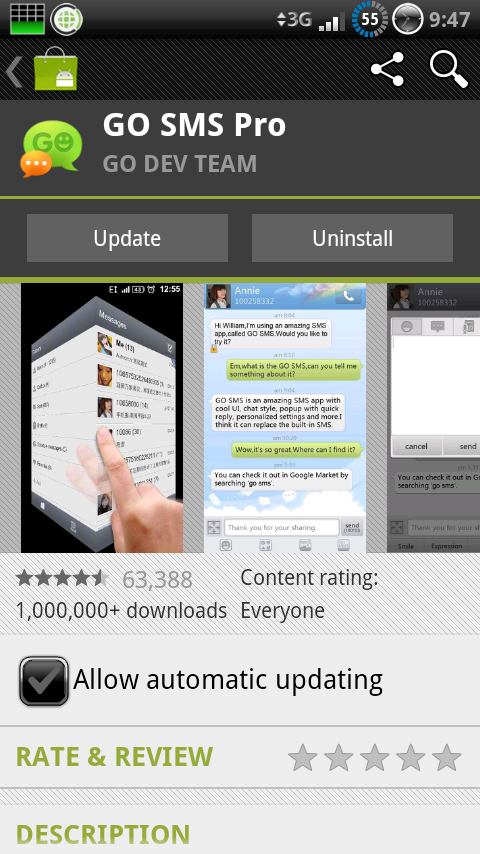
Check my previous post again, I uploaded a second pic......I was guessing that would be the issue in question......mine says "Update" and "Uninstall" :D
 
Check my previous post again, I uploaded a second pic......I was guessing that would be the issue in question......min says "Update" and "Uninstall" :D

yeah mine did not say "Update" just "Open" and "Uninstall"

ill watch like a hawk and try to see if i can get a single app to need an update and get a cap of it...last night in particular it was QuickClock...i was able to update it by checking "allow automatic updates." After doing that it eventually downloaded on its own sometime when i was not looking at my phone...
 
I installed the new market again and have 3 updates available. When I press on each update individually I still only have "open" and "uninstall".
 
I installed the new market again and have 3 updates available. When I press on each update individually I still only have "open" and "uninstall".

but when you're on "my apps" screen...in the upper right hand corner you can press "update all" correct?
 
Hmmm...I just went into the Market again and now one of the apps shows an update button when before it didn't, the others still remain the same.
 
Mine updates just fine when there is only one app to update. I just go to "My apps" and select the app to update:


Or maybe I'm misunderstanding something here?

A little different question, does the GoSMS update fix the usage on CM7? I had to uninstall it because it was sucking away battery life. Thanks
 
Strange...I went in and out of the Market a few times and now one of the other apps is showing the update button but the last one still only has open an uninstall.
 
Strange...I went in and out of the Market a few times and now one of the other apps is showing the update button but the last one still only has open an uninstall.

Can you hook me up with the file you used to install it? Did you install it via Root Explorer?
 
Back
Top Bottom