• After 15+ years, we've made a big change: Android Forums is now Early Bird Club. Learn more here.

Help USB connection not working...

When i plug my phone into my computer via USB it dosnt show up on my PC. I want to transfer some files.

After investigating a bit i think i need to install the "pc suite" but my spica didnt come with a CD or anything...

Any help on this?
 
When i plug my phone into my computer via USB it dosnt show up on my PC. I want to transfer some files.

After investigating a bit i think i need to install the "pc suite" but my spica didnt come with a CD or anything...

Any help on this?

Can you describe in more detail where it fails? Does the computer not detect the cell phone at all, or does it report that it cannot access drive X: (X is whatever it displayed).
 
I'v been playing with it a bit more but here is whats happening.

I plug in my phone and it says in my tray "Found new hardware: Samsung Android" but when i look in My Computer, it dosnt show up.

I go into my "Settings" in my phone and i disable "Mass Storage Only" and try again, It shows up as Removable Disk E in My Computer. When i try to open it it pops up a window saying "Please insert a disk into Drive E".

I also found, downloaded and installed Samsung PC Studio 3, and it wont connect to my phone via USB.

I noticed aswell that when i disable Mass Storage Only, it enables "USB Debugging" in my Application settings....i read somewhere that it must be disabled, but when i disable debugging, mass storage only seems to auto enable. I dont know if this has anything to do with my issue but i do find it pretty odd...and very frustrating iv been fighting with this all morning! :/

 
I'v been playing with it a bit more but here is whats happening.

I plug in my phone and it says in my tray "Found new hardware: Samsung Android" but when i look in My Computer, it dosnt show up.

I go into my "Settings" in my phone and i disable "Mass Storage Only" and try again, It shows up as Removable Disk E in My Computer. When i try to open it it pops up a window saying "Please insert a disk into Drive E".

I also found, downloaded and installed Samsung PC Studio 3, and it wont connect to my phone via USB.

I noticed aswell that when i disable Mass Storage Only, it enables "USB Debugging" in my Application settings....i read somewhere that it must be disabled, but when i disable debugging, mass storage only seems to auto enable. I dont know if this has anything to do with my issue but i do find it pretty odd...and very frustrating iv been fighting with this all morning! :/

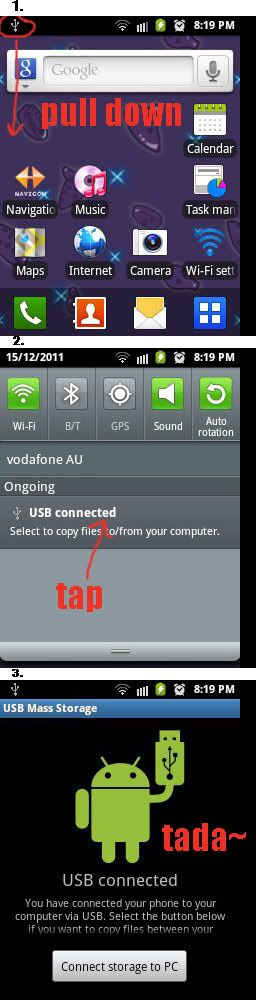
Did you drag the notification bar down and tell it to set the USB connection?
 
Im using Samsung PC Studio 3. Is what i should be using?

I got it working now. I had to reboot my phone, and connect it again. I had to go into my notifications, select my USB and "Mount" it to my PC. It seems to be working now.

Thanks gusto and petrol for the help i really appreciate it!
 
unistall pc studio 3 and any thing else to do with samsung then install this

Netload Serious Filehosting - Netload


don't connect your phone untill its installed when its done turn your phone off then connect usb turn phone on and wait for the drivers to install and new pc atudio has started
 
unistall pc studio 3 and any thing else to do with samsung then install this

Netload Serious Filehosting - Netload


don't connect your phone untill its installed when its done turn your phone off then connect usb turn phone on and wait for the drivers to install and new pc atudio has started

That should be it for now. When you merely want to access the SD card contents you don't actually need additional software. It's suppose to do those functions in the program, but currently they aren't compatible with the phone except to upgrade the android os (which is also not available for the majority of nations at this time).

If you would like to be up to date for the software though, google for Samsung New PC Studio 1.5 AC4. It's the latest leaked release.
 
is the spica supposed to mount the SD card as a usb storage device when plugged in a computer? ive read that the nexus one does this (on a pc and on macs)... the spica doesnt mount with my mac. sad.
 
When i plug my phone into my computer via USB it dosnt show up on my PC. I want to transfer some files.

After investigating a bit i think i need to install the "pc suite" but my spica didnt come with a CD or anything...

Any help on this?

Dude, you have a manual for a reason...
 
Still haven't figured out if there's a way to connect the phone itself, but I solved the problem of connecting the memory card THROUGH the phone. The instructions below assume that you've already installed the New PC Studio software that came with the phone.

Step 1. Using the Settings menu on your Spica, scroll down to SD Card & Phone Storage and open it. Then choose Unmount SD card.

Step 2. Plug the phone into your PC's USB port with the cable that came with the phone. You should hear some kind of notification sound from the phone when it connects.

Step 3. Look at your phone screen. In the top left corner (the so-called Notification Bar) you'll see some incomprehensible symbol and/or the USB connection icon.

Step 4. Click the hard plastic "menu" button on your phone (the top lefthand button on the fixed keypad). A popu menu will appear on the touch screen with the option to choose Notifications. Choose this.

Step 5. Click on the notification related to the USB connection, and select Mount the SD card to connect with the PC.

Now go to New PC Studio and double click on the memory card icon. You're good to go.
 
When i bought my phone(Samsung galaxy pop) , when I plug in my Droid to my computer I used to get a full screen pop up with little green Android dude and message

"USB connected" with button for "Turn on USB storage" at the bottom.

but now this is not happening...I dont get ant\y notification as such except the tethring notification that the usb is connected. I'm unable to transfer files from PC or to PC.
Please help.
Thanks!!
 
Try
1) Switching on USB Debugging option in Applications menu under Settings may help.
if that fails.
2) In Keis / PC Studio (Samsung Supplied computer software) Choose the Re-Install Drivers option.
 
This is on a Galaxy FIT, but see if it works for your Galaxy.

Don't need to turn on debug or anything. Just plug the phone via USB, slide down the notification, select the USB connection.


galaxyfit.jpg
 
Help! I bought a USB connector today for my Samsung galaxy touch screen cell because I want to upload a few files/images from my cell onto my computer, but whenever I connect the cable to my computer a message on my phone pops-up saying "bluetooth dial up networking or serial port cannot be used at the same time as USB connection" what does it mean and how can I peacefully upload my photo's! HELP please?
 
I did a soft reboot on my Droid incredible and it is now finding the phone memory and the SD card. Did the one where it closes all apps and reboots the phone. Does not lose data or apps
It is on the power down menu. hold the power button until you see the power off menu.
The bottom item says close all apps and restart....that is what fixed it for me.
 
i need help with my galaxy y cause when i plug my usb connector to my computer
and when im going now to tap down the notification on my screen it doesnt work
and when i unplug my usb connector
my screen work can you help me
(sorry for the english)
 
can PC studio really helps? need some instructions.
i need to transfer some hd games on my phone, but my laptop didnt read my phone. it also didnt charge when i plug it. need help pls.thx
 
Back
Top Bottom