• After 15+ years, we've made a big change: Android Forums is now Early Bird Club. Learn more here.

V4.3 update problems UK unbranded ?

wunay

Android Enthusiast
Have posted this under a previous heading that does not refer to this particular aspect.

UK PAYG Unbranded T-Mobile not rooted as per purchased and no intention of rooting in the future.
My S4 has just downloaded, but not yet installed V4.3.

Feel concerned with regard to the update to V4.3 after seeing all of the problems with that update but believe the majority of the concerns are in the US.

Should I be overly concerned and go ahead with update?

 
I got 4.3 two days ago (Ireland) and am having nothing but trouble with my phone since. I have an S3, not rooted nor will it be.
 
Phone is running extremely slow, apps keep disappearing them reappearing, but worst of all the screen locks and won't unlock. I end up having to take out the battery. Pain in the hole!
 
I feel that I need to ask as to whether V4.3 problems are being experienced by the majority or the minority. Generally postings on any forum problems might be said to be of in the minority.

Is it the majority or the minority that are having problems with the update and are the problems related to the particular country/area or provider?

If the update does go pear shape what are the options to restore the phone to a working condition?
 
Have posted this under a previous heading that does not refer to this particular aspect.

UK PAYG Unbranded T-Mobile not rooted as per purchased and no intention of rooting in the future.
My S4 has just downloaded, but not yet installed V4.3.

Feel concerned with regard to the update to V4.3 after seeing all of the problems with that update but believe the majority of the concerns are in the US.

Should I be overly concerned and go ahead with update?


I have an unbranded S4 (UK) and have upgraded the firmware to 4.3, ten days ago, and I have had no problems so far.

John
 
Samsung Galaxy S4, UK unbranded, not rooted and no intention of rooting, PAYG T-Mobile.

With much trepidation after seeing all the negative postings in respect of Android V4.3 I downloaded the update and all seems to be as it was with the addition of Knox being downloaded and therefore understood to be available to be installed if so required.

I have not installed Knox and wonder as to my options in respect of that. - I did receive warnings of the blocking of some applications but those applications just carried on and did what I expected of them.

The one thing that struck me was the speed of downloads when using Mobile Data, previously this had been around the3/4MB area, since the 4.3 update this now hovers at between 9/ 12MB.

What are the implications of having downloaded Knox but not as yet installed?
 
What are the implications of having downloaded Knox but not as yet installed?[/SIZE][/FONT]

Make no mistake, Knox is already installed on your phone. Just check as per #1.4 of Warning - Knox Security on 4.3 quad core firmwares.

Knox is much more than just a locked bootloader and a flag, much of which has not been implemented by Samsung yet, as this article explains from post #19 of the thread...

Knox Security... You ain't seen nothing yet!

The following article by Galen Gruman in yesterday's Info World, lifts the lid on the new Knox security feature and goes into a lot more detail regarding its future use, (oh yes, there's more to come), on phones and tablets and why some carriers may not even implement it fully.

The truth about Samsung Knox for Android security
The higher-level security technology for select Android devices isn't really available yet, despite the hype
 
ironass

The Knox icon is there displaying "You need to download and install this app"

My understanding of that would be that it is not therefore installed.

Am I completely incorrect?
 
ironass

The Knox icon is there displaying "You need to download and install this app"

My understanding of that would be that it is not therefore installed.

Am I completely incorrect?

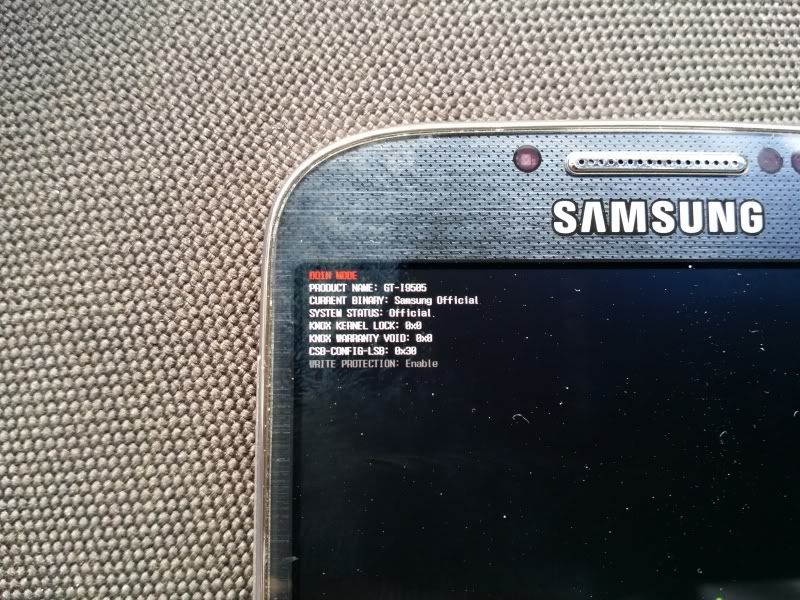
Have you checked if the Knox warranty counter is installed when you go to Download mode?
 
ironass

Over the past two months I have had a series of misfortunes where everything has seemed to go awry, and when looking at the method of entering download mode it does seem a little tenuous and after recent events I feel uncertain as to going down that path. You seem certain that Knox is installed despite the icon stating "You need to download and install"?
 
ironass

Over the past two months I have had a series of misfortunes where everything has seemed to go awry, and when looking at the method of entering download mode it does seem a little tenuous and after recent events I feel uncertain as to going down that path. You seem certain that Knox is installed despite the icon stating "You need to download and install"?

Entering Download mode is a zero risk... the same as Recovery mode. If your GT-i9505, quad core, Qualcomm, firmware is Android 4.3 it will have the locked bootloader and Knox flag installed irrespective of any icon you activate as per the article I mentioned earlier.
 
ironass

Thanks for prompt reply. I bow to your better knowledge having very little myself in respect of Android.

Could you explain in the simplest terms to someone who just uses the phone for phone calls, e-mails and some surfing as to the implications of having Knox installed?
 
ironass

Thanks for prompt reply. I bow to your better knowledge having very little myself in respect of Android.

Could you explain in the simplest terms to someone who just uses the phone for phone calls, e-mails and some surfing as to the implications of having Knox installed?

To anyone who does not wish to root their firmware... nothing save that it is now a more secure platform that meets with the industry and government requirements mentioned in my earlier post.
 
UK S4 was branded to "3" - installed first leak, was running fine, then upgraded to second leak - just fine - now the official unbranded BTU - just fine ... :)

And personally I love knox .. finally a separate environment. As its password protected (requirement for work Exchange) I can finally leave my insecure swipe unlock whilst still having the secure knox partition for corporate mail .. and if they wipe the phone remotely - it will only ever affect the knox environment and not the whole phone ...
 
SGS4 running perfectly normally on the update. No issues whatsoever. I interchange between it and my Note 3 every day. Note 3 day today.

Entering download mode is completely harmless. Turn off phone completely, press home button, keep it pressed, press volume down and keep it pressed press power button, you'll get a warning about installing a custom ROM release all buttons (The worse thing that can happen is you get it wrong and the phone reboots as normal). Press volume up, you'll see a big green Android and the words "Downloading do not turn off target" underneath it. In the top left is miniscule writing it will look like this in the top left:
20131014_142152_zps5cdd7c8f.jpg
.

To reboot long press the power button. Nothing at all bad can happen I assure you.
 
Back
Top Bottom