• After 15+ years, we've made a big change: Android Forums is now Early Bird Club. Learn more here.

Root [Verizon] [Guide] Step-by-Step Rooting & Flashing

Status
Not open for further replies.
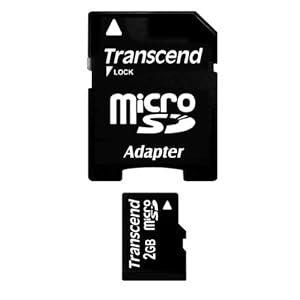
I do and its a Micro SD adapter but the card won't fit into the reader.
Well, if it's a micro sd card adapter, your sd card is also a micro sd card.

I wish I can help you with that, but I can't. :(

When you get it to work, my thoughts were to download the rom to your computer, transfer it to your sd card, put the sd card into the phone, boot into recovery, then wipe and flash the rom.
 
So the sd card from your phone will not fit into that adapter:?
Does your computer have a port for that adapter?
41lw-5S7wcL._SL500_AA300_.jpg

The bottom pic ^^^ is the micro sd card that should be in your phone.
============================


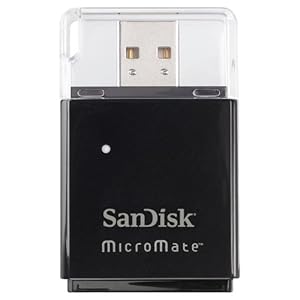
And I am not familiar with this one:
51BdtACbBzL._AA300_.jpg

Your phone sd card will not fit into that one?
 
Which Otterbox case are you using? Is it the Commuter? If so, that is what I use. It is a complete PITA to remove, but I can tell you how to do it. I pull mine off once a month, because I remove and replace the Plasti-Dip Spray coating I use on the exterior of the Commuter. It is just too slippery for me without that rubberized coating to hang onto. Each time I remove the Commuter I learn a little more about making it easier. The key to doing so without damage is to have some plastic tools to use, like a Case Opener, spudger, or even an Orange Peeler. Essentially you need a plastic 'screwdriver' to get started.
 
Would this one work? It is the ROM I am using.
http://forum.xda-developers.com/showthread.php?t=1974114

I am using the second listing, for VRBLK3.

I was looking at that also...yes, he can use it but not sure if it will unroot him or not. If it does, it really is no big deal to root again....I guess at this point, he doesn't have much of an option in my opinion:)

@php....I would read thru the whole op too just to gain more knowledge of what the thread includes:)
 
I did follow step 1 and 2 and in Odin it shows as passed but it doesn't boot up but only in recovery or download mode.
 
You just needed to do step one:
Stock VRBLK3 Factory Image with No Data Wipe ***FIXED (12/10)*** - Link
MD5: 0b579c15f170eba36a6bd44879e0d4e8

The link goes to here:
COMBINATION_I535VRBLK3_I535VZWBLK3_381038_REV09_user_low_ship_NOWIPE_FIXED.tar.md5 | by Open1Your1Eyes0 for Galaxy S 3_VZW

Instructions as per op here:
Step 1 - Flashing the Factory Image
Download and Install USB drivers (Main Download #1)
Download and extract ODIN v3.07 (Main Download #2)
Download the Stock Factory Image with No Data Wipe (Image Download #1)
Boot phone into ODIN mode (See here for how-to)
Flash the flash the factory image using ODIN v3.07 (See here for guide on flashing)
After reboot you should now be on Jelly Bean with all your apps, data, and storage contents in tact
 
I have read the entire thread over there (1000+ posts). Nothing earth shattering hidden within. He updates the files in the OP very well as problems get reported and fixed, so you are safe to use it without having to slog through the entire thread. ;)

That ROM is going to put you back to just as if the phone were completely stock, but be on Jelly Bean (not rooted). That's why he includes the rooting and bootloader unlocking steps toward the end. Just follow it through carefully from start to finish. It worked for me without any problems at all. I am still running that ROM, and the only negative things I have seen, even in the slightest, are that I have had 2 spontaneous reboots on the S3. Once while using Opera Browser, and once while using K9 Mail. I've used both of those apps across multiple Android devices for a few years, so i don't think it was anything they did to cause the reboot. Maybe just a glitch of some sort.

If you are not familiar with Odin, sometimes it takes longer than you would expect it to take to complete certain actions. But it will tell you when it is done. You just have to wait for it.
 
Keep in mind that ROM was designed as a "no-wipe" installation, so when he says

"After reboot you should now be on Jelly Bean with all your apps, data, and storage contents in tact"

He is referring to most people who have not wiped their phone like you did. Once you get the ROM installed, you won't have apps installed aside from what Jelly Bean comes with itself. Just wanted to make that clear. It should, however, allow you access to your SD card. Just make sure and remember there are TWO things called "SD Card" in the S3 (to which I am adamantly opposed!! but I digress). The REAL SD card will be in this path

/mnt/extSdCard

while the internal storage is found in /mnt/sdcard
 
Thank you! I got my phone up and running and I also did the root again.

@Zoandroid: I know you asked me what apps do I have in mind? I know this is a stupid and silly questions for this kind of app because there are probably none, so please forgive me for asking? My bedroom is upstairs and I always use my phone in my bedroom while I'm upstairs, but without me going downstairs to take a picture to see what someone is doing down there, would there be an app where it would like me see what's going on down there, and if needed then take a picture from my room upstairs? I know they are stupid questions? I'm sorry about that
 
Thank you! I got my phone up and running and I also did the root again.

@Zoandroid: I know you asked me what apps do I have in mind? I know this is a stupid and silly questions for this kind of app because there are probably none, so please forgive me for asking? My bedroom is upstairs and I always use my phone in my bedroom while I'm upstairs, but without me going downstairs to take a picture to see what someone is doing down there, would there be an app where it would like me see what's going on down there, and if needed then take a picture from my room upstairs? I know they are stupid questions? I'm sorry about that

Questions are not stupid if they are asked with honesty and sincerity. ;)

You can do that, but the way I know to do it requires an IP camera, such as this one I am using

Wansview Wireless IP Pan/Tilt/ Night Vision Internet Surveillance Camera Built-in Microphone With Phone remote monitoring support(Black):Amazon:Camera & Photo

Then you get an app for your phone to receive the camera's transmission over wifi. Or it can also simply plug into a router, if you don't need it to be used remotely. I prefer IP Cam Viewer Pro by Robert Chou, available on the Store. There is also a way to view it from your computer using a browser and IP address. It requires an IP server, which sometimes costs money depending on who you pick, but it also uses a server which is freely available from the camera vendor if you want to use it. I do. However, understand that means your imagery is indeed going through some unknown remote server, so I wouldn't use such a device unless the location is deemed publicly viewable. No way to know who could be watching the feed at that server. :) Your own access is password protected, and you can even create a shared password and IP address to give to others, allowing them to see the imagery live, but not control the camera.

I use mine to watch over an outbuilding. The software lets me pan and tilt the camera remotely by wifi, and has a motion sensor (which can be turned off, or its sensitivity adjusted) and sends me emailed still shots if motion is detected. But the rest of the time I have full live action video view from a widget on my phone and tablet. I've been running it since last summer and it has been very reliable. On very rare occasions I have had to deal with a loss of signal or email issues, but most of the time it just simply works. Oh, it also has IR night vision. The imagery is color in daylight, but the night vision is B&W.
 
Thank you very much! So I would need to buy a Cam like above, and I can't use an app by itself without any sort of Can in the house?
 
While I'm in my room with my S3 phone, and my desktop PC, and there is no Camera downstairs to view someone. Would this one method work on the website I am going to give? Would it be yes it will work? Or will it be a no it won't work? The website is:


Technology News - CNET News

I know of no way to view an image on your S3 or PC that is not coming from a camera "somewhere". :) I do not understand how that website fits into the equation.
 

That was fun! Maybe I should give it another shot? Lol. I'm joking around. It wasn't fun because I thought I was going to have a massive heart failure due to the fact my phone wouldn't turn on. Who's up next for the task? Lol. It looks I'm in a good mood to joke around. Actually it wasn't fun, and I'm only joking around, but honestly, I'm not going to do it again.
 
Status
Not open for further replies.
Back
Top Bottom