• After 15+ years, we've made a big change: Android Forums is now Early Bird Club. Learn more here.

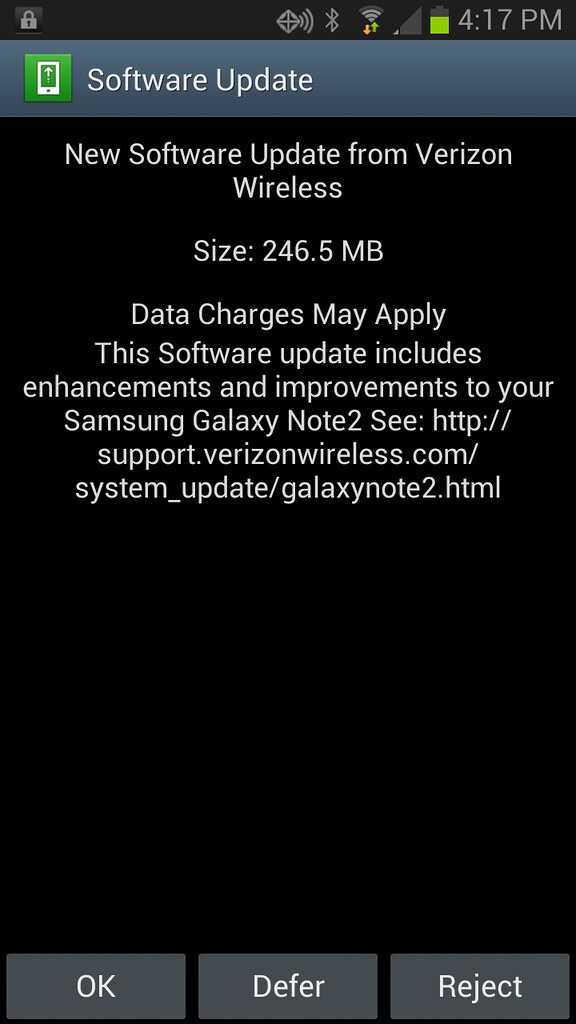
Verizon Note 2 gets Android 4.1.2 plus other goodies

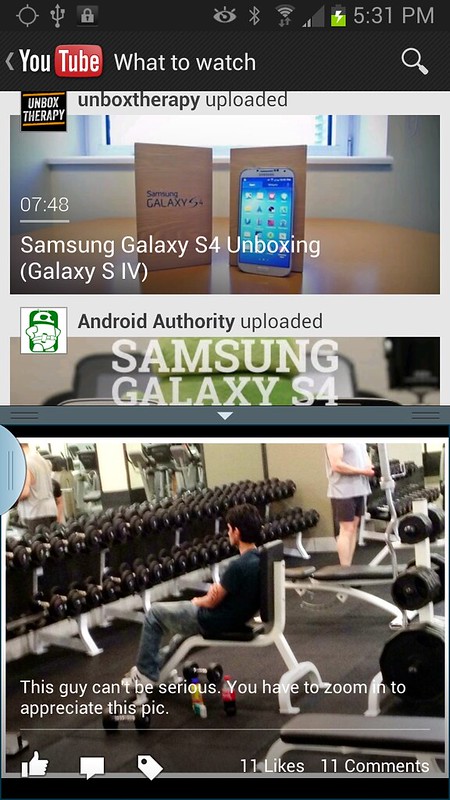
Just got mine..check out all the apps available for multi window now!
 

Attachments

  • 2013-05-02 12.57.17.png
    2013-05-02 12.57.17.png
    106.7 KB · Views: 215
Just another observation: does it seem like screen brightness has been cranked up? Whites seem brighter to me by a good amount. Hope it fixes the battery drain I got with their last update too..
 
Yep, I just checked and the update is ready on my phone. I'm holding off on updating mine for a little bit. Just want to make sure there are no battery issues or any other problems.
 
Haven't really messed with the phone too much, but the one thing I noticed was that the swype path (I use the swype keyboard) is significantly thicker and a different color than it was before. Also noticed the "eye" icon up top in the status bar - could we have possibly gotten the some of smart screen stuff touted for the S4 already?
 
Go to :

Settings > Display > Notification Panel.

You can now customize it after this update.
 
Yep, I just checked and the update is ready on my phone. I'm holding off on updating mine for a little bit. Just want to make sure there are no battery issues or any other problems.

I'm waiting for a confirmation that this is safe, and wont screw anything up.
 
Phone seems faster after update...but it's probably a wishful thinking placebo effect.

Was just thinking the same thing, I'm currently looking for a piece of wood to knock on :thumbup:
 
Any chance this update enabled the blocking mode or is that wishful thinking? I am considering the Verizon Note 2 and that may push me over the edge. :)
 
WARNING : The results of this update may cause you to fall in love all over again w/ your device.:cheers:
Too late :)

Update went smoothly. 10 min and its done! For some weird reason it got stuck on "Galaxy Note 2" screen but as soon as I plugged in external power - phone power cycled and continued (I was doing upgrade while on battery). So, probably a good idea to have your phone plugged in while running upgrade.

The "eye" in the notification bar is Smart Stay enabled by default. That could be disabled. I love how you can customize notification bar, choose 5 essential controls so you don't have to scroll, and also get rid off brightness control slider (I always bump it when pulling notification down). Of course, you get more apps in multi-window.

So far so good!
 
Too late :)

Update went smoothly. 10 min and its done! For some weird reason it got stuck on "Galaxy Note 2" screen but as soon as I plugged in external power - phone power cycled and continued (I was doing upgrade while on battery). So, probably a good idea to have your phone plugged in while running upgrade.

The "eye" in the notification bar is Smart Stay enabled by default. That could be disabled. I love how you can customize notification bar, choose 5 essential controls so you don't have to scroll, and also get rid off brightness control slider (I always bump it when pulling notification down). Of course, you get more apps in multi-window.

So far so good!

Yeah, I got a little nervous when it stayed on the Galaxy Note II logo / screen b/c it was on there for a while, probably half the time it took to update. You hear those horror stories about phones getting stuck on those logo screens w/ updates, but I got thru it. Thank goodness.

No blocking mode from what I see, but someone feel free to correct me if I'm wrong.
 
No SmartStay icon in notification bar on mine (Verizon). I'm running Nova with the notification bar hidden, but can see the icons when bringing up an app or dragging the bar down.

I don't see much diff yet, between this and the 4.1.1.
 
I find this update actually slowed my phone down a tiny bit!

I have rebooted several times and cleared cache by holding volume and home button while the phone is off.

I find nothing new besides more multi window programs that I barely use ever, I give this update a negative.
 
I am digging the update. I like the multitasking options now. I used to never use that feature because it didn't have the apps I wanted like Gmail or maps, but now I have both.

Also, I like that I can customize the layout of the toggle menu in the notification bar.

And my phone seems like it is a touch smoother which is amazing since it was already the smoothest phone ever.

Absolutely no issues with me. Running Nova Launcher Prime.
 
Well my phone runs the same speed, but now the multi window becomes use full with the addition of Gmail, Facebook, You Tube and most importantly Google Maps!! It is suddenl;y what I want multi-window to be in the beginning. Can't wait to try the navigation in a split screen.
 
Back
Top Bottom