• After 15+ years, we've made a big change: Android Forums is now Early Bird Club. Learn more here.

Root Want to root but unsure

sannesley

Newbie
I'm running low on phone memory and want to root the phone to do away with this issue. I have read the guide about how to route on this forum but have a few questions:

When I checked my bootloader version it is 0.93, and there is no guide for that version.

Any help greatly appreciated. I am currently running Android 2.2 and the phone is a monthly contract with Orange as the carrier.
 
Something to bare in mind. If you're on the Orange ROM there is NO way to get back to it should you decide to root and use a custom ROM unless you have an AMOLED screen - and even then it might not work.

Should you need to return the phone you may be stuck
 
I have no insurance out on the phone and the only reason I would want to return it would be for repair if it was defective.
 
I have no insurance out on the phone and the only reason I would want to return it would be for repair if it was defective.

Yes but if it goes defective, you can't return to stock so warranty void. Repair cost comes directly from your pocket
 
Check out the guide in my signature if you just want to root to the most recent desire 2.2 rom without any customisations.

But the people above do make a serious point... it's an important decision.

I take it when you say you have tried the guides in the forum, you mean my noobs guide or similar to force more apps to sd?
 
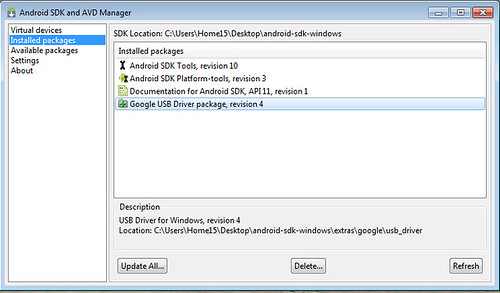
Okay so I installed the Android SDK and AVD Manager to the desktop as in the guide. The screenshot shows what I have installed software wise from the SDK. So I open up a command window after allowing usb debugging and running the HTC sync. I navigated to the SDK location and typed in the command "adb devices". At this stage I get an error which reads "'adb' is not recognised as an internal or external command, operable program or batch file". I did a check and the Google USB driver for my Desire is up to date. Any suggestions where I'm going wrong?


5538130604_b9c8ddf561.jpg
 
Can I have a screen shot of you're cmd window with that error please?

Also what version of the sdk do you have?

Is adb in the folder you're running the command in? See some of my posts in that same thread
 
Problem sorted. For some reason or other the computer couldn't seem to navigate to the "platform-tools" folder which was within the android-sdk-windows folder. In the end I just created a new folder within the tools folder and called it platform-tools and copied all the files over from the platform-tools folder to this new folder.

After this it was simple enough to navigate to this folder from the command line and follow the instructions in the guide. Works a treat
 
Can I have a screen shot of you're cmd window with that error please?

Also what version of the sdk do you have?

Is adb in the folder you're running the command in? See some of my posts in that same thread

Do you still want a screen shot of the cmd window now that I've got it sorted?
 
williamj1 - on your guide it says the first step is to root using unrevoked, but as i and OP are on orange (and have orange ROMs) don't we have to debrand first? :/ i am just about to root but if it will mess up my phone then obvioulsy i'd rather not.. it's just that i don't think your guide states anything about having to debrand first :( haha.. sorry if i'm being ignorant
 
williamj1 - on your guide it says the first step is to root using unrevoked, but as i and OP are on orange (and have orange ROMs) don't we have to debrand first? :/ i am just about to root but if it will mess up my phone then obvioulsy i'd rather not.. it's just that i don't think your guide states anything about having to debrand first :( haha.. sorry if i'm being ignorant

You don't have to debrand. No disrespect to William, but 1 step that says "root with unrevoked" hardly constitutes a guide

Read the rooting faq in my Sig. We rather you understand what you are about to do first. I also link to a step by step rooting guide.

Be aware orange handsets will not return to stock for warranty purposes. Unless its amoled, then it is possible
 
Back
Top Bottom