
Install the app
How to install the app on iOS
Follow along with the video below to see how to install our site as a web app on your home screen.
Note: This feature may not be available in some browsers.
-
After 15+ years, we've made a big change: Android Forums is now Early Bird Club. Learn more here.
You are using an out of date browser. It may not display this or other websites correctly.
You should upgrade or use an alternative browser.
You should upgrade or use an alternative browser.
Help weird icon on my screen
- Thread starter dennhop
- Start date
-
- Tags
- htc thunderbolt
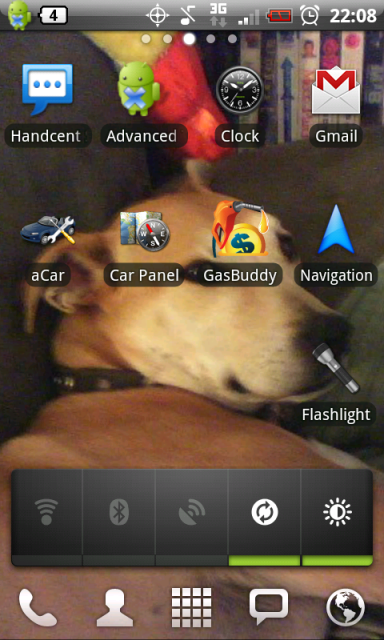
I really hope you arnt talking about the icon between the 3g and gps bc thts telling you your phone is silenced lol
ummmmmmmmmmmmmmmmmmmmm..........

yeahhhhhhh.....about that.....
damn...
...
...
...
I'm an idiot...

Thanks for the chuckle...
I've been there a few times my friend... ;-)
Any time bud! LOL
I know this is kinda dumb, but I just had to do a full factory reset on my TB, long story, and in another post. Now I can't for the life of me remember what that skin was in my original post....anyone help? I really don't like the factory HTC skins, and that one's closer to my droid was setup, so it's easier for me to navigate it.
infinite012
Newbie
Looks like you had a launcher app such as Launcher Pro running the Froyo launcher.
T
TxGoat
Guest
You sure it's an "L on its side"? 


This thread is epic. Lol
You sure it's an "L on its side"?
Yeah, looks like that task killer is working out great for your battery
LOL
Never said I was smart...just over time, I'll figure something out...I figured it was better to stay in the same thread as what I'd started out before, than to start a whole new one, for one single question, that I was going to need to use the same photo for.
As far as the task killer, I've turned it off since, so that it's not running in the background, but after reading through the thread on it, I decided to just keep it in case I did need to nuke an app for some reason or another. Whether or not it truly makes a difference, I don't know-that's for people a lot more knowledgeable than me to figure out...I'm just an average consumer, with a curiosity that gets me in trouble more often than not.

McLabia
Android Expert
LOL
Never said I was smart...just over time, I'll figure something out...I figured it was better to stay in the same thread as what I'd started out before, than to start a whole new one, for one single question, that I was going to need to use the same photo for.
As far as the task killer, I've turned it off since, so that it's not running in the background, but after reading through the thread on it, I decided to just keep it in case I did need to nuke an app for some reason or another. Whether or not it truly makes a difference, I don't know-that's for people a lot more knowledgeable than me to figure out...I'm just an average consumer, with a curiosity that gets me in trouble more often than not.
Revisiting Android Task Killers and Why You Still Don’t Need One… - Droid Life: A Droid Community Blog
Remove the task killer. If you need to kill an app, go into your app management and do it there. App killers do one thing. Kill your battery.

OrigamiKiller
Newbie
-__-