
Install the app
How to install the app on iOS
Follow along with the video below to see how to install our site as a web app on your home screen.
Note: This feature may not be available in some browsers.
-
After 15+ years, we've made a big change: Android Forums is now Early Bird Club. Learn more here.
You are using an out of date browser. It may not display this or other websites correctly.
You should upgrade or use an alternative browser.
You should upgrade or use an alternative browser.
What do you do with Tasker?
- Thread starter dautley
- Start date


Flumme
Android Enthusiast
I use Tasker for setting the volume and alarms, depending on where I am, what I'm doing (off google calendar), time of day, who's calling, and so fourth. It sets my Keyguard when out and about, and disables it at home, sends me a text message of where my phone is with a link to google maps using both net and GPS, if I send a certain trigger phrase to it. Takes a picture of whoever tries to unlock my Keyguard and fails. Many more are in the works, but not ready yet.
Here are some of my profiles. I've written them fairly easy to understand, I hope. They seem out of order internally (context, task, context), but that's because you have to add the second context to a profile after you created the task.
1. Out and about:
Context variable "%where" matches "out"
Task wifi off, all sounds louder.
2. Close to home:
Context state close to home using positioning via net, not GPS.
Task (name) toggle wifi if variable "%where" doesn't match "home".
Context state not connected to my wifi (set this up by inverting state connected to home wifi).
3. At home:
Context state wifi near (my home wifi ssid)
Task (name) set wifi on, set variable "%where" to "home", popup Welcome home!
Exit task (name) set wifi off, set variable "% where" to "out".
4. Keyguard off:
Context wifi connected to home wifi
Task (name) plugin secure settings clear password/wait for unlock.
5. Keyguard on:
Context inverted wifi connected to home wifi
Task (name) plugin secure settings configuration set pin
6. Sound at home days:
Context variable "% where" matches "home"
Task (name) set sounds fairly low
Context time from 07:31 to 22:00
7. Sound at home nights:
Context variable "% where" matches "home"
Task (name) set sounds to mute and really low
Context time from 22:01 to 07:30
Many more to come!
Here are some of my profiles. I've written them fairly easy to understand, I hope. They seem out of order internally (context, task, context), but that's because you have to add the second context to a profile after you created the task.
1. Out and about:
Context variable "%where" matches "out"
Task wifi off, all sounds louder.
2. Close to home:
Context state close to home using positioning via net, not GPS.
Task (name) toggle wifi if variable "%where" doesn't match "home".
Context state not connected to my wifi (set this up by inverting state connected to home wifi).
3. At home:
Context state wifi near (my home wifi ssid)
Task (name) set wifi on, set variable "%where" to "home", popup Welcome home!
Exit task (name) set wifi off, set variable "% where" to "out".
4. Keyguard off:
Context wifi connected to home wifi
Task (name) plugin secure settings clear password/wait for unlock.
5. Keyguard on:
Context inverted wifi connected to home wifi
Task (name) plugin secure settings configuration set pin
6. Sound at home days:
Context variable "% where" matches "home"
Task (name) set sounds fairly low
Context time from 07:31 to 22:00
7. Sound at home nights:
Context variable "% where" matches "home"
Task (name) set sounds to mute and really low
Context time from 22:01 to 07:30
Many more to come!

SUroot
Extreme Android User
Wifi profiles:
Misc profiles:
Thats it for now
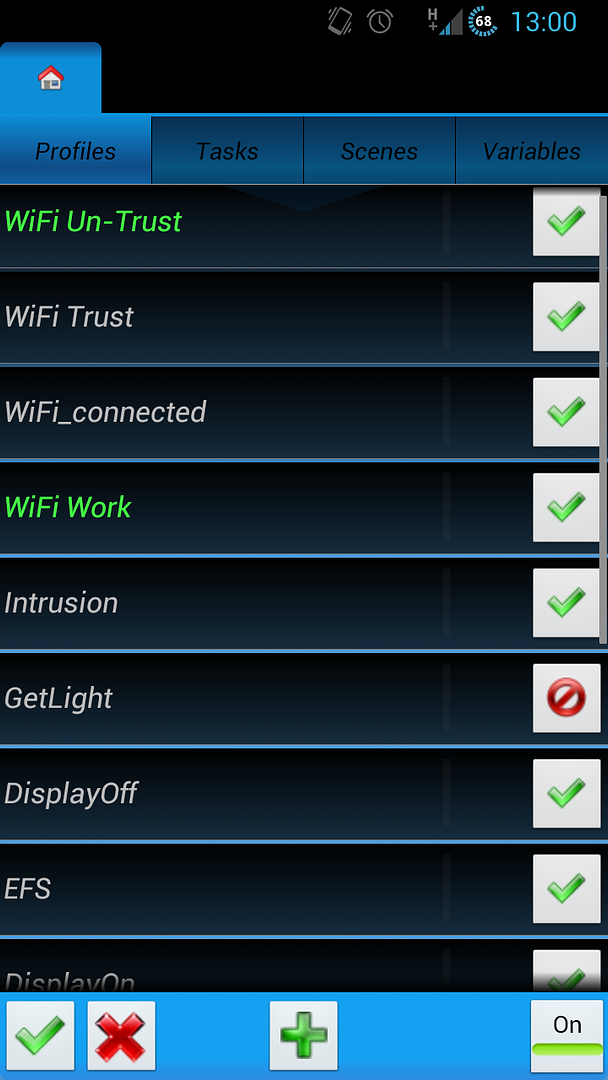
Audio profiles:Wifi work - turns wifi off based on time leave for work. Reverts based on time I return home. If connected to wifi, remains connected until out of range
Wifi trust - connection to trusted wifi network turns off pattern lock
Wifi untrust - opposite of above
Wifi connected - active if connected to wifi. When profile exits (wifi disconnects) wifi is disabled
Sleep week - uses working week bed time to activate silent mode
Sleep weekend - weekend version of shove (mummy lets me system up late)
Misc profiles:
Intrusion - photographs and emails a picture of anyone twice incorrectly entering pattern lock
Step-by-step HERE
Get light - registers the current level of light using the light sensor
Display on - when turning on the display, calls the above profile to get a light level. If over x, sets brightness to y
Step-by-step HERE
Nandroid - Root only. Automatically (and manually) boots into recovery and takes a nandroid backup.
Profile HERE
Home Near / Work - 2 profiles. One that throws up a pop up when I am close to work (to stop me reading Android forums and ensure I get off the bus) and another for on the way home.
logcat - Root only. Runs a logcat whilst I am asleep. Will eventually add Kmsg to this too
Thats it for now

Autosync Off - Turns Off Autosync between the hours of 23:30 & 07:30 (although that varies when I'm on night shift).
2G On - Switches to using a 2G signal when connected to my home WiFi. 3G at my house is terrible and this helps massively with battery life.
WiFi Off - Turns Off Wifi when I've not been connected to Wireless network for 5 or more minutes.
WiFi On - Turns on WiFi when I'm within 400 metres of my flat (has a dependancy on the one below).
Location On - Turns on GPS between 07:15 & 07:45
3G On - Switches to using a 3G when I'm within 400 metres of work (has a dependancy on the one below).
Location Work - Turns on GPS between 17:30 & 18:15.
Based on SU's post above, I also think I'm going to give the Intrusion profile a go.
2G On - Switches to using a 2G signal when connected to my home WiFi. 3G at my house is terrible and this helps massively with battery life.
WiFi Off - Turns Off Wifi when I've not been connected to Wireless network for 5 or more minutes.
WiFi On - Turns on WiFi when I'm within 400 metres of my flat (has a dependancy on the one below).
Location On - Turns on GPS between 07:15 & 07:45
3G On - Switches to using a 3G when I'm within 400 metres of work (has a dependancy on the one below).
Location Work - Turns on GPS between 17:30 & 18:15.
Based on SU's post above, I also think I'm going to give the Intrusion profile a go.

gcobb
Android Enthusiast
I have location profiles where I have the volume, background and a few other things changed. I have BG sync once an hour, I have a Sleep profile a few Scenes for SMS and Phone calls (still need to learn more about that) I had more on my last phone. I just add them as I need them.
jasdjensen
Lurker
thanks for the security one that take the picture that's a nice one.
KaztheMinotaur
Newbie
I use it to:
Speak the sender and body of text messages when I am driving greater than 15 miles per hour.
Silent mode when in church. (based on day and time)
Turn GPS off / on when WiFi connected / not connected.
Turn WiFi on / off based on GPS location (work and home).
Speak the sender and body of text messages when I am driving greater than 15 miles per hour.
Silent mode when in church. (based on day and time)
Turn GPS off / on when WiFi connected / not connected.
Turn WiFi on / off based on GPS location (work and home).

CarsnGadgets
Android Expert
some of my more interesting tasks:
1. turn screen brightness to 10% when I launch the Kindle app, and set it back to default when I exit it.
2. say "connected to the network sir" when it joins a wifi network.
3. turn off wifi and APN data when its connected to AC power, and back on when its unplugged.
4. reset all volumes to pre defined levels when I say the phrase "reset volumes" using the UTTER app by Ben Randall.
1. turn screen brightness to 10% when I launch the Kindle app, and set it back to default when I exit it.
2. say "connected to the network sir" when it joins a wifi network.
3. turn off wifi and APN data when its connected to AC power, and back on when its unplugged.
4. reset all volumes to pre defined levels when I say the phrase "reset volumes" using the UTTER app by Ben Randall.
tatootie67
Member
I use it to:
Speak the sender and body of text messages when I am driving greater than 15 miles per hour.
Silent mode when in church. (based on day and time)
Turn GPS off / on when WiFi connected / not connected.
Turn WiFi on / off based on GPS location (work and home).
How do you get tasker to know you're traveling faster than 15 mph?
KaztheMinotaur
Newbie
How do you get tasker to know you're traveling faster than 15 mph?


tatootie67
Member
So it's%LOCSPD.
Nice, I was not aware of that variable. Thank you
Nice, I was not aware of that variable. Thank you
KaztheMinotaur
Newbie
You're welcome. Just make sure to convert from m/s to MPH. 
SUroot
Extreme Android User
How did you override the tasker tick boxes? Or does it simply use the theme defaults?
KaztheMinotaur
Newbie
Not sure what you mean. I had this profile before I updated Tasker to 4.0 beta yeserday.
KaztheMinotaur
Newbie
Ok, my bad.
The slide buttons came with the update.
The slide buttons came with the update.
KaztheMinotaur
Newbie
Yeah. Check the Tasker Google group.
phonephreak32
Member
what is the link to update? im on 1.3.3. i never got an update from the play store
phonephreak32
Member
if you install the beta can you go back to the last final release?