
Install the app
How to install the app on iOS
Follow along with the video below to see how to install our site as a web app on your home screen.
Note: This feature may not be available in some browsers.
-
After 15+ years, we've made a big change: Android Forums is now Early Bird Club. Learn more here.
You are using an out of date browser. It may not display this or other websites correctly.
You should upgrade or use an alternative browser.
You should upgrade or use an alternative browser.
what icons do you have?
- Thread starter amerika
- Start date
-
- Tags
- motorola droid x

Hrethgir
Android Expert
I use whatever I want. Downloaded a red/black icon pack, but not every icon I had on my homescreen had an icon available, and some of the ones that did, I didn't like. But with ADW Launcher, if you long-press on an icon and then hit Edit, you can change the icon to whatever you want. So I just surf Google Images until I find something I want to use for an icon, save it to the phone, and then assign it to that icon. I don't ned no steeking icon packs, LOL!


amerika
Newbie
i am an absolute penguin fanatic so i love these icons except since none of them have any meaning for what i would use them for, i would constantly click on the wrong thing.
Linux Penguin avatars collection | LordofDesign.com - Download free graphic design, vector, brushes, psd, photoshop
Linux Penguin avatars collection | LordofDesign.com - Download free graphic design, vector, brushes, psd, photoshop

foo
Android Enthusiast
if you look in the "What does your X screen look like" thread (here), you can probably get a better idea of some great icon packs people use
my current one:
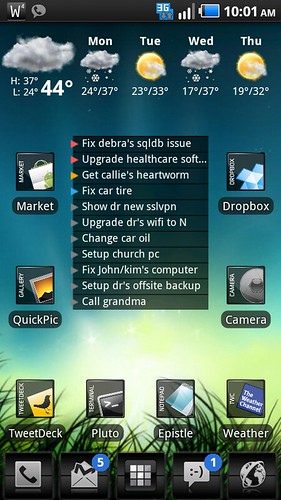
also, this has been a great thread of icon pack collections:
ICON SETS | OVER *300* different Icon Packs - xda-developers
my current one:
also, this has been a great thread of icon pack collections:
ICON SETS | OVER *300* different Icon Packs - xda-developers

Turdbogls
Android Expert
MINE, from the market (gloss orbz or something like that) for most of them (had to get creative with some stuff like the market for instance) all the other ones you could want can be found here
Orbz icons

Orbz icons
Hrethgir
Android Expert
hahaha, right on.
i was using launcher pro, what's the major difference between that and ADW?
seems it's kind of 50/50 on who prefers what.
I used to use Launcher Pro, but switched to ADW because I was having Force Closes multiple times a day from LP. It was something to do with the autorotate. So I switched, and I like the themes available in the Market for ADW, they make a nice base to start from, so I've just stayed with it.
karma2burn
Well-Known Member
MINE, from the market (gloss orbz or something like that) for most of them (had to get creative with some stuff like the market for instance) all the other ones you could want can be found here
Orbz icons
I use the same icons and love them. They were the first and only ones I installed.

nj02vette
Android Expert
Using Launcher Pro and never had an issue even once with a Force Close.
However, I did disable auto rotate. I'm not a fan of that feature with icons switching around all the time. That seems to give most of the headache. Anytime I see someone with LauncherPro problems, inevitably they have auto rotate enabled.
However, I did disable auto rotate. I'm not a fan of that feature with icons switching around all the time. That seems to give most of the headache. Anytime I see someone with LauncherPro problems, inevitably they have auto rotate enabled.
Turdbogls
Android Expert
I use the same icons and love them. They were the first and only ones I installed.
same here...i have just started looking around for others, but nothing looks as good IMO.
Hrethgir
Android Expert
Using Launcher Pro and never had an issue even once with a Force Close.
However, I did disable auto rotate. I'm not a fan of that feature with icons switching around all the time. That seems to give most of the headache. Anytime I see someone with LauncherPro problems, inevitably they have auto rotate enabled.
I like autorotate, so that is a problem with LP that I couldn't deal with. I have since found that you can disable the homescreen autorotate while leaving it working on the browser (where I want to use it most often), but I'm hooked on ADW now, so I'm not going to switch back right now.

Doit2it
Android Expert
i am an absolute penguin fanatic so i love these icons except since none of them have any meaning for what i would use them for, i would constantly click on the wrong thing.
Grow your own. I used the penguin icon pack you listed and an icon pack I found HERE to create this:

Use any good editing software. I use PaintShopPro, but Gimp is free. Yes there is a learning curve, but once you get the hang of it, you can create stuff like this in a few minutes (longer if you're OCD and gotta get it just right, like me).
And before you ask, sorry, I won't make more. This is just an example. While I'm decent at it, it can be tedious work. I've gotta have a passion for it. My penguin passion has peeked and my probability of perpetuating the project has passed. Sorry

gwcaton
Android Expert


ylexot
Android Expert
Simple Text - make your own.
https://market.android.com/details?id=com.redphx.simpletext&feature=search_result
https://market.android.com/details?id=com.redphx.simpletext&feature=search_result