
Sorry I don't have a screenshot, but every once in awhile - usually in the morning - I see a small icon in the upper right, near the signal indicators, that looks like a phone handset with 5 or so small horizontal bars surrounding it. I can't find reference to it in the manual, and the verizon store rep said she thinks it "might" be the backup assistant. Anyone see this and have any ideas?
Install the app
How to install the app on iOS
Follow along with the video below to see how to install our site as a web app on your home screen.
Note: This feature may not be available in some browsers.
-
After 15+ years, we've made a big change: Android Forums is now Early Bird Club. Learn more here.
You are using an out of date browser. It may not display this or other websites correctly.
You should upgrade or use an alternative browser.
You should upgrade or use an alternative browser.
Help What is this icon?
- Thread starter BigRoach
- Start date
-
- Tags
- htc rezound
T
TxGoat
Guest
Sorry I don't have a screenshot, but every once in awhile - usually in the morning - I see a small icon in the upper right, near the signal indicators, that looks like a phone handset with 5 or so small horizontal bars surrounding it. I can't find reference to it in the manual, and the verizon store rep said she thinks it "might" be the backup assistant. Anyone see this and have any ideas?
You can take screenshots without rooting the phone, power and home button.
You can take screenshots without rooting the phone, power and home button.
Yep - I just haven't had an opportunity to catch my phone when it's there and I'm coherent enough to do something about it... early morning + no coffee = no good!
Yep - I just haven't had an opportunity to catch my phone when it's there and I'm coherent enough to do something about it... early morning + no coffee = no good!
I'm not sure, but I think that's for the sound setting, either silent or vibrate. Maybe it starts out on that and then after coming up fully it goes to the last setting it was at.
It could also be no service, but IIRC that's a little x just above the signal meter.

T
TxGoat
Guest
Are they curved bars? Sounds like the GPS is updating. Does it look like the bottom icon here?
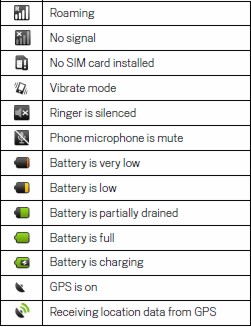

It isn't set on vibrate, and unfortunately no, it isn't in that list of icons, above. I still haven't been able to catch it when it's on-screen, and it isn't in the HTC manual... I'll post a screenshot as soon as I can.
Yea definitely try to catch it and let us know
Yeah, I'm sorry I can't post it - as I mentioned, I can't reproduce it (can't figure out what made it come up - but it's on the right side of the notification bar, so would seem to be system-related, and not from an application I've installed), and I haven't seen it in a few days. However, this is a rudimentary MS Paint drawing of what it looked like:

Attachments

T
TxGoat
Guest
Yeah, I'm sorry I can't post it - as I mentioned, I can't reproduce it (can't figure out what made it come up - but it's on the right side of the notification bar, so would seem to be system-related, and not from an application I've installed), and I haven't seen it in a few days. However, this is a rudimentary MS Paint drawing of what it looked like:
Wow, that's an odd looking notification. I can't say I've ever seen that one, then again you said you created it out of MS paint. I'll see if anyone I know has ever seen it.
Oh and for the record, it looks like an alien space ship from the old Atari games I used to play with as a kid


T
TxGoat
Guest
Maybe it's for the TTY setting. I dunno, I turn on TTY and make a call but that icon doesn't show up.
I think you're right about that actually. It looks like it's a setting for the Hearing Impaired.
OP, do you have any accessibility devices or have you ever had any accessibility devices installed (No need to answer here, just a question to ask yourself)? Maybe the phone is looking for that device that was once connected. I know they make some devices that attach to the phone that enable voice to text or some other accessibility option. If you've never had such a device installed then you may have a defective unit that's picking up the signal needed to register such a device has been installed.
Interesting thought, and I agree, it makes sense. I don't see an icon next to the TTY section in the manual, so I'm not sure if they have one that specifically shows when it's in use - but I did check and apparently, it was turned on on my phone, set to "Full". Although I haven't seen the icon since I initially posted, I certainly don't see it now - hopefully, that's the answer (and thanks, if so!).
T
TxGoat
Guest

Agreed - good job! My drawing is close, but not the best, obviously - but I'm pretty sure that was it. Funny, too - if you google "htc tty icon" there are a couple threads about it on other forums (even one on howard from 2007, although that's actually for the iPhone); strange that HTC still isn't including a pic of it in the manual.