
• After 15+ years, we've made a big change: Android Forums is now Early Bird Club. Learn more here.

Root When will rooting be available for GB 2.4.4?

I tried to downgrade the version to 2.3.3, but I keep running into issues and I'm afraid I will brick my phone inadvertently. Is there a timetable on when a root will be available for 2.4.4?
 
I tried to downgrade the version to 2.3.3, but I keep running into issues and I'm afraid I will brick my phone inadvertently. Is there a timetable on when a root will be available for 2.4.4?

2.4.4? I think you mean 2.3.4.

I don't think anyone is working on a way to root right from 2.3.4.

Post what type of problems you are having and maybe we can help. Completely read through the two link located in my signature.
 
2.4.4? I think you mean 2.3.4.

I don't think anyone is working on a way to root right from 2.3.4.

Post what type of problems you are having and maybe we can help. Completely read through the two link located in my signature.

Sorry, that is what I meant. I've actually tried following this walkthrough already, but I run into an issue.
At the part where I'm supposed to "Exract All" of the zip file, it's not giving me the option to do that. When I extract the files out, all of the files just appear on my desktop. I'm using Windows 7, will this cause issues?

I even watched a video on how to do it. I just don't have the "Extract All" option that allows me to put everything into 1 folder, and then put it on my C drive. I used this link as well:
[Tool] Downgrade VivoW with hboot 0.98 - xda-developers
 
Is this the step you are referring to?

Prepare the files
Unzip the VivoW file to a folder on the root of your C: drive (makes finding the directory with the command prompt much easier). You can call it anything; lets say you call this folder “Android”. I found it easier to manage with all files in the same directory. I copied the files from Android\tools\win\ and pasted them to the root of the Android folder.

For this all I did was create a folder called "Android" as indicated in this step. Place the downloaded .zip file in there and extract. It will dump all the files in the "Android" file.
I used Windows 7 so that will not be a issue.
 
I'm getting this when I type in the command "adb devices" at the cmd screen, what does this mean?

'adb' is not recognized as an internal or external command, operable program, or batch file.
 
Open CMD.exe as Administrator
In Windows 7, the easiest way to do this is to put “cmd” in the search bar in the Start Menu. When it pops up at the top of the start menu, right click on it and choose “run as administrator”.

Navigate to your file location. For an Android folder located on your C: drive, it would look like the following:

android.png

Once there, you can test adb by typing “adb devices” at the prompt and hitting enter as shown above.
 
UPDATE: So I just moved the files to the android folder root, they were there but just deeper in files so the prompt wasn't activating.


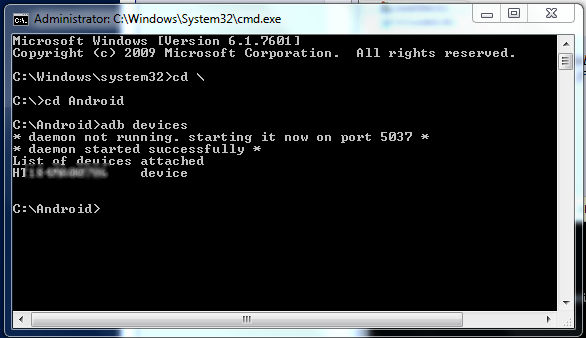
I an running it as admin, here's what I did and here's what happend:


Microsoft Windows [Version 6.1.7601]
Copyright (c) 2009 Microsoft Corporation. All rights reserved.

C:\windows\system32>cd \

C:\>cd Android

C:\Android>adb devices
'adb' is not recognized as an internal or external command,
operable program or batch file.

C:\Android>adb devices
'adb' is not recognized as an internal or external command,
operable program or batch file.

C:\Android>
 
Sounds like the files did not get placed into your Android directory correctly.

While at c:\Android can you run DIR /W and post a screen capture or tell us what files show up?
 
So after a confusing couple hours I'm finally rooted with the Superuser app and everything. Question is, what should I do now? Apps?
 
So after a confusing couple hours I'm finally rooted with the Superuser app and everything. Question is, what should I do now? Apps?

Very first steps i usually take ...

1) reboot into Recovery, and go through the steps to Backup

2) download Rom Manager, do a second backup from within there. I usually name it "Fresh.After.Root"

3) download favorite Rom, I'd suggest this thread for starters as it has some download links:
http://androidforums.com/incredible...647-ok-im-rooted-whats-your-daily-driver.html

4) download the ROM and put it anywhere on your SD Card. I usually make a folder called "ROMs" or something. Now boot into recovery and go to Flash Zip From SD Card ... let it do its thing

when it finishes, boot into your new rom. load your apps, set it all up, and run a new backup.

enjoy
 
So after a confusing couple hours I'm finally rooted with the Superuser app and everything. Question is, what should I do now? Apps?

Glad to see you got it to work. Let the fun begin. A question for you is what do you want to accomplish now that your phone is rooted? What drove you to decide you wanted to root your phone.

This is a good source for most of the ROMs available for this phone.
Droid Incredible 2 Android Development - xda-developers

I'm current running the Mikrunny ROM which is Android 2.3.5 and Sense 3.5.
MikRunny v1.01 [ Sense 3.5 | GB 2.3.5 | 12/24/2011 ]
 
For apps I would start with Titanium backup and ROM manager. Titanium backup will allow you to backup your apps and freeze any unwanted bloatware apps if you are not going to load a custom ROM.
 
So I bought Titanium Pro, and merge it with Dropbox. So when I back up everything via Titanium Pro, how would I access it if my phone was wiped? Through Dropbox?

Also, I'm confused about the "flashing mods" thing like Cyanogen. Is there a website/post dedicated to explaining what these things do? Is it like a regular launcher (GO, ADW, etc)?
 
Cyanogen isn't a mod. It's a ROM. A complete replacement of the base firmware on the phone. Like changing from XP to Vista or Windows 7. Launchers are just apps.
 
So what makes these ROMs better than the original? Are they just really enhanced? Are they made to fit specific needs of the individual interested?
 
Some people like MIUI for it's looks, some say it's too iPhoneish. Some people can't stand Sense and run Cyanogen. Some Sense ROMs include "tweaks". There are ICS ROMs. You can change kernels so you can undervolt and overclock....
 
I downloaded cyanogyn from Rom manager, after backing up my current Rom. So apparently there is no android market app,so I can't download anything. Also, when I tried to restore to my old Rom out of frustration, the process is failing and informs me my Rom Manager app may be out of date.
 
I don't use ROM Manager. You should be able to restore the nandroid from Recovery. With Cyanogen you also have to flash gapps.
 
I downloaded cyanogyn from Rom manager, after backing up my current Rom. So apparently there is no android market app,so I can't download anything. Also, when I tried to restore to my old Rom out of frustration, the process is failing and informs me my Rom Manager app may be out of date.

Before installing a ROM make sure to read the instructions completely. You can find the gapps in the OP here.
http://forum.cyanogenmod.com/index....he-HTC-Incredible-2-::-V7.1.0.1-(11-Oct-2011)
 
Back
Top Bottom