• After 15+ years, we've made a big change: Android Forums is now Early Bird Club. Learn more here.

Accessories Why not just buy HDMI cable instead of dock?

Camel

Lurker
Instead of buying the multimedia dock, can't you just buy a HDMI cable and use it as if it were the dock? Also, I'm guessing the bluetooth keyboard and mouse connect to the phone instead of the dock itself so you could just purchase the the keyboard and mouse separately.


HDMI cable: $1 ~ $10 via ebay.
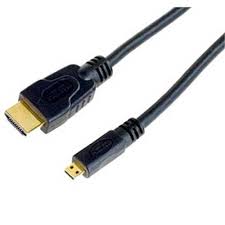
images


Bluetooth Keyboard: $20 and up for full-size keybaords via ebay.
n4QqdYG701jqaXNKz9vEbCBbaQoNaYL1XlL7J++mPnoYzyM6XqPjmgt9tEIkXmsK


Bluetooth Mouse: $15 and up via ebay.
LOG_M_V470_BLUE.jpg


Total: $36 or higher.

Am I misunderstanding something or is the $189 price tag just for a shiny plastic dock that has HDMI cable in it?
 
Instead of buying the multimedia dock, can't you just buy a HDMI cable and use it as if it were the dock? Also, I'm guessing the bluetooth keyboard and mouse connect to the phone instead of the dock itself so you could just purchase the the keyboard and mouse separately.


HDMI cable: $1 ~ $10 via ebay.
images


Bluetooth Keyboard: $20 and up for full-size keybaords via ebay.
n4QqdYG701jqaXNKz9vEbCBbaQoNaYL1XlL7J++mPnoYzyM6XqPjmgt9tEIkXmsK


Bluetooth Mouse: $15 and up via ebay.
LOG_M_V470_BLUE.jpg


Total: $36 or higher.

Am I misunderstanding something or is the $189 price tag just for a shiny plastic dock that has HDMI cable in it?

Ya I dont get why people are saying $190 is fair for the bundle. That seems like an absolute ripoff to me...
 
At first I thought I would do this but if you just plug an hdmi cable to the phone you won't be able to use webtop. Also the Motorola keyboard has the buttons that the phone has so you can control it from the keyboard. Regardless videos have shown that simply plugging up an hdmi cable won't give you the option to use webtop.
 
At first I thought I would do this but if you just plug an hdmi cable to the phone you won't be able to use webtop. Also the Motorola keyboard has the buttons that the phone has so you can control it from the keyboard. Regardless videos have shown that simply plugging up an hdmi cable won't give you the option to use webtop.

Actually, if you watch a video demoing the multimedia dock, you'll see the first option on the phone is the Webtop application.
 
Actually, if you watch a video demoing the multimedia dock, you'll see the first option on the phone is the Webtop application.

Read before you post -.-

At first I thought I would do this but if you just plug an hdmi cable to the phone you won't be able to use webtop. Also the Motorola keyboard has the buttons that the phone has so you can control it from the keyboard. Regardless videos have shown that simply plugging up an hdmi cable won't give you the option to use webtop.
 
At first I thought I would do this but if you just plug an hdmi cable to the phone you won't be able to use webtop. Also the Motorola keyboard has the buttons that the phone has so you can control it from the keyboard. Regardless videos have shown that simply plugging up an hdmi cable won't give you the option to use webtop.

Could you possible post a link to the video you found that shows the Atrix not giving an option to use the Webtop interface? I've seen videos showing the media center already running with a straight HDMI cable, I've seen videos of someone selecting an option for the media center when plugging in an HDMI cable (couldn't see the other options), and I've seen which shows someone running Citrix off of an Atrix plugged directly into an HDMI cable. http://www.youtube.com/watch?v=KjOND67hYCE

I find the video I linked very intriguing as it shows the Atrix being used as a touchpad and it shows him selecting an option to go back to Citrix when unplugging and re-connecting the cable. It however doesn't show the options on the screen with any clarity.

As far as the keyboard is concerned, I would assume that the functionality would be similar to using a Windows BT keyboard on an Apple product. The keys to the left and right of the spacebar may be mapped differently, but the majority of the functionality will be there. Especially if the webtop is Debian based as has been posted in several places.


Update: In fact, the video shows the poster using the same Microsoft BT keyboard I am using with my iPad.
 
Could you possible post a link to the video you found that shows the Atrix not giving an option to use the Webtop interface? I've seen videos showing the media center already running with a straight HDMI cable, I've seen videos of someone selecting an option for the media center when plugging in an HDMI cable (couldn't see the other options), and I've seen which shows someone running Citrix off of an Atrix plugged directly into an HDMI cable. http://www.youtube.com/watch?v=KjOND67hYCE

I find the video I linked very intriguing as it shows the Atrix being used as a touchpad and it shows him selecting an option to go back to Citrix when unplugging and re-connecting the cable. It however doesn't show the options on the screen with any clarity.

As far as the keyboard is concerned, I would assume that the functionality would be similar to using a Windows BT keyboard on an Apple product. The keys to the left and right of the spacebar may be mapped differently, but the majority of the functionality will be there. Especially if the webtop is Debian based as has been posted in several places.


Update: In fact, the video shows the poster using the same Microsoft BT keyboard I am using with my iPad.

here are two videos showing the difference.

Correct me if I'm interpreting this incorrectly but from this video showing it directly connected through HDMI only at ~30 seconds you see: Music, Pictures, Video and Settings.

Now looking at this video showing it connected through the HD dock at 2:44 in you have the options Music, Pictures, Video, Start Webtop and Settings.

So the HD Dock gives you the Webtop option and the Firefox full browser, so the dock does seem to provide more than just a connection convenience.
 
here are two videos showing the difference.

Interesting. The video I found was posted about 8 days before CES, I wonder if it was an earlier prototype or if the phone was further locked down for CES.

It looks like the phone is capable of running the webtop with just the HDMI cable, it's a matter of if the option will be there.
 
Having hands on with the atrix i can tell you right now plugging in the HDMI directly to the phone auto activates multi media mode, and turns the phone into that remote interface. Webtop is a dock only feature (until it gets hacked of course)

AT&T tracks webtop itself, not the docks. so until there is a hack around it, there is no way around it.


(and the atrix doesnt have support for BT mouse)
 
Marc,
Do you know if the dock will be offered by itself, as has been hinted at on Amazon, or if it will only be sold as a bundle with the keyboard, remote, etc?

Laptop dock pricing aside, I'm still interested in this phone and would pay $60 for the dock, but $200 is a bit much, especially for extra items I do not need/want.

My 3GS is about in need of replacement and it seems the more I keep looking for an Android phone I like, the more reasons I find to wait until the iPhone 5 is announced.
 
Having hands on with the atrix i can tell you right now plugging in the HDMI directly to the phone auto activates multi media mode, and turns the phone into that remote interface. Webtop is a dock only feature (until it gets hacked of course)

AT&T tracks webtop itself, not the docks. so until there is a hack around it, there is no way around it.


(and the atrix doesnt have support for BT mouse)

So i guess the webtop mode has to be hacked and fingerprint or checkin value changed... who knows a lot about Citrix?
 
So i guess the webtop mode has to be hacked and fingerprint or checkin value changed... who knows a lot about Citrix?

From what I can gather from watching several videos, the Citrix client just runs in the Webtop. After what Marc said, I'm guessing that what we saw in the video was a pre-production model that didn't have the Webtop locked down to only the docks. From previous videos I've seen, the webtop will return to it's previous state when plugged in to a dock, so I'm going to assume the guy in the video had the Citrix client open when it was disconnected.

Unless the phone is detecting the type of display from the HDMI and only providing appropriate options, (IE: only gives webtop options when connected to an actual computer monitor, not when connected to a TV) we'll have to wait for a hack, 3rd party device, etc. before we can get the webtop via other means. Like I said earlier, I'd be willing to pay $60 for the dock if it's sold by itself, maybe even $90 for the dock and remote, but I'm not going to pay an extra $100 for a bluetooth keyboard I don't need.
 
Greetings. First Post!

I was looking at the Atrix to replace my N900 but the stupid crap Nokia announced today pretty much guaranteed I'm switching to Android.

So I came here to learn a bit.

Anyway, I've got some ideas but I sure wish I could get somebody with review hardware to check them out.

One thing not discussed is the Atrix apparently has USB Host capability. That is, it can be either a USB slave like most phones where you plug it in and it appears as a mass storage device OR it can be a USB host (with the help of the cradle or laptop dock) where you plug mice or keyboards into it.

So it may be possible that the key to triggering the webtop option is triggering the USB host capability.

If Motorola adhered to the standard for this capability (known as "USB on the go"), then it is pretty easy to build a special cable to put it into host mode. You just have to ground the "extra" pin in the micro-usb cable. There are 5 pins in a micro USB cable but only 4 are needed to be a USB slave (power, ground, D+ and D-).

I had an old Nokia N810 with "USB on the go" capability and I have an adapter just waiting to be tested. If this is the case, it should be super easy and super cheap to build your own "multimedia dock". All you would need is an HDMI cable, a special "micro-USB male to USB A female" adapter and a plain old powered USB hub.

Now Motorola may have built some special handshaking into the cradle or laptop dock, but they might not. If anyone knows anybody with a review unit I would be willing to mail them an adapter and instructions to test.

David
 
So it may be possible that the key to triggering the webtop option is triggering the USB host capability.

It has also been suggested that it may be as simple as magnets in the dock. Either way, I don't think it will take too long for a workaround to be found.
 
The dock plugs into both the USB port and the HDMI port. I haven't taken the time to plug both into my laptop yet to see what happens but the phone comes with both cables.
 
The dock plugs into both the USB port and the HDMI port. I haven't taken the time to plug both into my laptop yet to see what happens but the phone comes with both cables.


The phone has a "web top connector" app in the app tray, anyone try plugging it in and hitting that app?
 
Still haven't messed with it but if you hit webtop connect while plugged into USB port you get your phone on your laptop.

through a chrome browser that is.

I would venture that in order to use it with an actual laptop you will need an emulator of the proprietary laptop they offer.
 
I have a demo unit from the local ATT guy. Waiting on the demo dock.

I am paired to a BT mouse and I have tried connecting via my micro hdmi cable to my TV.

The only options I get are; media player or no action.
 
It works, just tried it. I ssh'd into my Atrix and ran the command /osh/etc/init.d/startX.sh. Of course I don't have a keyboard or mouse I can use with it yet.
 
I have a g2x for T-Mobile and think i found an HDMI cord with USB end can i use this to use my phone as a laptop screen unfortunately my laptop screen broke
 
And please no difficult words i guess u could call me a noon r whatever. But everything I've done over founnd out on my own so i know a lil bit u could say
 
Back
Top Bottom