• After 15+ years, we've made a big change: Android Forums is now Early Bird Club. Learn more here.

Root Wifi issue after root

Chaznsc

Android Enthusiast
I rooted my Dx a couple of months back and now cannot get on my office wifi. I had not noticed because I rarely use the office wifi but rooting is the last known variable that's changed. I manage the office network and know nothing there has changed. I've rebooted everything, but no dice.Home wifi works fine, and nothing has changed at the office, it simplify won't connect. It sometimes gets to the OBTAINING IP ADDRESS, but won't ever make the connection.

Is it possible rooting changed or added a flaky wifi driver, etc?

Chaz

 
I rooted my Dx a couple of months back and now cannot get on my office wifi. I had not noticed because I rarely use the office wifi but rooting is the last known variable that's changed. I manage the office network and know nothing there has changed. I've rebooted everything, but no dice.Home wifi works fine, and nothing has changed at the office, it simplify won't connect. It sometimes gets to the OBTAINING IP ADDRESS, but won't ever make the connection.

Is it possible rooting changed or added a flaky wifi driver, etc?

Chaz

In Settings | Wireless & networks | Wi-Fi settings

Is your office network listed?

When you select it and type your password does it logon?

Do you perhaps have an old entry under Managed networks for your work wi-fi that has an old password?

... Thom
 
In Settings | Wireless & networks | Wi-Fi settings

Is your office network listed?

When you select it and type your password does it logon?

Do you perhaps have an old entry under Managed networks for your work wi-fi that has an old password?

... Thom

Thom,
I cleared out my MN, but it still will not connect. The SSID for the network is broadcast and it SEES the SSID. Whats strange is:

1 - Pre-root it used to connect, and nothing's changed on the network
2 - Earlier this week it would try to get an IP address
3 - Now it just "searches" then quits.
4 - My iPad connects fine, my Kindle Fire also will NOT connect.

If you or anyone have any thoughts I would appreciate. Thanks for your valuable input.

chaz_
 
Could the Fire connect previously? If so, then it is a network issue, not a device issue. Can you reboot the wifi router?

Sent from my DROIDX using Tapatalk
 
Could the Fire connect previously? If so, then it is a network issue, not a device issue. Can you reboot the wifi router?

Sent from my DROIDX using Tapatalk

I only recently got the Fire, so dont know.

Its back to "OBTAINING IP ADDRESS".....waits a minute, then disengages. Starta the process all over. Is there a log on the device that can be looked at?
 
Back to my original question. Does rooting change anything that might affect wifi on some networks? Th only variable that's changed is the Dx.
 
No.

Sent from my DROIDX using Tapatalk

Damn....LOL

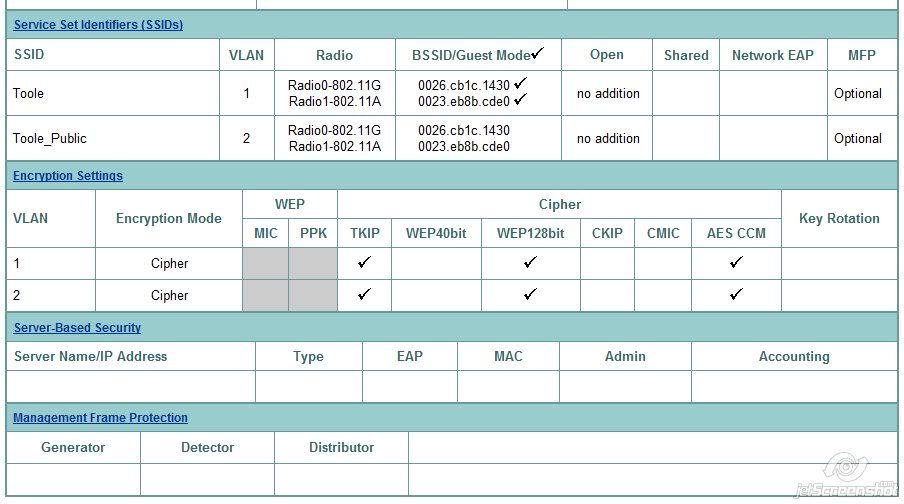
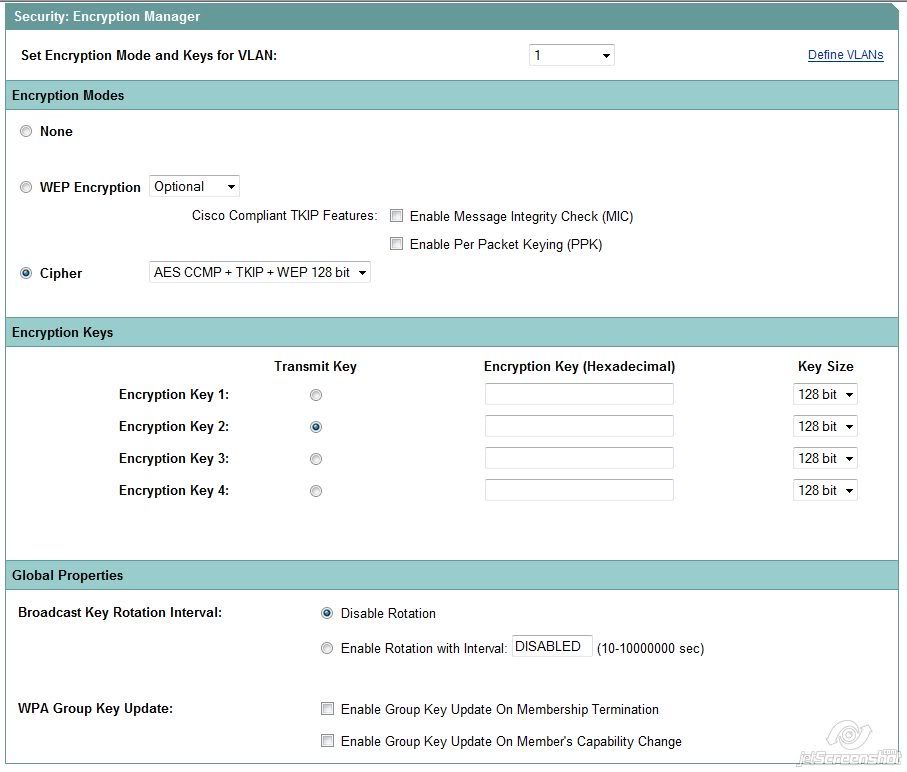
Im not a Wireless expert, but am uploading some of the security settings I have set that have been working and work for everything else we have in the office.......comments welcomed.

chaz_

ssid1.jpg


ssid2.jpg
 
Back to my original question. Does rooting change anything that might affect wifi on some networks? Th only variable that's changed is the Dx.

The root-ing does not nail you. What nails you is the accidental mistakes you make after you are root-ed. (Yes we all make mistakes.)

... Thom
 
I assume you installed Super User (or Super User Elite). Did you authorize SU to ANY applications? If the answer to either is no then you have no exposure.

If you did, those applications have the possibility of damaging the system or other applications.

It seems odd to me that you have no problem with your home router and you have a problem with two devices connecting to your work router. It would seem logical that the problem is not in your Bionic.

I'm using a NetGear router in my office so I can't help much with your configuration question. WiFi was rock solid before root-ing, while root-ed, and after reverting back. I connect my Droid X and Bionic constantly.

... Thom
 
I assume you installed Super User (or Super User Elite). Did you authorize SU to ANY applications? If the answer to either is no then you have no exposure.

If you did, those applications have the possibility of damaging the system or other applications.

It seems odd to me that you have no problem with your home router and you have a problem with two devices connecting to your work router. It would seem logical that the problem is not in your Bionic.

I'm using a NetGear router in my office so I can't help much with your configuration question. WiFi was rock solid before root-ing, while root-ed, and after reverting back. I connect my Droid X and Bionic constantly.

... Thom

How can I check what super user has access to?

What I find odd in addition to your list is that only my 2 android devices do not connect to my office network, but every other device, from phones to tablets (Samsung tab 7 plus) to notebooks, etc without a hitch.

Thanks for everyone's input.

Chaz
 
Back
Top Bottom