• After 15+ years, we've made a big change: Android Forums is now Early Bird Club. Learn more here.

WonderMedia WM8650

You know...that is really crazy because it should have worked. Try it again and see what happens. I went searching really quickly around the internet and on that site and those are the same exact directions I got when I rooted my tablet.

I think mine also rebooted with the Uberoid over and over again until I tried again. I think it was the part about the "figure what device you have" that threw me off so many times.

If that doesn't work, a reboot should bring back the original Android OS you had.
 
hello. i have the wondermedia 8650 tablet and have done factory reset on it. I now do not have a browser to go to. Could you please advise of how to get this??
 
yup I tried 6 times, then finaly i got it but screen is not working.........


another problem. but anyhow I came to desktop.

I do remember reading on the website about one of the tablets having no touch sensor. Read the link and see if their solution will work for you.

Glad it eventually did something!
 
hello. i have the wondermedia 8650 tablet and have done factory reset on it. I now do not have a browser to go to. Could you please advise of how to get this??

They have a number of different browsers for Android such as Opera, Dolphin, Firefox, and many more.

You can download what are known as "apk files" onto your SD card, then use a file browser to install these files. We call them apk files because they are in .apk format.

What you do is:
1. Download apk from wherever. There is a Google online app Market as well as an Amazon app store.
2. Insert SD card into computer through USB or whatever.
3. Open My Computer or just Computer and select your SD card.
4. Click and drag the .apk file(s) onto your SD card's window and they'll be in there.
5. Insert SD card into tablet.
6. Use a file browser such as the one that came with the tablet or one like Astro or ES File Explorer to find the .apk file.
7. Click the .apk file and tell it to install.

BAM! Now you've got an internet browser :D
 
@ndh777

Ya now my screen is also working I have re-flash it with other option. At last I updated my tablet not to latest one but newer to what i was having earlier.
 
hey do u have any idea to install win7 into this tablet...........

HAHA I can tell you that I've thought of it myself and I don't think there is anything out there at the moment that can help you in regards to installing a Windows or even Mac OS on there. If you do come across something, please shoot it to me as well cause I'd like to have at least some sort of Windows operating system. If I find anything, I'll let you know!

That is very great to hear about the tablet working! I was admittedly a little worried. Well, hopefully it's better than before.
 
HAHA I can tell you that I've thought of it myself and I don't think there is anything out there at the moment that can help you in regards to installing a Windows or even Mac OS on there. If you do come across something, please shoot it to me as well cause I'd like to have at least some sort of Windows operating system. If I find anything, I'll let you know!

That is very great to hear about the tablet working! I was admittedly a little worried. Well, hopefully it's better than before.
ya, I too very happy that after struggling for 6Hrs..it is working fine now. Mean while I came to know that it also support pointing device like mouse.
 
ya, I too very happy that after struggling for 6Hrs..it is working fine now. Mean while I came to know that it also support pointing device like mouse.

Actually yeah, most Android tablets can support USB mouses and keyboards if you can find the female USB connector that we were lucky to receive in with our package :D

I was looking today and actually saw that you can connect iPhones and presumable iPod Touches to the same keyboards as an iPad. Seems like they should really make more cause those really come in handy especially with our tablets being sort of slow and lacking screen space.
 
When I am connecting that USB converter to my Tablet and when I connect one pendrive to that converter it is showing my pen-drive, but if I connect 2 pendrive to that converter. I am only shown the first one. Can u tell me why this happen. Like after connecting 2 pendrive why I am only shown One.
 
When I am connecting that USB converter to my Tablet and when I connect one pendrive to that converter it is showing my pen-drive, but if I connect 2 pendrive to that converter. I am only shown the first one. Can u tell me why this happen. Like after connecting 2 pendrive why I am only shown One.

I'm not completely sure, but I believe that our tablets are only able to read one USB device at a time because that is the way they were designed.

The other USB port is more so if the other one breaks and for charging USB devices such as phones.
 
Hi, I am a newbie also to this thread, and my first time to use a tablet. i have a wondermedia WM8650 blue color light 8", i tried different upgrades already, most of them Just hung up on the "Upgrading, pls wait....". the only thing that works for me is HYBRiD_WM8650_Uberoid_v6FiNAL.7z and Uberoid_V7.7z. But both of them hungs up on the UBEROID flashing screen. I'm not aware of the model # on this one, because i cant find it anywhere in the product and the box. It was working fine before i upgrade it. but now its stuck. Just bought this 2 days ago. I just want to upgrade it for better performance. now i can't use it anymore. I BADLY NEED HELP. Thanks
 
Greetings, all. I'm a noob, too, and I've been trolling Android forums for about a month. I have the WM8650, 7 inch with 3G. I began installing the proper Uberoid ROM, and now my tablet has been stuck on "WM8650 Android 2.2 Upgrading" screen for about an hour. If I've killed my new toy, hubby will kill me. Have I bricked it, or do i need patience? Can I do a factory reset, and how do I do that? Thank you smart peeps for getting me this far!
 
Hi, I am a newbie also to this thread, and my first time to use a tablet. i have a wondermedia WM8650 blue color light 8", i tried different upgrades already, most of them Just hung up on the "Upgrading, pls wait....". the only thing that works for me is HYBRiD_WM8650_Uberoid_v6FiNAL.7z and Uberoid_V7.7z. But both of them hungs up on the UBEROID flashing screen. I'm not aware of the model # on this one, because i cant find it anywhere in the product and the box. It was working fine before i upgrade it. but now its stuck. Just bought this 2 days ago. I just want to upgrade it for better performance. now i can't use it anymore. I BADLY NEED HELP. Thanks

Get register to below link and after registration again clk this link, then u will come to place where u will get all ur answer. The same problem happend with me also. If ur not able to updated ur Tablet then try other Number. What is Number u will come to know after registration to this site. Read this page Fully and carefully.
I hope ur problem will get solved.
HcH'z TechKnow [www.HcH.net.tc] - Login
 
Greetings, all. I'm a noob, too, and I've been trolling Android forums for about a month. I have the WM8650, 7 inch with 3G. I began installing the proper Uberoid ROM, and now my tablet has been stuck on "WM8650 Android 2.2 Upgrading" screen for about an hour. If I've killed my new toy, hubby will kill me. Have I bricked it, or do i need patience? Can I do a factory reset, and how do I do that? Thank you smart peeps for getting me this far!

Get register to below link and after registration again clk this link, then u will come to place where u will get all ur answer. The same problem happend with me also. If ur not able to updated ur Tablet then try other Number. What is Number u will come to know after registration to this site. Read this page Fully and carefully.
I hope ur problem will get solved.
HcH'z TechKnow [www.HcH.net.tc] - Login
 
Hi, I am a newbie also to this thread, and my first time to use a tablet. i have a wondermedia WM8650 blue color light 8", i tried different upgrades already, most of them Just hung up on the "Upgrading, pls wait....". the only thing that works for me is HYBRiD_WM8650_Uberoid_v6FiNAL.7z and Uberoid_V7.7z. But both of them hungs up on the UBEROID flashing screen. I'm not aware of the model # on this one, because i cant find it anywhere in the product and the box. It was working fine before i upgrade it. but now its stuck. Just bought this 2 days ago. I just want to upgrade it for better performance. now i can't use it anymore. I BADLY NEED HELP. Thanks

Greetings, all. I'm a noob, too, and I've been trolling Android forums for about a month. I have the WM8650, 7 inch with 3G. I began installing the proper Uberoid ROM, and now my tablet has been stuck on "WM8650 Android 2.2 Upgrading" screen for about an hour. If I've killed my new toy, hubby will kill me. Have I bricked it, or do i need patience? Can I do a factory reset, and how do I do that? Thank you smart peeps for getting me this far!


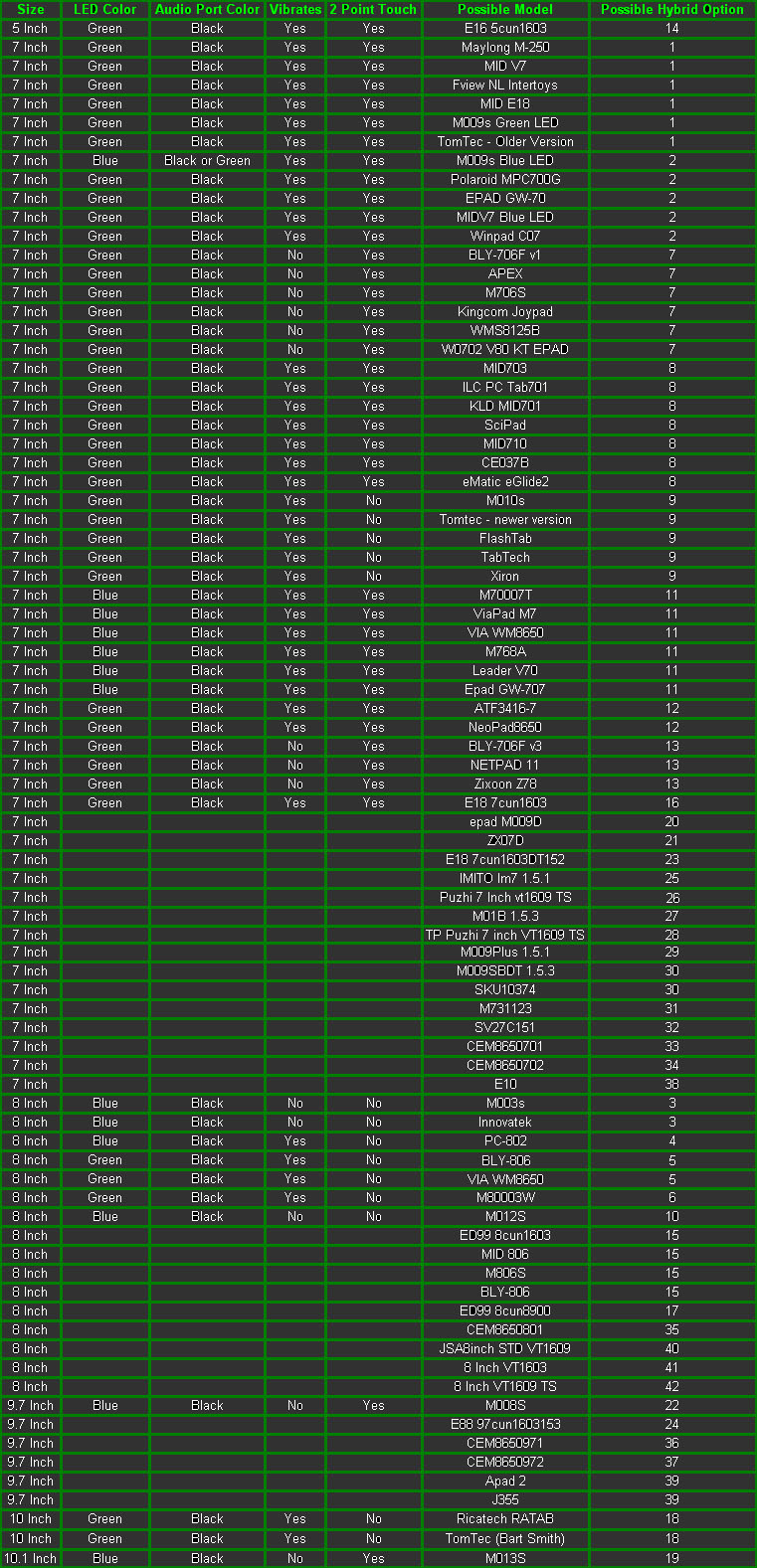
You both need to run the Uberoid again and choose a different option. Use this as a guide
dftbbg.jpg


(image credit to HCH author of Uberoid)
 
@ndh777

Hi,

I have a doubt just clr it dude...

think that i am browsing in any of the browser like mini opera etc etc, and if i want to go to any application like wifi setting or any where without closing the mini opera, how to do that. and after doing it how to get back to the miniopera or any other application.

Over all it means is how to switch diff. application like what we do in window (minimize) and again getting it back without loosing it.

Thanks.
 
Hello everyone,

Can any one tell me how to update the OS. It is still in 2.2 and as per my knowledge we have 3.1 also. I am trying to update from the Setting but it says ur system is up to date.

and one more thing can anyone tell me what ur Tablet gives indication after it gets fully charged. Last time i asked but no reply except from ndh777. Please try and tell me ndh777.

Any Help Pls............
 
ok, but when i charged mine, it will glow, but when it comes near to full charge it will blink rapidly for 10-15min and after that it will blink slowly slowly and at last it will get off.

so, is this a problem in it or it should do like this.

and do u know how to update the OS.
 
Back
Top Bottom