
Install the app
How to install the app on iOS
Follow along with the video below to see how to install our site as a web app on your home screen.
Note: This feature may not be available in some browsers.
-
After 15+ years, we've made a big change: Android Forums is now Early Bird Club. Learn more here.
You are using an out of date browser. It may not display this or other websites correctly.
You should upgrade or use an alternative browser.
You should upgrade or use an alternative browser.
How To Ymail working on Motorola Droid (finally)
- Thread starter dgp0961
- Start date
-
- Tags
- motorola droid
For those of you experiencing sporadic access to ymail, try turning off WiFi. I think Yahoo is blocking imap access on non mobile IP's. Whenever Im home and I want to check Yahoo, I just turn off WiFi (with the built in widget) and get yahoo.
As an alternative, you could just go to m.yahoo.com and get pretty good mail there too.
can you set up this for the email app or do you mean go through the browser? I tried the fix and it stopped working for me. I have seen people mention that POP works for them, and I was wondering how to set that up.


I finally found a workaround to get Ymail accounts working on the Motorola Droid that I hope will work for others. I was not able to find a thread (maybe I missed something) where someone got this working. This is a little bit of a kludge but it worked for me.
What I found, it was not possible to setup a Ymail account like you setup up a Yahoo account on the Droid. Everytime I tried this, I received some type of error. In order to get to this work, you need a Yahoo mail account. I had an old one - if you don't have one just set one up. I then used the following instructions to setup my yahoo mail account.
Make sure Wifi is off.
go to mail icon
add account
enter email address in email address filed (name@yahoo.com)
enter password at password field
select MANUAL SETUP not next
select imap
username= name@yahoo.com
password = yourpassword
imap server= imap.mail.yahoo.com
port=143
security=none
optional = blank
select next
Then, set the outgoing SMTP server to:
smtp.mail.yahoo.com, port 587, security=none
and finish the setup. Hopefully this will work and you can access you yahoo mail account.
Next, click on the email icon (you just setup), bring up the menu and select account settings. Choose Incoming settings and change the Username to your Ymail account - name@ymail.com and save the settings.
For me, this worked! Hopefully it will work for you.
Let me know if it does.
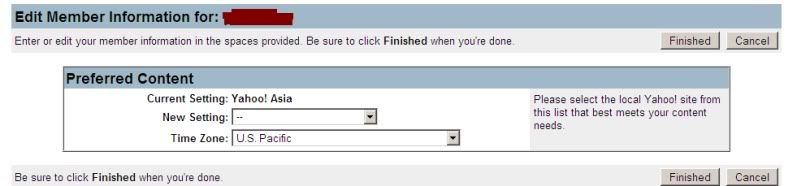
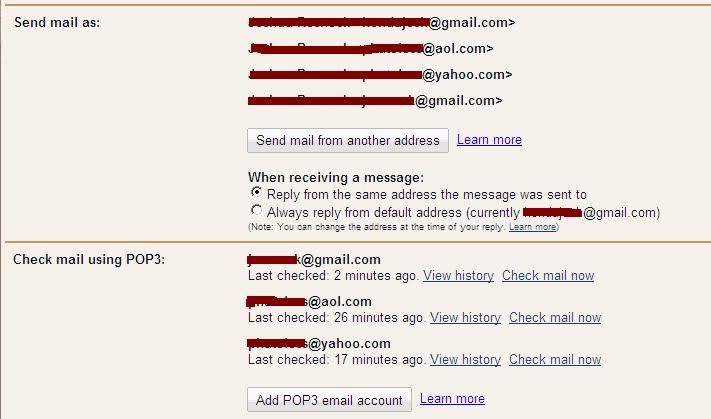
You do realize that it's far easier to change your Yahoo location to Asia so that you get free pop access, and then set your gmail account to access your yahoo mail account, right?
Voila, yahoo mail on your phone.
RockyBear08
Lurker
THANK YOU SO MUCH FOR THIS POST!! IT WORKED AWESOMELY, FINALLY I CAN GET BOTH OF MY ACCTS ON MY G1!!
You're awesome!
thanks again
You're awesome!
thanks again
I finally found a workaround to get Ymail accounts working on the Motorola Droid that I hope will work for others. I was not able to find a thread (maybe I missed something) where someone got this working. This is a little bit of a kludge but it worked for me.
What I found, it was not possible to setup a Ymail account like you setup up a Yahoo account on the Droid. Everytime I tried this, I received some type of error. In order to get to this work, you need a Yahoo mail account. I had an old one - if you don't have one just set one up. I then used the following instructions to setup my yahoo mail account.
Make sure Wifi is off.
go to mail icon
add account
enter email address in email address filed (name@yahoo.com)
enter password at password field
select MANUAL SETUP not next
select imap
username= name@yahoo.com
password = yourpassword
imap server= imap.mail.yahoo.com
port=143
security=none
optional = blank
select next
Then, set the outgoing SMTP server to:
smtp.mail.yahoo.com, port 587, security=none
and finish the setup. Hopefully this will work and you can access you yahoo mail account.
Next, click on the email icon (you just setup), bring up the menu and select account settings. Choose Incoming settings and change the Username to your Ymail account - name@ymail.com and save the settings.
For me, this worked! Hopefully it will work for you.
Let me know if it does.
THANK YOU! Just updated to 2.1 and forgot how to add ymail- TYTYTY!!

binglejellsx2
Well-Known Member
You do realize that it's far easier to change your Yahoo location to Asia so that you get free pop access, and then set your gmail account to access your yahoo mail account, right?
Voila, yahoo mail on your phone.
I know your reply is from a few months ago and I think I've repeated this info in another thread, but for those who don't know:
Newer users might not be able to find the setting to get free pop access even after changing the location to Asia because it isn't there. You will notice a larger space in the left panel in your settings where this option should be.
I have 3 Yahoo accounts, 1 of which is a newer Ymail account. I've forwarded the old yahoo accounts to my Gmail, but my Ymail account does not have the option. I'm not sure if it's disabled on domains not Yahoo, or if it's been disabled on accounts created after a certain date. For this account, I still use the regular Email app.
I know your reply is from a few months ago and I think I've repeated this info in another thread, but for those who don't know:
Newer users might not be able to find the setting to get free pop access even after changing the location to Asia because it isn't there. You will notice a larger space in the left panel in your settings where this option should be.
I have 3 Yahoo accounts, 1 of which is a newer Ymail account. I've forwarded the old yahoo accounts to my Gmail, but my Ymail account does not have the option. I'm not sure if it's disabled on domains not Yahoo, or if it's been disabled on accounts created after a certain date. For this account, I still use the regular Email app.
Really? That would really suck if they disabled it.
D
Deleted User
Guest
yes! it works perfectly m8... you're such a genius...
thx m8...
thx m8...
Ok I'm super glad that this problem is not just my phone. When I got my Motorola Droid 5 days ago they set up my yahoo email at the Verizon store. It wasn't working..and then that night I received several emails. It seems like it only works when it wants to work and I've been just manually deleting emails out of my yahoo account on my computer. So I guess it is now time to reroute all emails to gmail...ugh
nvm ill try and do that...didnt read all the way down...ooops
nvm ill try and do that...didnt read all the way down...ooops
YOU ARE RIGHT!!!! I am so excited. I have been waiting for weeks now. Works well, thus far.
All I did was turn off my wifi and it started working again. I didn't have to delete anything

Still.. "Username or password incorrect." ~__~!!
Same here. Two weeks of Yahoo Email not working on my Droid after being fine for almost a year and I am extremely frustrated.
I've been using the following setup - Here's the first portion (which I cannot even get past without the "Username or password incorrect" message):
username: xxx@yahoo.com (enter in your complete yahoo email address)
password: enter in your yahoo password account
IMAP Server: imap.mail.yahoo.com
Port: 143
Security Type: None
IMAP Path Prefix: leave blank / Optional
Every time I attempt to reinstall in the setup, I too get the "Username or Password Incorrect" message.
Does anyone have any information as to whether Verizon/Google/Android are aware of the latest problem and/or any solutions that will fix what the latest update broke?
Apologies for the tone of this message, but I am quite literally at wits end.

I should also add, that even using K-9 Mail, the same thing occurs as I try to setup.
interslicer
Lurker
Same here. Two weeks of Yahoo Email not working on my Droid after being fine for almost a year and I am extremely frustrated.
I've been using the following setup - Here's the first portion (which I cannot even get past without the "Username or password incorrect" message):
username: xxx@yahoo.com (enter in your complete yahoo email address)
password: enter in your yahoo password account
IMAP Server: imap.mail.yahoo.com
Port: 143
Security Type: None
IMAP Path Prefix: leave blank / Optional
Every time I attempt to reinstall in the setup, I too get the "Username or Password Incorrect" message.
Does anyone have any information as to whether Verizon/Google/Android are aware of the latest problem and/or any solutions that will fix what the latest update broke?
Apologies for the tone of this message, but I am quite literally at wits end.
I should also add, that even using K-9 Mail, the same thing occurs as I try to setup.
GUYS calm down ... at the point where this guide fails simply put in ...@ymail.com instead of yahoo.com for your username
After all ymail is your email address!
enjoy !