• After 15+ years, we've made a big change: Android Forums is now Early Bird Club. Learn more here.

[22/FEB/22] BVB1 FEBRUARY Security update and bugfix

Samsung has begun rolling out their 8th Android 12 release for the S21 series of international devices.

Initially, as always, this is a staged rollout to the non-carrier branded, stock Samsung CSC codes first.

The Galaxy S21 international devices that will receive this update are...
  • S21 5G model SM-G991B
  • S21+ 5G model SM-G996B
  • S21 Ultra 5G model SM-G998B
This latest release replaces the previous G99*BXXU4BULF/BVA9 builds on the international devices.

Changelog
  • February Android Security update
  • Bugfixes
It is a FOTA, (Firmware Over The Air), update and you can check... Settings > Software update... to see if it is available for you. Alternatively, you can connect to the Samsung PC suite, Smart Switch and check via that.

Software information

LmGiyvRm.jpg


The update = G99*BXXU4BVB1

Download = 250MB (TBC)

Build date = 03 February 2022

Release date = 22 February 2022

Camera version = 12.0.01.23 (no change)

One UI version = 4.0

Android Security patch = 01 February 2022

This is the 27th stable update for the Exynos model in 391 days. Average = 1 update every 14 days.

TOP TIP: Wipe the phone's cache partition and use the Galaxy App Booster after updating.


(N.B. This post will be updated as more information becomes available)

[22/FEB/22] BVB1 FEBRUARY Security update and bugfix

Samsung has begun rolling out their 8th Android 12 release for the S21 series of international devices.

Initially, as always, this is a staged rollout to the non-carrier branded, stock Samsung CSC codes first.

The Galaxy S21 international devices that will receive this update are...
  • S21 5G model SM-G991B
  • S21+ 5G model SM-G996B
  • S21 Ultra 5G model SM-G998B
This latest release replaces the previous G99*BXXU4BULF/BVA9 builds on the international devices.

Changelog
  • February Android Security update
  • Bugfixes
It is a FOTA, (Firmware Over The Air), update and you can check... Settings > Software update... to see if it is available for you. Alternatively, you can connect to the Samsung PC suite, Smart Switch and check via that.

Software information

LmGiyvRm.jpg


The update = G99*BXXU4BVB1

Download = 250MB (TBC)

Build date = 03 February 2022

Release date = 22 February 2022

Camera version = 12.0.01.23 (no change)

One UI version = 4.0

Android Security patch = 01 February 2022

This is the 27th stable update for the Exynos model in 391 days. Average = 1 update every 14 days.

TOP TIP: Wipe the phone's cache partition and use the Galaxy App Booster after updating.


(N.B. This post will be updated as more information becomes available)

Photo albums..

When viewing the thumbnail, all I am getting is three black dots with grey squares, I cannot view them until I click on them, the bug has been happening to me forever ago, and did not thought of it until recently to drop in a message on here, anyone else's photo albums are having the same problem?

"Not enough information to infer type variable T" android studio error

6gBPr7k
I'm following a series of kotlin based tutorials on youtube for android studio jetpack compose, but now android studio is giving me the error "Not enough information to infer type variable T" for keyframes, while everything is exactly copied from the tutorial video, what am i doing wrong?

Code:
class MainActivity : ComponentActivity() {
    override fun onCreate(savedInstanceState: Bundle?) {
        super.onCreate(savedInstanceState)
        setContent {
            var sizeState by remember { mutableStateOf(200.dp) }
            val size by animateDpAsState(
                targetValue = sizeState,
                keyframes {
                    durationMillis = 5000
                    sizeState at 0 with LinearEasing
                    sizeState * 1.5f at 1000
                    sizeState * 2f at 5000
                }

            Box(modifier = Modifier
                .size(size)
                .background(Color.Red),
            contentAlignment = Alignment.Center) {
                Button(onClick = {
                    sizeState += 50.dp
                }) {
                    Text("Increase Size")
                }
            }

        }
    }
}

6gBPr7k

Help SD Card Unavailable | Vivo V2029

Few days ago, my phone suddenly shows a notification said "SD Card Unavailable". I've tried removing the SD Card and putting it back in, it wont work. I've tried searching various similar posts but doesn't work for me.
All the post I've read about told me to start my phone in safe mode and see if the card can read or not, then delete the apps or file that are causing that trouble...doesn't work (the SD Card just wont read).
Then, I also know that i can connect it to my computer and see if it's able to read the SD Card and re-format if need to, but the SD Card's File doesn't even show up in the first place. What can I do?
(Thank you in advance)

Samsung S7 Edge #fail to open recovery_cause(No such file or directory) loop

Hi,

My grandstander's Samsung S7 Edge was frozen on the Samsung S7 logo screen, and it didn't want normally turn on.

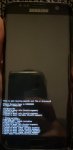
We launched it in Safe Mode, and now it is in a constant loop with an error message "#fail to open recovery_cause(No such file or directory)." Please, see the attachments below.

Video:

The phone is not as important to him as the photos accumulated on the phone's internal memory over the years. He didn't back them up into the cloud.

We tried using DroidKit and Fonedog apps to recover the information on the phone, but they didn't work.
We are afraid to use Odin because we are unsure if it removes photos on the memory.

How could we recover grandpa's photos from this phone? Any suggestion will be greatly appreciated.

Attachments

  • samsung-s7.jpg
    samsung-s7.jpg
    107.4 KB · Views: 472

Help Edit Photo - Text Broke

I use the camera on my phone a lot, most for taking pictures of something I going to disassemble, or shot of something as a reminder, then I write text notes on the picture. I have not had any recent updates to my phone, or any of its apps in over a couple of weeks. I almost always write text on the photo, by selecting the Pen icon top center, and then in the upper right a 2nd Pen icon will appear, selecting it loads the toolbar with option to choose the Pens color, size etc.

Yesterday I went to write on (edit) a picture, after selecting the 1st Pen icon, the 2nd Pen icon never appeared, instead I just got a menu at
Note 10+ photo edit broke.jpg
the bottom to edit the photo's size, crop, mirror, etc. I went in the camera’s settings, and photos, and could not see than anything had changed.

Any ideas how I can fix this so I can once again write text on a picture?

Webchat knew my phone

Anyone know how this works:
Just contacted a business via webchat regarding an order that was just delivered - the order was in my wifes name, her email her phone.
But the guy on webchat knew the phone I was using was registered to me (I gave it to my wife 18months ago).

Question is: why do they keep this info and why for that long??

Accessing assets folder from within a fragment

Hi.
I'm trying to use inputStream in a fragment but having difficulty with the usage.
Works fine in an activity. Please help. The issue in the code below is the line that accesses the assets folder.
Thanks

import android.os.Bundle
import androidx.fragment.app.Fragment
import android.view.LayoutInflater
import android.view.View
import android.webkit.WebView
import android.view.ViewGroup
import kotlinx.android.synthetic.main.fragment_home.*
import java.io.IOException
import java.io.InputStream


public var message:String = ""

class Home : Fragment(R.layout.fragment_home) {


override fun onViewCreated(view: View, savedInstanceState: Bundle?) {
super.onViewCreated(view, savedInstanceState)

val mimeType: String = "text/html"
val utfType: String = "UTF-8"
readFile()
webViewHome.setVerticalScrollBarEnabled(true)
webViewHome.loadData(message, mimeType, utfType)
}

fun readFile() {
var string: String = ""
try {
val inputStream: InputStream = assets.open("sample.html")
val size = inputStream.available()
val buffer = ByteArray(size)
inputStream.read(buffer)
string = String(buffer)
} catch (e: IOException) {
e.printStackTrace()
}
message = string
}

}

Miracast - does the phone have to have it?

Can I use a Miracast program, if the phone doesn't support it natively? I've tried 5 apps, including the one which came with the Leelbox adapter to plug into my TV, but although the phone can connect to the Leelbox and use it as a wireless access point to get to the internet, when I try to cast the screen to it using any of the 5 apps, it cannot connect. There's no option for casting under display in my phone's settings. Does it need to be there to use a casting program, or are those programs for phones which are unable to do it natively?

Help Problem opening links from Gmail messages

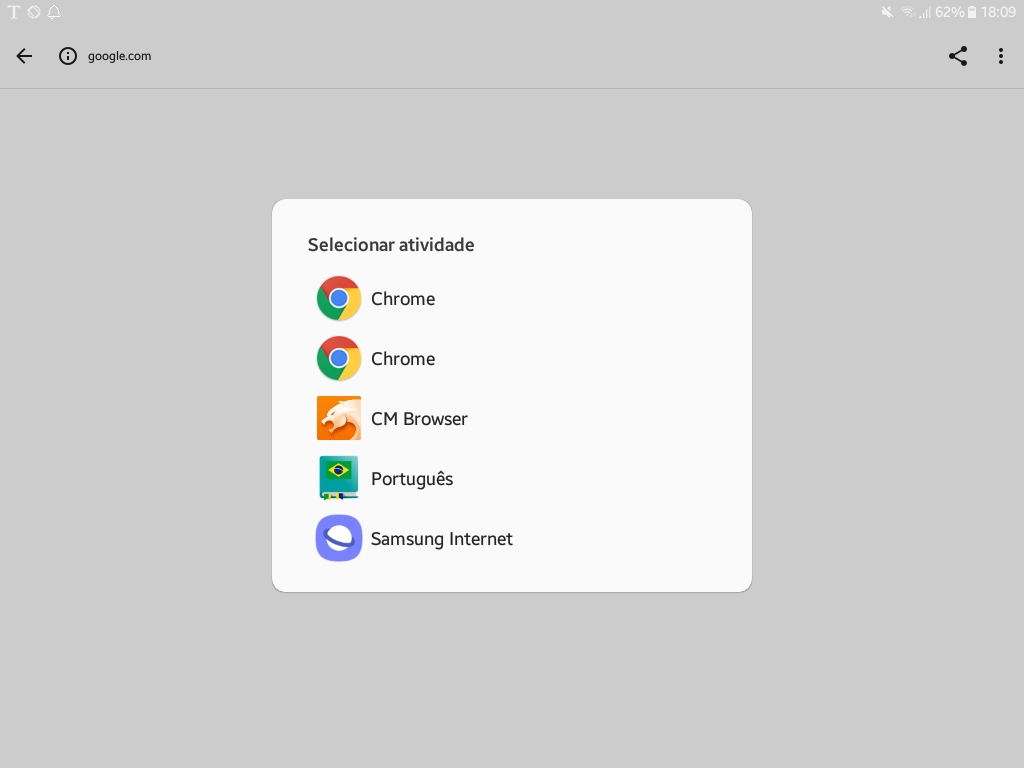
Until about two weeks ago when I clicked on links in Gmail messages it opened the content (mostly web pages) right in Gmail itself, 'cause it's set to do so. But then one day that changed. Now I have this pop-up showing me options to open stuff from Gmail. What's weird is that it shows Chrome twice, plus the other browsers I have installed on my Galaxy Tab A SM-P555M... and an app that happens to be a Portuguese dictionary!

Screenshot-20220205-180957.jpg


My guess is that it may be related to WebView, but I'm not sure. Would you please help me fix that? TIA.

Help How to find/delete originals of files in emulated folder

Hi. I have .mp3u files that show in /storage/emulated/O/Playlists. I want to delete them because when my Sonos music speaker scans for Playlists it's picking these up and I don't want them to appear with Sonos. My understanding is that these 'files' in the emulated folder are not files as such - they are just references to the original files. So I need to delete the orginals - then the emulated 'versions' will no longer appear. But I can't find any sign of the original files? I've tried a couple of search apps but no luck (although they did find the ones in the emulated folder.) Any help thoughts appreciated. Thanks

Help Need help, draw pattern suddenly is wrong? Locked out

I've had my S21 for close to a year now. The draw pattern has always been the same. Today, I went to open my phone, and instead of the fingerprint, it only gave me the option to draw the pattern. My phone tells me that the pattern is wrong, and I'm locked out of my phone.

I know the pattern isn't wrong. It's the same one I have always had, and I used it earlier this morning with no issue.

So how do I get into my phone now?? This is massively frustrating...When I try to draw the pattern, any dots that I used are now unable to be used again, this was never the case. I did not update the phone or anything.

EDIT, should also mention that no matter how many times I try the pattern, no option ever pops up to answer security questions. It just locks attempts for 30 seconds and then I have to try the pattern again...

Sigma - coding for everyone!

Hi guys,
I would like to share my new Android app: "Sigma | code wars"
Sigma offers coding and programming challenges for all levels from complete beginner to top-level expert!

What makes sigma different and much better than usual coding challenges is that you compete 1v1 against an online player and the fastest one wins

You can try it here: https://play.google.com/store/apps/details?id=com.eshqol.sigma

I would appreciate any reviews and suggestions, thanks!

Filter

Back
Top Bottom